 ) to create meshed boundaries within selected edges in a surface mesh in 3D, as shown in Figure 8-49. The generated face will be as close to planar as possible.
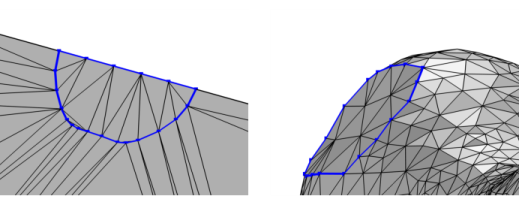 ) to create meshed boundaries within selected edges in a surface mesh in 3D, as shown in Figure 8-49. The generated face will be as close to planar as possible.
 |
 |
|
•
|
Right-click in the Graphics window to open The Graphics Context Menu and select Create Faces (
 ). In 3D, do this from the Create Faces menu. ). In 3D, do this from the Create Faces menu. |
|
•
|
For a 3D mesh, it is available from the Entities menu (
 ) on The Mesh Toolbar. For 2D meshes, click the Create Faces ( ) on The Mesh Toolbar. For 2D meshes, click the Create Faces ( ) button in the Mesh toolbar. ) button in the Mesh toolbar. |
|
•
|
Right-click a Mesh-Based Geometry node or a Mesh node and select Create Faces (
 ). In 3D, do this from the Entities menu. ). In 3D, do this from the Entities menu. |
 |
Most physics require a mesh on the domains. Use the Free Tetrahedral, Swept, and Boundary Layers operations to fill the domains with domain elements.
|
 |