Use Create Edges (

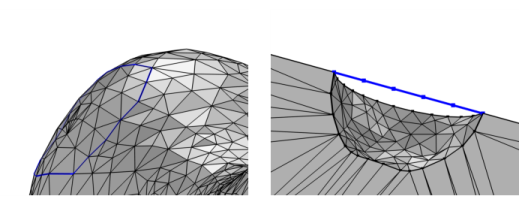
) to create edges in a mesh by clicking on mesh edges in the graphics or by selecting existing points, as shown in
Figure 8-48. It is possible to add a
Create Edges node when the mesh sequence includes either an
Import node or a
Create Vertices node.
To add a Create Edges node, choose one of the following:
From the Specify list, select
Mesh edges (default) to convert mesh edges to edge elements. This is done by clicking on mesh edges in the
Graphics window. Alternatively, choose
Vertices to specify the positions of start and end vertices.
Select the Group by continuous tangent checkbox (default OFF) to extend the selection of mesh edges to a chain of mesh edges that have continuous tangent. Modify the
Angular tolerance setting to control which mesh edges to group together when
Group by continuous tangent is selected.
Click the Activate Selection button to toggle between turning ON and OFF the mesh edge selection. This enables selection by clicking in the
Graphics window. When the
Activate Selection button is toggled ON, the
Mesh Rendering will automatically be turned ON to facilitate the selection of vertices. Select a mesh edge to populate the table with the
x-,
y-, and (3D only)
z-coordinates of the midpoint of the mesh edge. It is possible enter the exact
x-,
y-, and (3D only)
z-coordinates manually in the table. Selected edges are highlighted in the Graphics. Click a second time on the same edge to remove it from the selection.
To create edges, select vertices in the Starting Vertices and
End Vertices sections. Edges will be created from vertices in the selection in
Starting Vertices to vertices in the selection in
End Vertices. From each vertex in the selection in
Starting Vertices, edges will be created to the closest vertices in the selection in
End Vertices.
Select the Resulting edges checkbox to create a predefined selection in subsequent nodes in the mesh sequence.
To create resulting face (3D) or domain (2D) selections, select the Resulting small faces and
Complement faces checkboxes, respectively. Specify an
Area fraction or use the accompanied slider to specify the maximum area of a small face as a fraction of the total area of the input faces. The rest of the input faces will be part of the complement selection. From the
Color list, choose a color for highlighting the resulting objects selection. See
Selection Colors and
Creating Named Selections in Mesh Sequences.
 ) on
) on  ) button in the
  ). In 3D, do this from the

