 ) to repair an imported 3D surface mesh that might have minor holes, as seen in Figure 8-58.
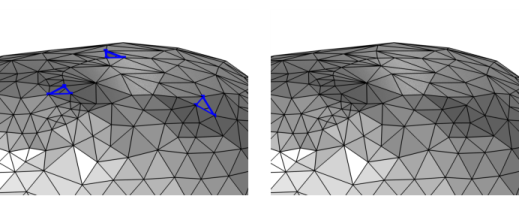 ) to repair an imported 3D surface mesh that might have minor holes, as seen in Figure 8-58.
 |
 ) node, select one or more boundaries in which to fill holes, then choose one of the following:
|
•
|
Right-click in the Graphics window and in The Graphics Context Menu, select Fill Holes (
 ) from the Cleanup and Repair menu. ) from the Cleanup and Repair menu. |
|
•
|
|
•
|
Right-click a Mesh-Based Geometry node or a Mesh node and choose Fill Holes (
 ) from the Cleanup and Repair menu. ) from the Cleanup and Repair menu. |
|
•
|
Select Automatic (the default) to use a tolerance that is 10 times the mean element size of the imported mesh.
|
|
•
|
 |
Most physics require a mesh on the domains. Use the Free Tetrahedral, Swept, and Boundary Layers operations to fill the domains with domain elements.
|
 |
See STL Import 1 — Repairing and Combining STL Files: Application Library path COMSOL_Multiphysics/Meshing_Tutorials/stl_1_repair_imported_meshes
|
 |
 ) and choose