









PDF

Microwave Cavity Plasma Reactor
Introduction
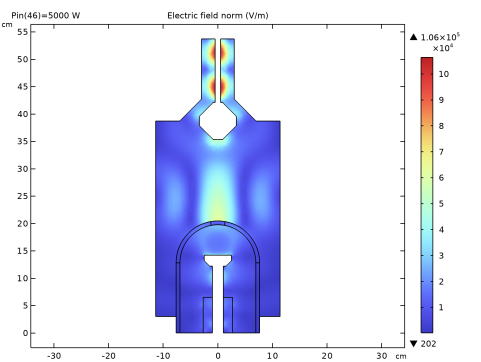
This tutorial shows how to prepare a model of a hydrogen plasma sustained in a microwave cavity at moderate pressures. The model is based on the work in Ref. 1 and solves the plasma transport equations fully coupled with Maxwell’s equations, fluid flow, and heat transfer. A microwave cylindrical chamber contains a bell jar were a hydrogen plasma is created. The reactor is carefully designed so that the electric field has its maximum intensity above a substrate and much lower intensity at the bell jar boundary. This is important in order for the plasma to keep its maximum density in the substrate region even at high power.
Note: The model requires the Plasma Module and the RF Module.
Model Definition
Electron transport is modeled by solving the continuity equation, the momentum equation under the drift-diffusion approximation, and the mean electron energy equation (for detailed information on electron transport, see Theory for the Drift Diffusion Interface in the Plasma Module User’s Guide)
The source coefficients in the above equations are determined by the plasma chemistry. The electron rate expression is defined as
where νe,j is the stoichiometric coefficient, and the reaction rate is defined as
where kjf is the forward rate constant and kjr is the reversed rate constant. Both the Electron Impact Reaction feature and Reaction feature can contribute to the electron rate expression. However, when using the Reaction feature it is important to note that the associated electron energy gain or loss is not included in the source term of the electron mean energy equation.
The rate constants can be computed from electron impact cross-section data
where γ = (2q/me)1/2 (SI unit: C1/2/kg1/2), me is the electron mass (SI unit: kg), ε is the electron energy (SI unit: V), σ is the electron impact collision cross section (SI unit: m2), and f is the electron energy distribution function.
When Townsend coefficients are used, the reaction rate is defined as
where αj/Nn is the reduced Townsend coefficient for reaction j (SI unit: m2) and Γe is the electron flux as defined above (SI unit: 1/(m2·s)). Townsend coefficients can increase the stability of the numerical scheme when the electron flux is field driven as is the case with DC discharges.
The total electron energy loss or gained is calculated by summing the collisional energy changes from all reactions defined with the Electron Impact Reaction feature as
where Δεj is the energy loss from reaction j (SI unit: V) and F is the Faraday constant (SI unit: C/mol). For excitation and ionization collisions Δεj corresponds to the energy of the excited state being excited/deexcited or ionized, for attachment Δεj is set to zero, and for elastic collisions
where me and mk are the electron and heavy species mass in kg, Te is the electron temperature in eV, and Tgas is the gas temperature in K.
For heavy species, the following equation is solved for the mass fraction of each species (for detailed information on the transport of the nonelectron species, see Theory for the Heavy Species Transport Interface in the Plasma Module User’s Guide):
The electrostatic field is computed using the following equation:
The space charge density ρ is automatically computed based on the plasma chemistry specified in the model using the formula
For detailed information about electrostatics see Theory for the Electrostatics Interface in the Plasma Module User’s Guide.
In a microwave reactor, the high-frequency electric field is computed in the frequency domain through the equation
The electromagnetic wave “sees” a plasma defined by the plasma conductivity in the cold plasma approximation that is set in the Plasma Conductivity Coupling multiphysics feature:
where ne is the electron density, q is the electron charge, me is the electron mass, νe is the collision frequency, and ω is the angular frequency. The Joule heating term that is responsible to heat the electrons is set in the Electron Heat Source multiphysics feature.
The fluid flow and heat transfer in the fluid are also solved for. The gas temperature plays an important role in the reactor operation since it can significantly influence the reduced electric field E/N.
Plasma Chemistry
The plasma chemistry is based on the simplified chemistry presented in table 4 of Ref. 1 and is presented in Table 1. The electron impact reactions are from Ref. 2 and retrieved from Ref. 3, and the rates are from Ref. 4 and Ref. 5. The model includes eight species: electrons, H2, H, H2+, H+, H3+, and two excited states of hydrogen corresponding to the levels n = 2 and n = 3 that are represented by Hn2 and Hn3.
In addition to the volume reactions, the surface reaction listed in Table 2.
Results and Discussion
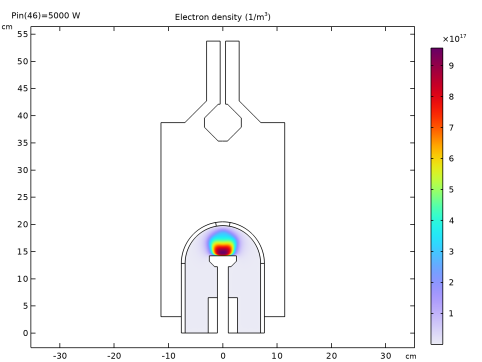
The figures in this section present model results for a hydrogen plasma sustained at 25 kPa with 5 kW. In general, the results agree well with results presented in figure 21 and figure 22 of Ref. 1. A detailed comparison is not attempted because many aspects of the models are different. The plasma chemistry is not exactly the same. Even if the reactions are mostly the same, the rates and cross sections were obtained independently. The reactor dimensions and configurations are only approximate. Additionally, there are differences in the model equations.
Using a global model fully coupled with a Boltzmann equation in the two-term approximation, the study performed in the model Hydrogen Global Model Coupled with the Two-Term Boltzmann Equation — also in the Plasma Module Application Library — showed that for main quantities like electron density, H-atom density, and gas temperature there is not a significant difference when using a computed or a Maxwellian EEDF. This justified doing the space-dependent simulations using a Maxwellian EEDF. However, in this first attempt the results were wrong in many ways. An important aspect not captured was the plasma localization at the subtract. With a Maxwellian EEDF it is very easy to ionize in regions of low electron energy and the maximum of the plasma easily moves somewhere else. Further investigations with the global model showed significant differences in results for low mean electron energies. The EEDF was than adjusted to use a generalized distribution with a power law of 1.2.
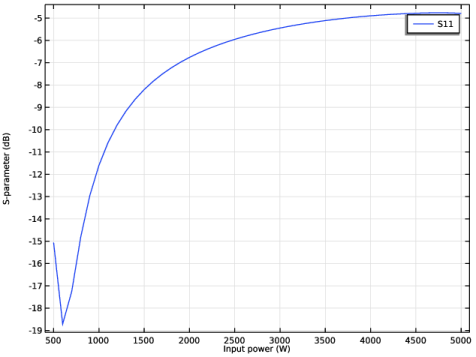
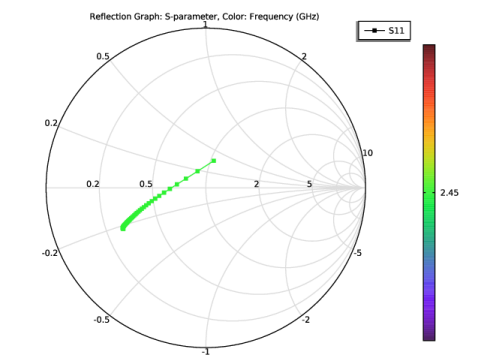
The reactor dimensions were adjusted to have high electric field intensity at the substrate and to have a minimum in reflected power without plasma. This part of the investigation is done with the Electromagnetic Waves, Frequency Domain interface only and it is not shown here. With the plasma present, the electromagnetic characteristics of the reactor change considerably. This is possible to observe in Figure 5 and Figure 6, which show the S-parameter and Smith plot when increasing the power from 500 to 5000 W. Having a high-dense plasma in a considerable part of the reactor strongly increases the reflected power.
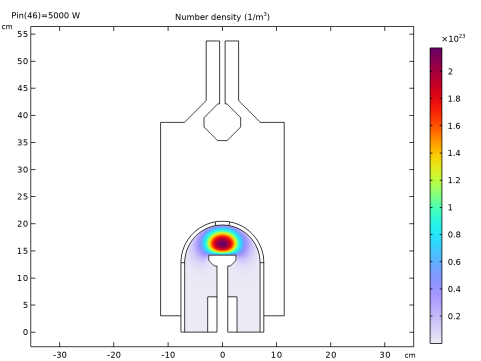
Figure 1: Electron density for a hydrogen plasma operating at 25 kPa with 5 kW of input power.
Figure 2: Electron temperature for a hydrogen plasma operating at 25 kPa with 5 kW of input power.
Figure 3: RF electric field norm for a hydrogen plasma operating at 25 kPa with 5 kW of input power.
Figure 4: RF power absorbed by electrons for a hydrogen plasma operating at 25 kPa with 5 kW of input power.
Figure 5: S-parameter as a function of the input power.
Figure 6: Smith plot as a function of the input power. For higher powers the curve moves away from the center.
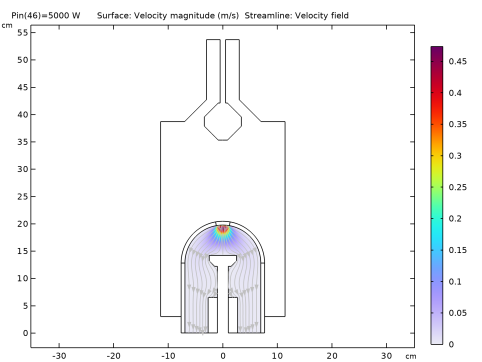
Figure 7: Fluid velocity for a hydrogen plasma operating at 25 kPa with 5 kW of input power.
Figure 8: Gas temperature for a hydrogen plasma operating at 25 kPa with 5 kW of input power.
Figure 9: Number density of atomic hydrogen for a hydrogen plasma operating at 25 kPa with 5 kW of input power.
References
1. K. Hassouni, F. Silva, and A. Gicquel, “Modelling of diamond deposition microwave cavity generated plasmas,” J. Phys. D: Appl. Phys., vol.  43, p. 153001, 2010.
2. L. Marques, J. Jolly, and L.L. Alves, “Capacitively Coupled Radio-Frequency Hydrogen Discharges: The Role of Kinetics,” J. Appl. Phys., vol. 102, p. 063305, 2007.
3. IST-Lisbon database, www.lxcat.net, retrieved 2023.
4. M. Capitelli, C.M. Ferreira, B.F. Gordiets and A.I. Osipov, Plasma Kinetics in Atmospheric Gases, Springer, 2000.
5. R.K. Janev; W.D. Langer; K. Evans, Jr.; and D.E. Post, Jr., Elementary Processes in Hydrogen-Helium Plasmas, Springer-Verlag, 1987.
Application Library path: Plasma_Module/Wave-Heated_Discharges/microwave_cavity_plasma
Modeling Instructions
From the File menu, choose New.
New
In the New window, click  Model Wizard.
Model Wizard
1
In the Model Wizard window, click  2D Axisymmetric.
2
In the Select Physics tree, select Plasma > Nonisothermal Plasma Flow > Microwave Plasma.
3
Click Add.
4
Click  Study.
5
In the Select Study tree, select Preset Studies for Selected Multiphysics > Frequency–Transient.
6
Import a file with parameters to be used in the model. Most of them are used to create the reactor geometry.
Global Definitions
Parameters 1
1
In the Model Builder window, under Global Definitions click Parameters 1.
2
In the Settings window for Parameters, locate the Parameters section.
3
Click  Load from File.
4
Create a profile to be used as initial conditions for the gas temperature.
Definitions
Variables 1
1
In the Model Builder window, under Component 1 (comp1) right-click Definitions and choose Variables.
2
In the Settings window for Variables, locate the Variables section.
3
Create the geometry of the reactor. Some geometry elements are to be used later when creating the mesh.
Geometry 1
1
In the Model Builder window, under Component 1 (comp1) click Geometry 1.
2
In the Settings window for Geometry, locate the Units section.
3
From the Length unit list, choose cm.
Rectangle 1 (r1)
1
In the Geometry toolbar, click  Rectangle.
2
In the Settings window for Rectangle, locate the Size and Shape section.
3
In the Width text field, type R0.
4
In the Height text field, type H0.
Rectangle 2 (r2)
1
In the Geometry toolbar, click  Rectangle.
2
In the Settings window for Rectangle, locate the Size and Shape section.
3
In the Width text field, type Slw.
4
In the Height text field, type Slh.
Rectangle 3 (r3)
1
In the Geometry toolbar, click  Rectangle.
2
In the Settings window for Rectangle, locate the Size and Shape section.
3
In the Width text field, type Shw.
4
In the Height text field, type Shh.
5
Locate the Position section. In the z text field, type Slh.
Rectangle 4 (r4)
1
In the Geometry toolbar, click  Rectangle.
2
In the Settings window for Rectangle, locate the Size and Shape section.
3
In the Width text field, type Shw.
4
In the Height text field, type 2[mm].
5
Locate the Position section. In the z text field, type Slh+Shh.
Rectangle 5 (r5)
1
In the Geometry toolbar, click  Rectangle.
2
In the Settings window for Rectangle, locate the Size and Shape section.
3
In the Width text field, type Bhw-Bth/2.
4
In the Height text field, type Bhh.
5
Locate the Position section. In the r text field, type R0-Bhw+Bth/2.
Circular Arc 1 (ca1)
1
In the Geometry toolbar, click  More Primitives and choose Circular Arc.
2
In the Settings window for Circular Arc, locate the Center section.
3
In the z text field, type Bz.
4
Locate the Radius section. In the Radius text field, type Br.
Line Segment 1 (ls1)
1
In the Geometry toolbar, click  More Primitives and choose Line Segment.
2
In the Settings window for Line Segment, locate the Starting Point section.
3
From the Specify list, choose Coordinates.
4
In the r text field, type Br.
5
In the z text field, type Bz.
6
Locate the Endpoint section. From the Specify list, choose Coordinates.
7
In the r text field, type R0-Bhw.
Circular Arc 2 (ca2)
1
In the Geometry toolbar, click  More Primitives and choose Circular Arc.
2
In the Settings window for Circular Arc, locate the Center section.
3
In the z text field, type Bz.
4
Locate the Radius section. In the Radius text field, type Br.
5
Locate the Angles section. In the Start angle text field, type 80.
6
Click the  Zoom Extents button in the Graphics toolbar.
7
Click  Build All Objects.
Thicken 1 (thi1)
1
In the Geometry toolbar, click  Conversions and choose Thicken.
2
Select the objects ca1, ca2, and ls1 only.
3
In the Settings window for Thicken, locate the Options section.
4
In the Total thickness text field, type Bth.
Rectangle 6 (r6)
1
In the Geometry toolbar, click  Rectangle.
2
In the Settings window for Rectangle, locate the Size and Shape section.
3
In the Width text field, type Cxw.
4
In the Height text field, type Cxh.
5
Locate the Position section. In the z text field, type H0.
Polygon 1 (pol1)
1
In the Geometry toolbar, click  Polygon.
2
In the Settings window for Polygon, locate the Coordinates section.
3
Union 1 (uni1)
1
In the Geometry toolbar, click  Booleans and Partitions and choose Union.
2
Select the objects pol1, r1, and r6 only.
3
In the Settings window for Union, locate the Union section.
4
Clear the Keep interior boundaries checkbox.
5
Click  Build All Objects.
Rectangle 7 (r7)
1
In the Geometry toolbar, click  Rectangle.
2
In the Settings window for Rectangle, locate the Size and Shape section.
3
In the Width text field, type Dw.
4
In the Height text field, type Dw.
5
Locate the Position section. From the Base list, choose Center.
6
In the z text field, type H0.
7
Locate the Rotation Angle section. In the Rotation text field, type 45.
Chamfer 1 (cha1)
1
In the Geometry toolbar, click  Chamfer.
2
Click the  Zoom Extents button in the Graphics toolbar.
3
On the object r7, select Points 1–4 only.
4
In the Settings window for Chamfer, locate the Distance section.
5
In the Distance from vertex text field, type Dcut.
Rectangle 8 (r8)
1
In the Geometry toolbar, click  Rectangle.
2
In the Settings window for Rectangle, locate the Size and Shape section.
3
In the Width text field, type Cxiw.
4
In the Height text field, type Cxh.
5
Locate the Position section. In the z text field, type H0.
Difference 1 (dif1)
1
In the Geometry toolbar, click  Booleans and Partitions and choose Difference.
2
3
In the Settings window for Difference, locate the Difference section.
4
Click to select the  Activate Selection toggle button for Objects to subtract.
5
Select the objects cha1, r2, r3, r5, and r8 only.
Circular Arc 3 (ca3)
1
In the Geometry toolbar, click  More Primitives and choose Circular Arc.
2
In the Settings window for Circular Arc, locate the Center section.
3
In the z text field, type Shh+Slh.
4
Locate the Radius section. In the Radius text field, type 3[cm].
Line Segment 2 (ls2)
1
In the Geometry toolbar, click  More Primitives and choose Line Segment.
2
In the Settings window for Line Segment, locate the Starting Point section.
3
Click to select the  Activate Selection toggle button for Start vertex.
4
On the object ca3, select Point 1 only.
5
Locate the Endpoint section. Click to select the  Activate Selection toggle button for End vertex.
6
On the object r4, select Point 2 only.
Line Segment 3 (ls3)
1
In the Geometry toolbar, click  More Primitives and choose Line Segment.
2
On the object ls2, select Point 1 only.
3
In the Settings window for Line Segment, locate the Endpoint section.
4
Click to select the  Activate Selection toggle button for End vertex.
5
On the object thi1(3), select Point 2 only.
Chamfer 2 (cha2)
1
In the Geometry toolbar, click  Chamfer.
2
On the object dif1, select Point 9 only.
3
In the Settings window for Chamfer, locate the Distance section.
4
In the Distance from vertex text field, type 1[cm].
Rectangle 9 (r9)
1
In the Geometry toolbar, click  Rectangle.
2
In the Settings window for Rectangle, locate the Size and Shape section.
3
In the Width text field, type dielw.
4
In the Height text field, type dielh.
5
Locate the Position section. In the r text field, type Slw.
Mesh Control Edges 1 (mce1)
1
In the Geometry toolbar, click  Virtual Operations and choose Mesh Control Edges.
2
On the object fin, select Boundaries 4, 22, 23, 26, and 38 only.
3
In the Geometry toolbar, click  Build All.
4
Click the  Zoom Extents button in the Graphics toolbar.
The Plasma Chemistry Import feature
The next steps have instructions to use the Plasma Chemistry Import feature to import a file that automatically creates the hydrogen plasma chemistry.
The following is set or created automatically:
a
Species properties using Preset species data
b
c
The documentation accompanying the Plasma Chemistry Import feature contains more information about the file structure and what can be set automatically.
Plasma (plas)
Plasma Chemistry Import 1
1
In the Physics toolbar, click  Global and choose Plasma Chemistry Import.
2
In the Settings window for Plasma Chemistry Import, locate the Plasma Chemistry Import section.
3
Click  Browse.
4
5
Click  Import.
Define material properties for air and quartz. The plasma conductivity is computed in the Plasma Conductivity Coupling multiphysics feature and overrides its definition set in the material properties.
Add Material
1
In the Materials toolbar, click  Add Material to open the Add Material window.
2
Go to the Add Material window.
3
In the tree, select Built-in > Air.
4
Click the Add to Component button in the window toolbar.
5
In the tree, select Built-in > Glass (quartz).
6
Click the Add to Component button in the window toolbar.
7
In the Materials toolbar, click  Add Material to close the Add Material window.
Materials
Glass (quartz) (mat2)
Select Domains 2 and 4–6 only.
Materials
In the Model Builder window, collapse the Component 1 (comp1) > Materials node.
Set some properties of the plasma model.
Plasma (plas)
1
In the Model Builder window, under Component 1 (comp1) click Plasma (plas).
2
In the Settings window for Plasma, locate the Transport Settings section.
3
Select the Full expression for diffusivity checkbox.
4
Select the Mixture diffusion correction checkbox.
5
Locate the Plasma Properties section. Select the Use reduced electron transport properties checkbox.
6
Locate the Electron Energy Distribution Function Settings section. From the Electron energy distribution function list, choose Generalized.
7
In the g text field, type 1.2.
8
Locate the Domain Selection section. Click  Clear Selection.
9
Group - Species
Set initial conditions for the heavy species.
Species: H2
1
In the Model Builder window, expand the Component 1 (comp1) > Plasma (plas) > Group - Species node, then click Species: H2.
2
In the Settings window for Species, locate the Species Formula section.
3
Select the From mass constraint checkbox.
Species: H
1
In the Model Builder window, click Species: H.
2
In the Settings window for Species, locate the General Parameters section.
3
In the x0 text field, type 1E-5.
Species: Hn3
1
In the Model Builder window, click Species: Hn3.
2
In the Settings window for Species, locate the General Parameters section.
3
In the x0 text field, type 1E-10.
Species: H2+
1
In the Model Builder window, click Species: H2+.
2
In the Settings window for Species, locate the General Parameters section.
3
In the n0 text field, type 1E7[1/m^3].
Species: H+
1
In the Model Builder window, click Species: H+.
2
In the Settings window for Species, locate the General Parameters section.
3
In the n0 text field, type 1E7[1/m^3].
Species: H3+
1
In the Model Builder window, click Species: H3+.
2
In the Settings window for Species, locate the Species Formula section.
3
Select the Initial value from electroneutrality constraint checkbox.
Group - Species
In the Model Builder window, collapse the Component 1 (comp1) > Plasma (plas) > Group - Species node.
Set boundaries for surface reactions.
Definitions
Walls
1
In the Definitions toolbar, click  Explicit.
2
3
In the Settings window for Explicit, locate the Output Entities section.
4
From the Output entities list, choose Adjacent boundaries.
5
In the Label text field, type Walls.
Walls neutrals
1
In the Definitions toolbar, click  Explicit.
2
In the Settings window for Explicit, type Walls neutrals in the Label text field.
3
Locate the Input Entities section. From the Geometric entity level list, choose Boundary.
4
Plasma (plas)
1: H=>0.5H2
1
In the Model Builder window, expand the Component 1 (comp1) > Plasma (plas) > Group - Surface Reactions node, then click 1: H=>0.5H2.
2
In the Settings window for Surface Reaction, locate the Boundary Selection section.
3
From the Selection list, choose Walls neutrals.
2: Hn2=>H
1
In the Model Builder window, click 2: Hn2=>H.
2
In the Settings window for Surface Reaction, locate the Boundary Selection section.
3
From the Selection list, choose Walls neutrals.
3: Hn3=>H
1
In the Model Builder window, click 3: Hn3=>H.
2
In the Settings window for Surface Reaction, locate the Boundary Selection section.
3
From the Selection list, choose Walls neutrals.
4: H+=>H
1
In the Model Builder window, click 4: H+=>H.
2
In the Settings window for Surface Reaction, locate the Boundary Selection section.
3
From the Selection list, choose Walls.
5: H2+=>H2
1
In the Model Builder window, click 5: H2+=>H2.
2
In the Settings window for Surface Reaction, locate the Boundary Selection section.
3
From the Selection list, choose Walls.
6: H3+=>H2+H
1
In the Model Builder window, click 6: H3+=>H2+H.
2
In the Settings window for Surface Reaction, locate the Boundary Selection section.
3
From the Selection list, choose Walls.
Group - Surface Reactions
In the Model Builder window, collapse the Component 1 (comp1) > Plasma (plas) > Group - Surface Reactions node.
Set an Outflow boundary condition for neutrals only. Ions are assumed to neutralized at the outlet.
Outflow 1
1
In the Physics toolbar, click  Boundaries and choose Outflow.
2
Plasma (plas)
Wall 1
1
In the Physics toolbar, click  Boundaries and choose Wall.
2
In the Settings window for Wall, locate the Boundary Selection section.
3
From the Selection list, choose Walls.
Ground 1
1
In the Physics toolbar, click  Boundaries and choose Ground.
2
Laminar Flow (spf)
1
In the Model Builder window, under Component 1 (comp1) click Laminar Flow (spf).
2
In the Settings window for Laminar Flow, locate the Domain Selection section.
3
Click  Clear Selection.
4
5
Locate the Physical Model section. In the pref text field, type p0.
Inlet 1
1
In the Physics toolbar, click  Boundaries and choose Inlet.
2
3
In the Settings window for Inlet, locate the Boundary Condition section.
4
5
Locate the Mass Flow section. From the Mass flow type list, choose Standard flow rate (SCCM).
6
In the Qsccm text field, type Qs.
Outlet 1
1
In the Physics toolbar, click  Boundaries and choose Outlet.
2
Laminar Flow (spf)
In the Model Builder window, collapse the Component 1 (comp1) > Laminar Flow (spf) node.
Heat Transfer in Fluids (ht)
1
In the Model Builder window, under Component 1 (comp1) click Heat Transfer in Fluids (ht).
2
In the Settings window for Heat Transfer in Fluids, locate the Domain Selection section.
3
Click  Clear Selection.
4
Initial Values 1
1
In the Model Builder window, under Component 1 (comp1) > Heat Transfer in Fluids (ht) click Initial Values 1.
2
In the Settings window for Initial Values, locate the Initial Values section.
3
In the T text field, type Tinit.
Temperature 1
1
In the Physics toolbar, click  Boundaries and choose Temperature.
2
3
In the Settings window for Temperature, locate the Temperature section.
4
In the T0 text field, type 1200[K].
Temperature 2
1
In the Physics toolbar, click  Boundaries and choose Temperature.
2
3
In the Settings window for Temperature, locate the Temperature section.
4
In the T0 text field, type 300[K].
Heat Flux 1
1
In the Physics toolbar, click  Boundaries and choose Heat Flux.
2
In the Settings window for Heat Flux, locate the Heat Flux section.
3
From the Flux type list, choose Convective heat flux.
4
In the h text field, type 200.
5
In the Text text field, type 300[K].
6
Outflow 1
1
In the Physics toolbar, click  Boundaries and choose Outflow.
2
Heat Transfer in Fluids (ht)
In the Model Builder window, collapse the Component 1 (comp1) > Heat Transfer in Fluids (ht) node.
Electromagnetic Waves, Frequency Domain (emw)
In the Model Builder window, under Component 1 (comp1) click Electromagnetic Waves, Frequency Domain (emw).
Port 1
1
In the Physics toolbar, click  Boundaries and choose Port.
2
3
In the Settings window for Port, locate the Port Properties section.
4
From the Type of port list, choose Coaxial.
5
In the Pin text field, type Pin.
Electromagnetic Waves, Frequency Domain (emw)
In the Model Builder window, collapse the Component 1 (comp1) > Electromagnetic Waves, Frequency Domain (emw) node.
The fluid velocity, pressure, and temperature are also linked to the plasma model making it fully self-consistent.
Plasma (plas)
Plasma Model 1
1
In the Model Builder window, under Component 1 (comp1) > Plasma (plas) click Plasma Model 1.
2
In the Settings window for Plasma Model, locate the Electron Density and Energy section.
3
In the μeNn text field, type 1.4E24[1/(V*m*s)].
Plasma (plas)
In the Model Builder window, collapse the Component 1 (comp1) > Plasma (plas) node.
Create a mesh that is fine enough in the plasma region, specially at the subtract surface, and coarse elsewhere.
Mesh 1
Edge 1
1
In the Mesh toolbar, click  More Generators and choose Edge.
2
Size 1
1
Right-click Edge 1 and choose Size.
2
In the Settings window for Size, locate the Element Size section.
3
From the Calibrate for list, choose Fluid dynamics.
4
From the Predefined list, choose Extra fine.
Free Triangular 1
1
In the Mesh toolbar, click  Free Triangular.
2
In the Settings window for Free Triangular, click to expand the Control Entities section.
3
From the Smooth across removed control entities list, choose Off.
Size 1
1
Right-click Free Triangular 1 and choose Size.
2
In the Settings window for Size, locate the Element Size section.
3
From the Predefined list, choose Extra fine.
4
Locate the Geometric Entity Selection section. From the Geometric entity level list, choose Domain.
5
Size 2
1
In the Model Builder window, right-click Free Triangular 1 and choose Size.
2
In the Settings window for Size, locate the Geometric Entity Selection section.
3
From the Geometric entity level list, choose Domain.
4
5
Locate the Element Size section. From the Calibrate for list, choose Plasma.
6
From the Predefined list, choose Extremely fine.
7
Click the Custom button.
8
Locate the Element Size Parameters section.
9
Select the Maximum element size checkbox. In the associated text field, type 0.15.
Size 3
1
Right-click Free Triangular 1 and choose Size.
2
In the Settings window for Size, locate the Geometric Entity Selection section.
3
From the Geometric entity level list, choose Domain.
4
5
Locate the Element Size section. From the Calibrate for list, choose Plasma.
6
From the Predefined list, choose Extremely fine.
7
Click the Custom button.
8
Locate the Element Size Parameters section.
9
Select the Maximum element size checkbox. In the associated text field, type 0.25.
Size 4
1
Right-click Free Triangular 1 and choose Size.
2
In the Settings window for Size, locate the Geometric Entity Selection section.
3
From the Geometric entity level list, choose Domain.
4
5
Locate the Element Size section. From the Calibrate for list, choose Plasma.
6
From the Predefined list, choose Extremely fine.
7
Click the Custom button.
8
Locate the Element Size Parameters section.
9
Select the Maximum element size checkbox. In the associated text field, type 1.5.
Size 5
1
Right-click Free Triangular 1 and choose Size.
2
In the Settings window for Size, locate the Element Size section.
3
Click the Custom button.
4
Locate the Element Size Parameters section.
5
Select the Maximum element size checkbox. In the associated text field, type 0.025.
6
Locate the Geometric Entity Selection section. From the Geometric entity level list, choose Domain.
7
Boundary Layers 1
1
In the Mesh toolbar, click  Boundary Layers.
2
In the Settings window for Boundary Layers, click to expand the Transition section.
3
Clear the Smooth transition to interior mesh checkbox.
4
Click to expand the Corner Settings section. Locate the Domain Selection section. From the Geometric entity level list, choose Domain.
5
Boundary Layer Properties
1
In the Model Builder window, click Boundary Layer Properties.
2
In the Settings window for Boundary Layer Properties, locate the Layers section.
3
In the Number of layers text field, type 3.
4
5
In the Model Builder window, right-click Mesh 1 and choose Build All.
First, solve a Frequency-Transient study for an input power of 500 W and without the fluid flow.
After, use the solutions from the previous study as initial conditions of a Frequency-Stationary study to ramp the power up to 5000 W.
Study 1
Step 1: Frequency–Transient
1
In the Model Builder window, under Study 1 click Step 1: Frequency–Transient.
2
In the Settings window for Frequency–Transient, locate the Physics and Variables Selection section.
3
In the Solve for column of the table, under Component 1 (comp1), clear the checkbox for Laminar Flow (spf).
4
Locate the Study Settings section. Click  Range.
5
In the Range dialog, choose Logarithmic from the Entry method list.
6
In the Start text field, type 1e-9.
7
In the Stop text field, type 100.
8
In the Steps per decade text field, type 3.
9
Click Replace.
10
In the Settings window for Frequency–Transient, locate the Study Settings section.
11
In the Output times text field, type 0 10^{range(log10(1.0e-9),1/3,log10(100))}.
12
In the Frequency text field, type f0.
13
In the Study toolbar, click  Get Initial Value.
Results
Electric Field (emw), Electric Potential (plas), Electron Density (plas), Electron Temperature (plas), Temperature (ht)
1
In the Model Builder window, under Results, Ctrl-click to select Electron Density (plas), Electron Temperature (plas), Electric Potential (plas), Temperature (ht), and Electric Field (emw).
2
Pin=500 W, Without Fluid Flow
In the Settings window for Group, type Pin=500 W, Without Fluid Flow in the Label text field.
Pin=500 W, Without Fluid Flow
1
In the Model Builder window, click Study 1.
2
In the Settings window for Study, type Pin=500 W, Without Fluid Flow in the Label text field.
Step 1: Frequency–Transient
1
In the Model Builder window, under Pin=500 W, Without Fluid Flow click Step 1: Frequency–Transient.
2
In the Settings window for Frequency–Transient, click to expand the Results While Solving section.
3
Select the Plot checkbox.
4
From the Update at list, choose Time steps taken by solver.
5
In the Study toolbar, click  Compute.
Add Study
1
In the Home toolbar, click  Add Study to open the Add Study window.
2
Go to the Add Study window.
3
Find the Studies subsection. In the Select Study tree, select Preset Studies for Selected Multiphysics > Frequency–Stationary.
4
Click the Add Study button in the window toolbar.
5
In the Home toolbar, click  Add Study to close the Add Study window.
Study 2
Step 1: Frequency–Stationary
1
In the Settings window for Frequency–Stationary, locate the Study Settings section.
2
In the Frequency text field, type f0.
3
Click to expand the Values of Dependent Variables section. Find the Initial values of variables solved for subsection. From the Settings list, choose User controlled.
4
From the Method list, choose Solution.
5
From the Study list, choose Pin=500 W, Without Fluid Flow, Frequency–Transient.
6
Click to expand the Study Extensions section. Select the Auxiliary sweep checkbox.
7
8
Click  Range.
9
In the Range dialog, type 500 in the Start text field.
10
In the Step text field, type 100.
11
In the Stop text field, type 5000.
12
Click Replace.
13
In the Settings window for Frequency–Stationary, locate the Study Extensions section.
14
From the Run continuation for list, choose No parameter.
15
From the Reuse solution from previous step list, choose Yes.
16
In the Study toolbar, click  Get Initial Value.
Results
Electric Field (emw) 1, Electric Potential (plas) 1, Electron Density (plas) 1, Electron Temperature (plas) 1, Pressure (spf), S-Parameter (emw), Smith Plot (emw), Temperature (ht) 1, Velocity (spf), Velocity, 3D (spf)
1
In the Model Builder window, under Results, Ctrl-click to select Electron Density (plas) 1, Electron Temperature (plas) 1, Electric Potential (plas) 1, Velocity (spf), Pressure (spf), Velocity, 3D (spf), Temperature (ht) 1, Electric Field (emw) 1, S-Parameter (emw), and Smith Plot (emw).
2
Pin=500 To 5000 W
In the Settings window for Group, type Pin=500 To 5000 W in the Label text field.
Pin=500 To 5000 W
1
In the Model Builder window, click Study 2.
2
In the Settings window for Study, type Pin=500 To 5000 W in the Label text field.
Step 1: Frequency–Stationary
1
In the Model Builder window, under Pin=500 To 5000 W click Step 1: Frequency–Stationary.
2
In the Settings window for Frequency–Stationary, click to expand the Results While Solving section.
3
Select the Plot checkbox.
4
5
In the Study toolbar, click  Compute.
Add a mirror data set to better visualize the results.
Results
Mirror 2D 1
1
In the Model Builder window, expand the Results > Datasets node.
2
Right-click Results > Datasets and choose More 2D Datasets > Mirror 2D.
3
In the Settings window for Mirror 2D, locate the Data section.
4
From the Dataset list, choose Pin=500 To 5000 W/Solution 2 (sol2).
5
Click to expand the Advanced section. Find the Space variables subsection. Select the Remove elements on the symmetry axis checkbox.
Electron Density (plas) 1
1
In the Model Builder window, under Results > Pin=500 To 5000 W click Electron Density (plas) 1.
2
In the Settings window for 2D Plot Group, locate the Data section.
3
From the Dataset list, choose Mirror 2D 1.
4
In the Electron Density (plas) 1 toolbar, click  Plot.
Electron Temperature (plas) 1
1
In the Model Builder window, click Electron Temperature (plas) 1.
2
In the Settings window for 2D Plot Group, locate the Data section.
3
From the Dataset list, choose Mirror 2D 1.
4
In the Electron Temperature (plas) 1 toolbar, click  Plot.
Electric Potential (plas) 1
1
In the Model Builder window, click Electric Potential (plas) 1.
2
In the Settings window for 2D Plot Group, locate the Data section.
3
From the Dataset list, choose Mirror 2D 1.
4
In the Electric Potential (plas) 1 toolbar, click  Plot.
Velocity (spf)
1
In the Model Builder window, click Velocity (spf).
2
In the Settings window for 2D Plot Group, locate the Data section.
3
From the Dataset list, choose Mirror 2D 1.
4
In the Velocity (spf) toolbar, click  Plot.
Surface
1
In the Model Builder window, expand the Velocity (spf) node, then click Surface.
2
In the Settings window for Surface, locate the Coloring and Style section.
3
From the Color table list, choose Prism.
Streamline 1
1
In the Model Builder window, right-click Velocity (spf) and choose Streamline.
2
In the Settings window for Streamline, locate the Expression section.
3
In the x-component text field, type u.
4
In the y-component text field, type w.
5
Locate the Streamline Positioning section. From the Positioning list, choose Uniform density.
6
Locate the Coloring and Style section. Find the Point style subsection. From the Type list, choose Arrow.
7
From the Color list, choose Gray.
8
Locate the Streamline Positioning section. In the Density level text field, type 7.7.
9
In the Velocity (spf) toolbar, click  Plot.
Electric Field (emw) 1
1
In the Model Builder window, under Results > Pin=500 To 5000 W click Electric Field (emw) 1.
2
In the Settings window for 2D Plot Group, locate the Data section.
3
From the Dataset list, choose Mirror 2D 1.
4
In the Electric Field (emw) 1 toolbar, click  Plot.
Temperature, 2D
1
In the Results toolbar, click  2D Plot Group.
2
In the Settings window for 2D Plot Group, type Temperature, 2D in the Label text field.
3
Locate the Data section. From the Dataset list, choose Mirror 2D 1.
4
From the Parameter value (Pin (W)) list, choose 5000.
Surface 1
1
Right-click Temperature, 2D and choose Surface.
2
In the Settings window for Surface, locate the Expression section.
3
In the Expression text field, type T.
4
Locate the Coloring and Style section. From the Color table list, choose HeatCameraLight.
5
In the Temperature, 2D toolbar, click  Plot.
H Number Density
1
In the Results toolbar, click  2D Plot Group.
2
In the Settings window for 2D Plot Group, type H Number Density in the Label text field.
3
Locate the Data section. From the Dataset list, choose Mirror 2D 1.
4
From the Parameter value (Pin (W)) list, choose 5000.
Surface 1
1
Right-click H Number Density and choose Surface.
2
In the Settings window for Surface, locate the Expression section.
3
In the Expression text field, type plas.n_wH.
4
In the H Number Density toolbar, click  Plot.
Power Absorbed
1
In the Results toolbar, click  2D Plot Group.
2
In the Settings window for 2D Plot Group, type Power Absorbed in the Label text field.
3
Locate the Data section. From the Dataset list, choose Mirror 2D 1.
4
From the Parameter value (Pin (W)) list, choose 5000.
Surface 1
1
Right-click Power Absorbed and choose Surface.
2
In the Settings window for Surface, locate the Expression section.
3
In the Expression text field, type emw.Qrh.
4
Locate the Coloring and Style section. From the Color table list, choose ThermalWave.
Selection 1
1
Right-click Surface 1 and choose Selection.
2
3
In the Power Absorbed toolbar, click  Plot.