Use a Logical Expression node (

) to make a selection of geometric entities based on a logical expression in terms of other named selections and attributes.
Select the Level for the geometric entities:
Domain,
Boundary,
Edge (3D only), or
Point.
In the Logical expression field, enter a logical expression in terms of other named selections to define the resulting selection. You can use parentheses and the following Boolean operators:
||,
&&, and
! for logical or (union), logical and (intersection), and logical not (complement), respectively. For example, the logical expression
means the union of selections sel1 and
sel2 minus the selection
sel3, where
sel1,
sel2, and
sel3 are the tags of previously defined named selections.
The geometry operations Array,
Copy,
Move, and
Rotate can create index attributes that can be used to quickly select some of the output entities. For example, the expression
The expressions can also contain arithmetic operators: + - * / ^, relational operators:
== != > < >= <=, and parameters. For example, the expression
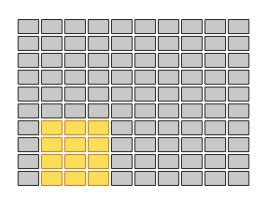
arr1.index1 > arr1.index2+1 selects the domains shown in
Figure 6-25 below.

When importing components from an ECAD file, it also possible to select all entities belonging to certain components or certain packages. For example, the expression imp1.component('C1','C3') will select all geometric entities belonging to the components
C1 or
C3, the expression
imp1.component.package('SIP','SOP') will select all geometric entities belonging to a component whose package is
SIP or
SOP, and the expression
imp1.pad.net('GND') will select all pads that have been selected to be imported in the
GND net. It is also possible to use wildcards
* for string attribute values. For example, the expression
imp1.component('R*') selects all components that begin with an r. For more information, see the
ECAD Import Module User’s Guide.