

PDF

RCS of a Metallic Sphere Using the Boundary Element Method
Introduction
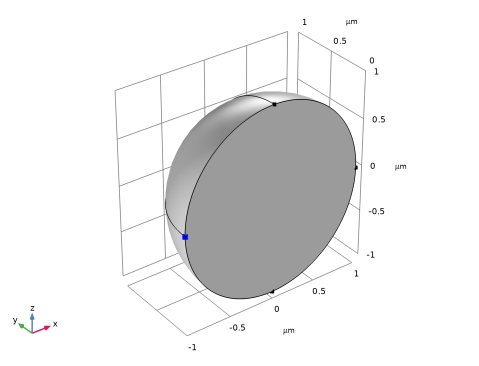
This model illustrates the process of evaluating the radar cross section (RCS) of a metallic sphere through the utilization of the boundary element method (BEM). By taking advantage of a vertical symmetry plane that is parallel to the polarization of an incident background field, the model reduces computational expenses. The computed RCS values are compared with analytical values within the Mie RCS region. See Table 1 below for a discussion of the characteristic sphere size a for the three RCS scattering regions.
r0 << λ0
r0 >> λ0, conventionally 2πr0/λ0 > 10
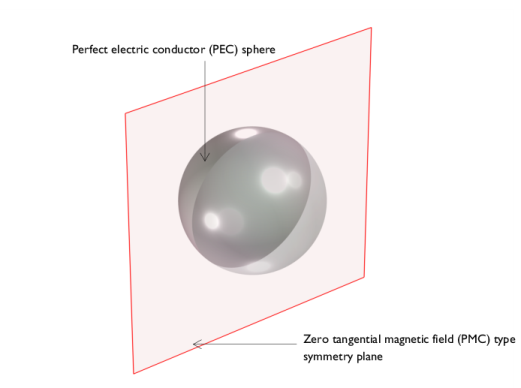
Figure 1: Only the half of the metallic sphere is modeled using the symmetric plane.
This classic benchmark problem in computational electromagnetics is about computing the RCS of a perfectly conducting sphere in free space, illuminated by a linearly polarized plane wave. The simulation result can be directly compared to the analytically solution presented in many electromagnetics textbooks to verify the simulation accuracy.
The analytical solution to the RCS of a perfectly conducting sphere is given by
where S = πr02 is the cross sectional area of the sphere, ρ = 2πr0f/c is the normalized frequency, r0 is the sphere radius, f is the frequency, and c is the speed of light.
In addition, the coefficients an and bn are given by
,
and
where jn is the spherical Bessel function of the first kind and hn(2) is the spherical Hankel function of the second kind.
Model Definition
The linearly z-polarized plane wave in the background field defines the incident field on the metallic spherical object. The conductive sphere is set up using the default perfect electric conductor (PEC) boundary condition. For the simulation, the sphere is divided in half, and only this half size is utilized. The boundary for far-field calculation is applied to the sphere’s exterior boundaries but excludes the cut plane due to the symmetry plane. As the symmetry plane aligns parallel to the polarization of the background field, a zero tangential magnetic field (PMC) type of symmetry plane is employed. Unlike the conventional finite element method (FEM), the boundary element method (BEM) does not necessitate an air-domain enclosing the sphere and incorporating absorbing features.
Results and Discussion
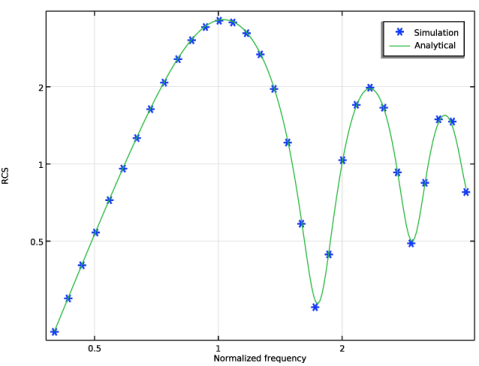
Figure 2 shows correspondence between the computed and analytical values of RCS in the Mie region, with both values scaled by the factor 2πr02, where r0 represents the radius of the sphere.
Figure 2: RCS comparison between the computed and analytical values.
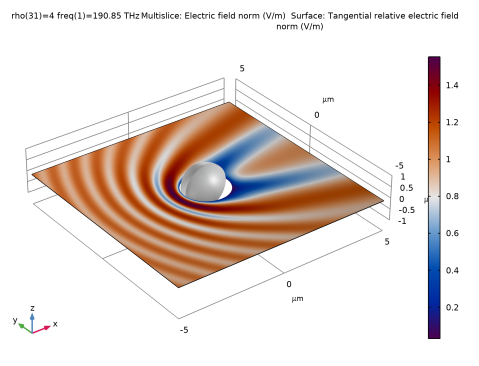
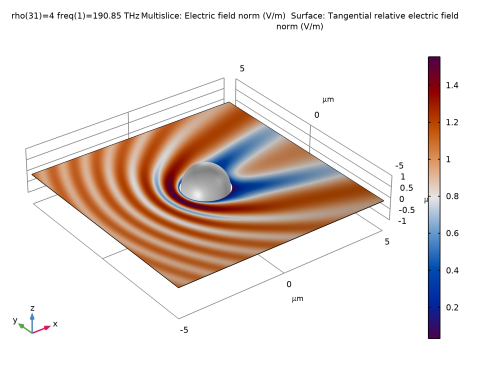
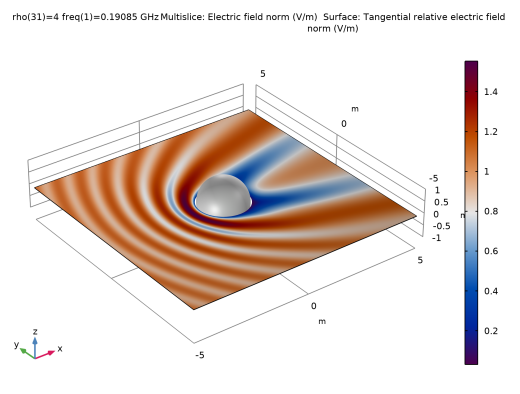
In Figure 3, the computed field solution outside the scattering object is assessed using a grid dataset. Initially, the plot of the metallic surface depicts only half the size of the sphere, which corresponds to the actual computation area. However, by employing a mirror dataset, the entire sphere can be visualized. Additionally, the material appearance subfeature provides a glossy metallic look, enhancing the visual effects.
Figure 3: Adjusted multislice plot of the electric field norm on a grid 3D dataset with a metallic sphere.
Notes About the COMSOL Implementation
This model uses the Electromagnetic Waves, Boundary Elements interface to demonstrate its functionalities. In principle, the Electromagnetic Waves, Frequency Domain interface can be used to model the same structure and achieve the same results. Both BEM and FEM solve the full Maxwell equations but FEM requires a finite simulation domain with volumetric meshing while BEM can model infinite domains and only require boundary meshing. Although the degrees of freedom in a BEM model are generally fewer compared to FEM, the memory and computation time requirements are not necessarily smaller. Therefore, one method could be more efficient than the other, depending on the type of problem to be solved.
Reference
1. J.A. Stratton, Electromagnetic Theory, Adams Press, 2013.
Application Library path: Wave_Optics_Module/Optical_Scattering/rcs_sphere_bem
Modeling Instructions
From the File menu, choose New.
New
In the New window, click  Model Wizard.
Model Wizard
1
In the Model Wizard window, click  3D.
2
In the Select Physics tree, select Optics > Wave Optics > Electromagnetic Waves, Boundary Elements (ebem).
3
Click Add.
4
Click  Study.
5
In the Select Study tree, select General Studies > Frequency Domain.
6
Global Definitions
Parameters 1
1
In the Model Builder window, under Global Definitions click Parameters 1.
2
In the Settings window for Parameters, locate the Parameters section.
3
Definitions
To compute the RCS using the analytical expression, the spherical Bessel functions of the first and second kinds and the spherical Hankel function of the second kind need to be defined. Create a Variables node for each function to avoid clustering all the variables in a single node. For the frequency range of interest in this model, truncate the summation in the analytical expression of the RCS at n=6.
Spherical Bessel Function of the First Kind
1
In the Model Builder window, expand the Component 1 (comp1) > Definitions node.
2
Right-click Definitions and choose Variables.
3
In the Settings window for Variables, type Spherical Bessel Function of the First Kind in the Label text field.
4
Locate the Variables section. In the table, enter the following settings:
Spherical Bessel Function of the Second Kind
1
Right-click Definitions and choose Variables.
2
In the Settings window for Variables, type Spherical Bessel Function of the Second Kind in the Label text field.
3
Locate the Variables section. In the table, enter the following settings:
Spherical Hankel Function of the Second Kind
1
Right-click Definitions and choose Variables.
2
In the Settings window for Variables, type Spherical Hankel Function of the Second Kind in the Label text field.
3
Locate the Variables section. In the table, enter the following settings:
Coefficient a
1
Right-click Definitions and choose Variables.
2
In the Settings window for Variables, type Coefficient a in the Label text field.
3
Locate the Variables section. In the table, enter the following settings:
Computing the coefficient b requires taking the derivative with respect to rho. This can be done conveniently by using the built-in d(f,x) operator.
Coefficient b
1
Right-click Definitions and choose Variables.
2
In the Settings window for Variables, type Coefficient b in the Label text field.
3
Locate the Variables section. In the table, enter the following settings:
RCS
1
Right-click Definitions and choose Variables.
2
In the Settings window for Variables, type RCS in the Label text field.
3
Locate the Variables section. In the table, enter the following settings:
With the calculated coefficients, the RCS can be evaluated according to the analytical expression.
Geometry 1
1
In the Model Builder window, under Component 1 (comp1) click Geometry 1.
2
In the Settings window for Geometry, locate the Units section.
3
From the Length unit list, choose µm.
Sphere 1 (sph1)
1
In the Geometry toolbar, click  Sphere.
2
In the Settings window for Sphere, locate the Size section.
3
In the Radius text field, type r.
4
In the Model Builder window, click Geometry 1.
5
In the Settings window for Geometry, locate the Reduction for Symmetry Boundaries section.
6
Select the zx-plane: remove y<0 checkbox.
7
In the Geometry toolbar, click  Build All.
Materials
Air
1
In the Model Builder window, under Component 1 (comp1) right-click Materials and choose Blank Material.
2
In the Settings window for Material, type Air in the Label text field.
Apply the air material to all voids, since we are modeling the scattering of a metallic sphere in air.
3
Locate the Geometric Entity Selection section. From the Selection list, choose All voids.
4
Locate the Material Contents section. In the table, enter the following settings:
Electromagnetic Waves, Boundary Elements (ebem)
1
In the Model Builder window, under Component 1 (comp1) click Electromagnetic Waves, Boundary Elements (ebem).
2
In the Settings window for Electromagnetic Waves, Boundary Elements, locate the Domain Selection section.
3
From the Selection list, choose All voids.
The interior of the PEC sphere will not be included in the simulation, so only Infinite void is selected in the Domain Selection.
4
Locate the Formulation section. From the list, choose Scattered field.
5
From the Background wave type list, choose Linearly polarized plane wave.
6
Click to expand the Symmetry section. From the Condition for the y = y0 plane list, choose Zero tangential magnetic field (PMC).
Far-Field Calculation 1
1
In the Physics toolbar, click  Boundaries and choose Far-Field Calculation.
Use this node to enable the evaluation of far-field quantities such as the RCS in the postprocessing.
2
In the Settings window for Far-Field Calculation, locate the Far-Field Calculation section.
3
From the Symmetry settings list, choose From symmetry plane(s).
Study 1
Parametric Sweep
1
In the Study toolbar, click  Parametric Sweep.
2
In the Settings window for Parametric Sweep, locate the Study Settings section.
3
4
The normalized frequency is swept in a logarithmic scale. In the postprocessing, the RCS will be plotted in logarithmic scale as well.
Step 1: Frequency Domain
1
In the Model Builder window, click Step 1: Frequency Domain.
2
In the Settings window for Frequency Domain, locate the Study Settings section.
3
In the Frequencies text field, type c_const*rho/cir.
4
In the Study toolbar, click  Compute.
Results
Global Evaluation Sweep 1
1
In the Results toolbar, click  More Derived Values and choose Other > Global Evaluation Sweep.
By default, the analytically calculated RCS variable will be evaluated at the simulated frequencies. However, a finer frequency resolution can be achieved without actually running the simulation by utilizing a Global Evaluation Sweep, where the parameter rho is swept at a much finer spacing.This way, the analytically calculated RCS will show a smooth curve.
2
In the Settings window for Global Evaluation Sweep, locate the Parameters section.
3
4
Locate the Expressions section. In the table, enter the following settings:
5
Click  Evaluate.
Simulated and Analytically Calculated RCS
1
In the Results toolbar, click  1D Plot Group.
2
In the Settings window for 1D Plot Group, type Simulated and Analytically Calculated RCS in the Label text field.
3
Click to expand the Title section. From the Title type list, choose None.
4
Locate the Data section. From the Dataset list, choose Study 1/Parametric Solutions 1 (sol2).
5
Locate the Plot Settings section.
6
Select the x-axis label checkbox. In the associated text field, type Normalized frequency.
7
Select the y-axis label checkbox. In the associated text field, type RCS.
Point Graph 1
1
Right-click Simulated and Analytically Calculated RCS and choose Point Graph.
2
3
In the Settings window for Point Graph, locate the y-Axis Data section.
4
In the Expression text field, type ebem.bRCS3D/(pi*r^2).
5
Locate the x-Axis Data section. From the Axis source data list, choose Outer solutions.
6
Click to expand the Coloring and Style section. Find the Line style subsection. From the Line list, choose None.
7
Find the Line markers subsection. From the Marker list, choose Cycle.
8
Click to expand the Legends section. Select the Show legends checkbox.
9
From the Legends list, choose Manual.
10
Table Graph 1
1
In the Model Builder window, right-click Simulated and Analytically Calculated RCS and choose Table Graph.
2
In the Settings window for Table Graph, click to expand the Legends section.
3
Select the Show legends checkbox.
4
From the Legends list, choose Manual.
5
6
In the Simulated and Analytically Calculated RCS toolbar, click  Plot.
7
Click the  x-Axis Log Scale button in the Graphics toolbar.
8
Click the  y-Axis Log Scale button in the Graphics toolbar.
As expected, the simulation and the analytical calculation agree very well.
Unlike FEM, where it is only possible to visualize field distributions within the truncated simulation domain, BEM allows the evaluation of fields anywhere by utilizing the automatically added Grid 3D dataset as shown in the following.
Grid 3D 1
1
In the Model Builder window, expand the Results > Datasets node, then click Grid 3D 1.
2
In the Settings window for Grid 3D, locate the Parameter Bounds section.
3
Find the First parameter subsection. In the Minimum text field, type -5.
4
In the Maximum text field, type 5.
5
Find the Second parameter subsection. In the Minimum text field, type -5.
6
In the Maximum text field, type 5.
7
Find the Third parameter subsection. In the Minimum text field, type 0.
8
In the Maximum text field, type 0.
9
Click to expand the Grid section. In the x resolution text field, type 200.
10
In the y resolution text field, type 200.
11
In the z resolution text field, type 2.
Increasing the resolution ensures that the details of the field distribution are well resolved.
Multislice 1
1
In the Model Builder window, expand the Results > Electric Field, Domains (ebem) node, then click Multislice 1.
2
In the Settings window for Multislice, locate the Multiplane Data section.
3
Find the x-planes subsection. In the Planes text field, type 0.
4
Find the y-planes subsection. In the Planes text field, type 0.
5
Locate the Coloring and Style section. From the Color table list, choose Opadometa.
Remove the staircase shape in the field plot by using a Filter subfeature.
Filter 1
1
In the Model Builder window, right-click Multislice 1 and choose Filter.
2
In the Settings window for Filter, locate the Element Selection section.
3
In the Logical expression for inclusion text field, type x^2+y^2>r*1.1*1[um].
4
In the Electric Field, Domains (ebem) toolbar, click  Plot.
Line 1
In the Model Builder window, under Results > Electric Field, Domains (ebem) right-click Line 1 and choose Delete.
Material Appearance 1
1
Right-click Surface 1 and choose Material Appearance.
2
In the Settings window for Material Appearance, locate the Appearance section.
3
From the Appearance list, choose Custom.
4
From the Material type list, choose Aluminum (anodized).
Make a complete sphere using a Mirror 3D dataset.
Mirror 3D 1
1
In the Results toolbar, click  More Datasets and choose Mirror 3D.
2
In the Settings window for Mirror 3D, locate the Plane Data section.
3
From the Plane list, choose ZX-planes.
Surface 1
1
In the Model Builder window, under Results > Electric Field, Domains (ebem) click Surface 1.
2
In the Settings window for Surface, locate the Data section.
3
From the Dataset list, choose Mirror 3D 1.
4
In the Electric Field, Domains (ebem) toolbar, click  Plot.