|
|
|




|
1
|
|
2
|
In the Select Physics tree, select Electrochemistry > Tertiary Current Distribution, Nernst–Planck > Tertiary, Supporting Electrolyte (tcd).
|
|
3
|
Click Add.
|
|
4
|
|
5
|
In the Concentrations (mol/m³) table, enter the following settings:
|
|
6
|
In the Select Physics tree, select Mathematics > ODE and DAE Interfaces > Global ODEs and DAEs (ge).
|
|
7
|
Click Add.
|
|
8
|
Click
 Study. Study. |
|
9
|
In the Select Study tree, select Preset Studies for Selected Physics Interfaces > Tertiary Current Distribution, Nernst–Planck > Time Dependent with Initialization.
|
|
10
|
Click
 Done. Done. |
|
1
|
|
2
|
|
3
|
Click
 Load from File. Load from File. |
|
4
|
Browse to the model’s Application Libraries folder and double-click the file znbr_flow_battery_parameters.txt.
|
|
1
|
|
2
|
|
3
|
|
4
|
|
5
|
Click to expand the Layers section. In the table, enter the following settings:
|
|
6
|
Select the Layers to the right checkbox.
|
|
7
|
Clear the Layers on bottom checkbox.
|
|
8
|
Click
 Build All Objects. Build All Objects. |
|
1
|
|
2
|
|
1
|
|
2
|
|
1
|
|
2
|
|
1
|
|
2
|
|
3
|
|
1
|
|
2
|
|
3
|
|
1
|
|
2
|
|
3
|
|
4
|
|
5
|
Locate the Solvent section. From the σl list, choose User defined. In the associated text field, type sigmal.
|
|
6
|
|
1
|
|
2
|
In the Settings window for Porous Electrode, type Porous Electrode - Negative in the Label text field.
|
|
3
|
|
4
|
|
5
|
Locate the Solvent section. From the σl list, choose User defined. In the associated text field, type sigmal.
|
|
6
|
Locate the Electrode Current Conduction section. From the σs list, choose User defined. In the associated text field, type sigmas_cf.
|
|
7
|
|
8
|
|
1
|
|
2
|
In the Settings window for Porous Electrode Reaction, locate the Stoichiometric Coefficients section.
|
|
3
|
|
4
|
|
5
|
|
6
|
|
7
|
|
1
|
|
2
|
In the Settings window for Porous Electrode, type Porous Electrode - Positive in the Label text field.
|
|
3
|
|
4
|
|
5
|
|
6
|
Locate the Solvent section. From the σl list, choose User defined. In the associated text field, type sigmal.
|
|
7
|
Locate the Electrode Current Conduction section. From the σs list, choose User defined. In the associated text field, type sigmas_cf.
|
|
8
|
|
9
|
|
1
|
|
2
|
In the Settings window for Porous Electrode Reaction, locate the Stoichiometric Coefficients section.
|
|
3
|
|
4
|
|
5
|
|
6
|
|
7
|
|
8
|
|
1
|
|
1
|
|
3
|
|
4
|
From the list, choose Average current density.
|
|
5
|
|
6
|
|
1
|
|
1
|
|
2
|
|
3
|
|
4
|
|
5
|
|
6
|
Locate the Electrode Kinetics section. From the Kinetics expression type list, choose Fast irreversible electrode reaction.
|
|
1
|
|
2
|
In the Settings window for Global ODEs and DAEs, type Global ODEs and DAEs - Tank Model in the Label text field.
|
|
1
|
In the Model Builder window, under Component 1 (comp1) > Global ODEs and DAEs - Tank Model (ge) click Global Equations 1 (ODE1).
|
|
2
|
|
3
|
Click
 Load from File. Load from File. |
|
4
|
Browse to the model’s Application Libraries folder and double-click the file znbr_flow_battery_global_equation.txt.
|
|
1
|
|
2
|
|
3
|
|
4
|
|
5
|
|
1
|
In the Model Builder window, under Component 1 (comp1) > Global ODEs and DAEs - Tank Model (ge) click Global Equations 1 (ODE1).
|
|
2
|
|
3
|
Click
 Select Dependent Variable Quantity. Select Dependent Variable Quantity. |
|
4
|
|
5
|
|
6
|
Click OK.
|
|
7
|
|
8
|
Click
 Define Source Term Unit. Define Source Term Unit. |
|
9
|
In the Source term quantity table, enter the following settings:
|
|
1
|
In the Model Builder window, under Component 1 (comp1) click Tertiary Current Distribution, Nernst–Planck (tcd).
|
|
1
|
|
2
|
|
3
|
|
4
|
|
5
|
|
1
|
|
2
|
|
3
|
|
1
|
|
2
|
|
3
|
|
1
|
|
2
|
|
3
|
|
4
|
|
5
|
|
1
|
|
3
|
|
4
|
|
5
|
|
6
|
|
7
|
Select the Symmetric distribution checkbox.
|
|
8
|
|
1
|
|
3
|
|
1
|
|
3
|
|
4
|
|
5
|
|
1
|
|
2
|
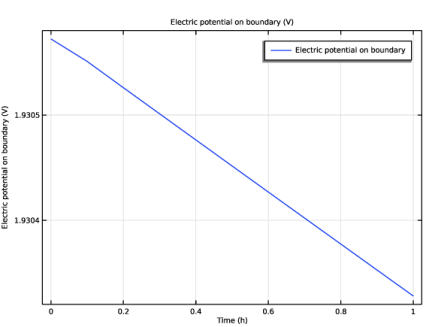
In the Settings window for Global Variable Probe, click Replace Expression in the upper-right corner of the Expression section. From the menu, choose Component 1 (comp1) > Tertiary Current Distribution, Nernst–Planck > tcd.phis0_ec1 - Electric potential on boundary - V.
|
|
1
|
|
2
|
|
3
|
|
4
|
Locate the Physics and Variables Selection section. In the Solve for column of the table, under Component 1 (comp1), select the checkbox for Tertiary Current Distribution, Nernst–Planck (tcd).
|
|
5
|
In the Solve for column of the table, under Component 1 (comp1), clear the checkbox for Global ODEs and DAEs - Tank Model (ge).
|
|
1
|
|
2
|
|
3
|
|
4
|
|
1
|
|
1
|
|
2
|
|
1
|
|
2
|
|
1
|
|
2
|
|
1
|
In the Model Builder window, under Component 1 (comp1) > Tertiary Current Distribution, Nernst–Planck (tcd) click Porous Electrode - Negative.
|
|
2
|
In the Settings window for Porous Electrode, click to expand the Dissolving–Depositing Species section.
|
|
3
|
Click
 Add. Add. |
|
1
|
|
2
|
In the Settings window for Porous Electrode Reaction, locate the Stoichiometric Coefficients section.
|
|
3
|
In the Stoichiometric coefficients for dissolving–depositing species: table, enter the following settings:
|
|
1
|
|
2
|
|
3
|
|
4
|
|
5
|
|
6
|
|
1
|
In the Model Builder window, under Component 1 (comp1) > Tertiary Current Distribution, Nernst–Planck (tcd) click Electrode Current 1.
|
|
2
|
|
3
|
|
1
|
In the Model Builder window, under Study 1 right-click Solver Configurations and choose Delete Configurations.
|
|
1
|
|
2
|
|
3
|
Click
 Add. Add. |
|
1
|
|
2
|
|
3
|
Click
 Range. Range. |
|
4
|
|
5
|
Click Replace.
|
|
1
|
|
2
|
|
3
|
Right-click Study 1 > Solver Configurations > Solution 1 (sol1) > Time-Dependent Solver 1 and choose Stop Condition.
|
|
4
|
|
5
|
Click
 Add. Add. |
|
7
|
|
8
|
|
1
|
|
2
|
|
3
|
Locate the Plot Settings section.
|
|
4
|
|
1
|
|
2
|
|
3
|
|
4
|
|
5
|
|
1
|
|
2
|
|
3
|
|
1
|
|
2
|
|
1
|
|
2
|
|
3
|
|
4
|
|
5
|
|
1
|
|
2
|
|
1
|
|
2
|
|
3
|
|
4
|
|
5
|
|
6
|
|
1
|
|
2
|
|
3
|
|
1
|
|
2
|
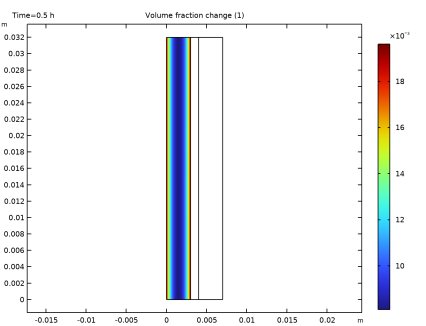
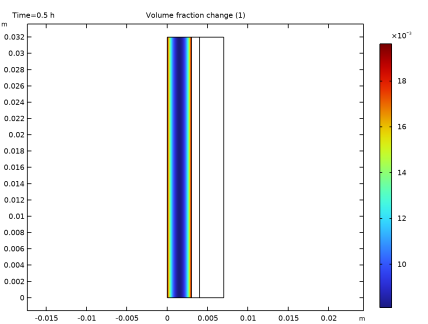
In the Settings window for 2D Plot Group, type Deposited Zinc Volume Fraction in the Label text field.
|
|
1
|
|
2
|
In the Settings window for Surface, click Replace Expression in the upper-right corner of the Expression section. From the menu, choose Component 1 (comp1) > Tertiary Current Distribution, Nernst–Planck > Dissolving–depositing species > tcd.deltaeps_pce1_Zn - Volume fraction change - 1.
|
|
1
|
|
2
|
|
3
|
|
4
|
|
5
|
|
6
|