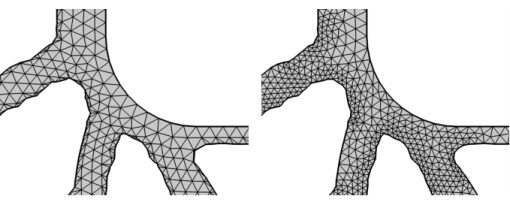
Use Remesh Domains (

) to modify the mesh in 2D domains, as seen in
Figure 8-100. This operation is supported for mesh-based geometries and imported meshes.
The attributes Corner Refinement,
Distribution, and
Size control the element size on boundaries and edges. The
Remesh Faces operation also remeshes the adjacent edges and may therefore modify the mesh on adjacent domains. Use the
Fixed Mesh attribute to keep the edge mesh on adjacent boundaries fixed when remeshing. Use the
Identical Mesh attribute to specify groups of boundaries where identical mesh is needed.
To add a Remesh Domains node, select one or several domains in the
Graphics, then choose one of the following:
Specify the domains that you want to remesh. Use All domains to select all domains in the mesh, select
Manual to specify the domains by clicking in the
Graphics window or selecting from the
Selection List, or choose a named selection to refer to a previously defined selection.
Select the Prefer quads checkbox (cleared by default) to remesh using a quad-dominant mesh.


 ).
). ) menu.
 ).
).