
|
|
|
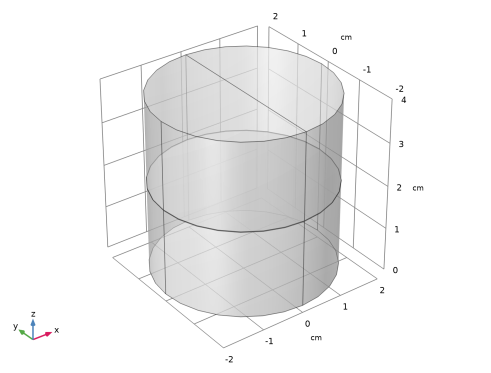
|
•
|
Thermal Connection feature in the Heat Transfer in Solids interface
|
|
•
|
External Terminal feature in the Lumped Thermal System interface
|
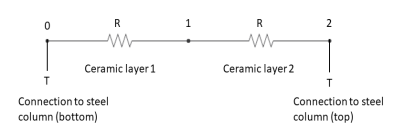



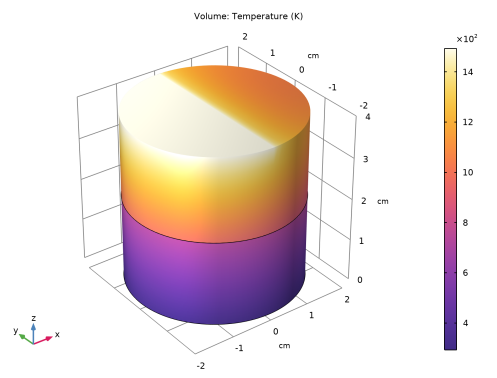
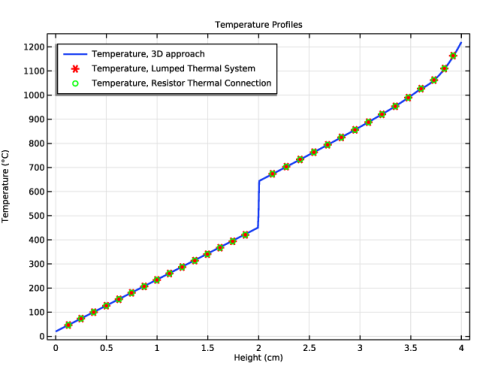
|
1
|
|
2
|
|
3
|
Click Add.
|
|
4
|
Click
 Study. Study. |
|
5
|
|
6
|
Click
 Done. Done. |
|
1
|
|
2
|
|
1
|
|
2
|
|
3
|
|
1
|
|
2
|
|
3
|
|
4
|
|
5
|
|
1
|
|
2
|
|
3
|
|
4
|
|
5
|
|
6
|
|
1
|
|
2
|
|
3
|
|
4
|
|
5
|
|
6
|
|
1
|
|
2
|
|
4
|
|
1
|
In the Model Builder window, under Component 1 (comp1) right-click Materials and choose More Materials > Material Link.
|
|
2
|
|
3
|
Click
 Add Material from Library. Add Material from Library. |
|
1
|
Go to the Add Material to Material Link 1 (matlnk1) window.
|
|
2
|
|
3
|
Right-click and choose Add to Material Link 1 (matlnk1).
|
|
1
|
|
2
|
|
3
|
Click
 Paste Selection. Paste Selection. |
|
4
|
|
5
|
Click OK.
|
|
6
|
|
7
|
Click
 Blank Material. Blank Material. |
|
8
|
|
9
|
Click
 Go to Material. Go to Material. |
|
1
|
|
2
|
|
3
|
Locate the Material Contents section. In the table, enter the following settings:
|
|
1
|
In the Model Builder window, under Component 1 (comp1) right-click Materials and choose More Materials > Material Link.
|
|
2
|
|
3
|
Click
 Paste Selection. Paste Selection. |
|
4
|
|
5
|
Click OK.
|
|
6
|
|
7
|
Click
 Blank Material. Blank Material. |
|
8
|
|
9
|
Click
 Go to Material. Go to Material. |
|
1
|
|
2
|
|
3
|
Locate the Material Contents section. In the table, enter the following settings:
|
|
1
|
|
1
|
|
3
|
|
4
|
|
1
|
|
3
|
|
1
|
|
3
|
|
4
|
|
5
|
Click
 Build All. Build All. |
|
1
|
|
2
|
|
3
|
Click OK.
|
|
4
|
|
1
|
|
2
|
|
3
|
Click
 Add Physical Quantity. Add Physical Quantity. |
|
4
|
|
5
|
Click OK.
|
|
6
|
|
8
|
Click
 Apply. Apply. |
|
1
|
|
2
|
|
1
|
|
2
|
Go to the Add Physics window.
|
|
3
|
|
4
|
Find the Physics interfaces in study subsection. In the table, clear the Solve checkbox for Study 1: 3D approach.
|
|
5
|
Click the Add to Component 2 button in the window toolbar.
|
|
6
|
|
7
|
|
8
|
Click the Add to Component 2 button in the window toolbar.
|
|
9
|
|
1
|
|
2
|
Go to the Add Study window.
|
|
3
|
|
4
|
Find the Physics interfaces in study subsection. In the table, clear the Solve checkbox for Heat Transfer in Solids (ht).
|
|
5
|
Click the Add Study button in the window toolbar.
|
|
6
|
|
1
|
|
2
|
|
1
|
|
2
|
|
3
|
|
4
|
|
1
|
|
2
|
|
3
|
|
4
|
|
5
|
|
6
|
|
1
|
|
2
|
|
4
|
|
1
|
|
2
|
|
3
|
Locate the Component Parameters section. From the Specify list, choose Thermal and geometric properties.
|
|
4
|
|
5
|
|
6
|
|
1
|
|
2
|
|
3
|
|
4
|
|
5
|
Locate the Node Connections section. In the table, enter the following settings:
|
|
1
|
|
2
|
|
3
|
|
1
|
|
2
|
|
3
|
|
1
|
|
2
|
|
3
|
Click
 Paste Selection. Paste Selection. |
|
4
|
|
5
|
Click OK.
|
|
6
|
|
7
|
Click
 Paste Selection. Paste Selection. |
|
8
|
|
9
|
Click OK.
|
|
10
|
|
11
|
|
12
|
Find the Connector 2 subsection. From the Pext,2 list, choose External Terminal 2 (term2) (lts/term2).
|
|
1
|
|
1
|
|
3
|
|
4
|
|
1
|
|
3
|
|
1
|
|
2
|
|
1
|
|
2
|
In the Rename Study dialog, type Study 2: Lumped Thermal System approach in the New label text field.
|
|
3
|
Click OK.
|
|
4
|
|
1
|
|
2
|
Go to the Add Physics window.
|
|
3
|
|
4
|
Find the Physics interfaces in study subsection. In the table, clear the Solve checkboxes for Study 1: 3D approach and Study 2: Lumped Thermal System approach.
|
|
5
|
Click the Add to Component 3 button in the window toolbar.
|
|
6
|
|
1
|
|
2
|
Go to the Add Study window.
|
|
3
|
|
4
|
Find the Physics interfaces in study subsection. In the table, clear the Solve checkboxes for Heat Transfer in Solids (ht), Heat Transfer in Solids 2 (ht2), and Lumped Thermal System (lts).
|
|
5
|
Click the Add Study button in the window toolbar.
|
|
6
|
|
1
|
|
2
|
|
1
|
|
2
|
|
3
|
|
4
|
|
1
|
|
2
|
|
3
|
|
4
|
|
5
|
|
6
|
|
1
|
|
2
|
|
4
|
|
1
|
|
2
|
|
3
|
Click
 Paste Selection. Paste Selection. |
|
4
|
|
5
|
Click OK.
|
|
6
|
|
7
|
Click
 Paste Selection. Paste Selection. |
|
8
|
|
9
|
Click OK.
|
|
10
|
|
11
|
|
1
|
|
1
|
|
3
|
|
4
|
|
1
|
|
3
|
|
1
|
|
2
|
|
1
|
|
2
|
In the Rename Study dialog, type Study 3: Resistor Thermal Connection approach in the New label text field.
|
|
3
|
Click OK.
|
|
4
|
|
1
|
|
2
|
|
3
|
Locate the Plot Settings section.
|
|
4
|
|
5
|
|
6
|
|
7
|
|
8
|
|
1
|
|
3
|
|
4
|
|
5
|
|
6
|
|
7
|
|
8
|
|
9
|
|
1
|
|
2
|
|
3
|
|
5
|
|
6
|
|
7
|
|
8
|
Locate the Coloring and Style section. Find the Line style subsection. From the Line list, choose None.
|
|
9
|
|
10
|
|
11
|
|
12
|
|
13
|
|
14
|
|
1
|
|
2
|
|
3
|
|
5
|
|
6
|
|
7
|
|
8
|
Locate the Coloring and Style section. Find the Line style subsection. From the Line list, choose None.
|
|
9
|
|
10
|
|
11
|
|
12
|
|
13
|
|
14
|
|
16
|


