

PDF

Eigenmodes in a Muffler
Introduction
In this example, you compute the propagating modes in the chamber of an automotive muffler. The geometry is a cross section of the chamber in the Absorptive Muffler example.
The purpose of the model is to study the shape of the propagating modes and to find their cutoff frequencies. As discussed in the documentation of the Absorptive Muffler example, some of the modes significantly affect the damping of the muffler at frequencies above their cutoff. In this model, you study modes with cutoff frequencies up to 1500 Hz.
Model Definition
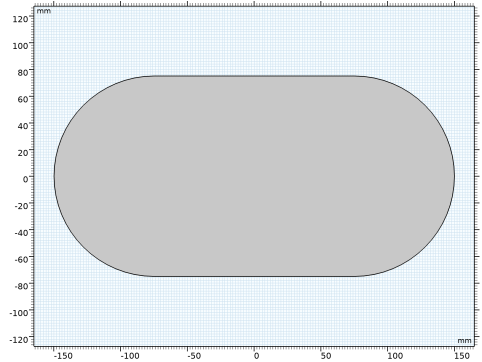
The muffler chamber has a race track shaped cross section, as seen in Figure 1. In this model, the chamber is considered to be hollow and field with air at atmospheric pressure.
Figure 1: The model geometry.
The wave numbers and mode shapes through a cross section of the chamber are found as the solution of an eigenvalue problem for the acoustic pressure p:
where ρ0 is the density, c the speed of sound, κz the out-of-plane wave number, and ω = 2π f the angular frequency. For a given angular frequency, only modes such that κz2 is positive can propagate. The cutoff frequency of each mode is calculated as
Results and Discussion
The model finds five propagating modes, whose characteristics are summed up in the table here below. The values are fund in the evaluation group in the Results section of the model. Note that both positive and negative wave numbers are presented, representing propagation in- and out-of-plane.
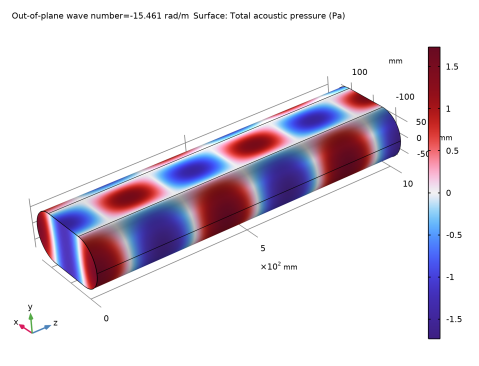
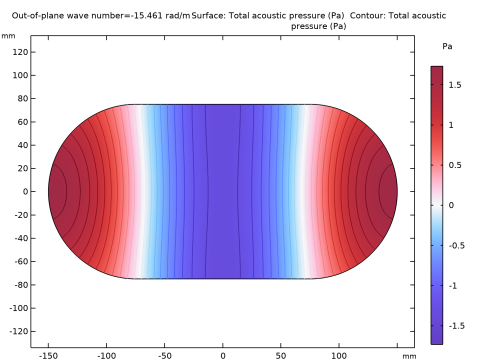
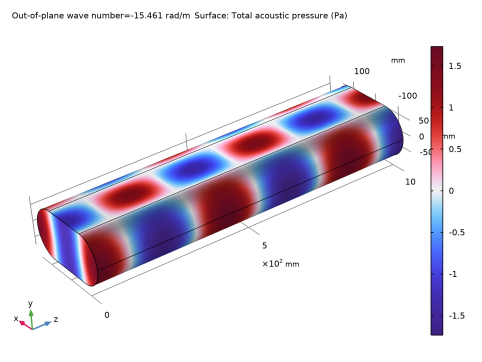
For a muffler with a centered tube leading into the chamber, the first mode that is symmetric with respect to both the  x-axis and the y-axis is propagating when the frequency is higher than 1240 Hz. Figure 2 shows this mode, which for an infinitely long chamber occurs at 1240 Hz. The mode is visualized in 3D in Figure 3.
Figure 2: The chamber’s first fully symmetric propagation mode. The plot shows the real part of the acoustic pressure.
Figure 3: The first fully symmetric mode visualized in a section of waveguide.
Application Library path: Acoustics_Module/Automotive/eigenmodes_in_muffler
Modeling Instructions
From the File menu, choose New.
New
In the New window, click  Model Wizard.
Model Wizard
1
In the Model Wizard window, click  2D.
2
In the Select Physics tree, select Acoustics > Pressure Acoustics > Pressure Acoustics, Frequency Domain (acpr).
3
Click Add.
4
Click  Study.
5
In the Select Study tree, select Preset Studies for Selected Physics Interfaces > Mode Analysis.
6
Geometry 1
1
In the Model Builder window, under Component 1 (comp1) click Geometry 1.
2
In the Settings window for Geometry, locate the Units section.
3
From the Length unit list, choose mm.
Square 1 (sq1)
1
In the Geometry toolbar, click  Square.
2
In the Settings window for Square, locate the Size section.
3
In the Side length text field, type 150.
4
Locate the Position section. From the Base list, choose Center.
Circle 1 (c1)
1
In the Geometry toolbar, click  Circle.
2
In the Settings window for Circle, locate the Size and Shape section.
3
In the Radius text field, type 75.
4
Locate the Position section. In the x text field, type -75.
Circle 2 (c2)
1
In the Geometry toolbar, click  Circle.
2
In the Settings window for Circle, locate the Size and Shape section.
3
In the Radius text field, type 75.
4
Locate the Position section. In the x text field, type 75.
Union 1 (uni1)
1
In the Geometry toolbar, click  Booleans and Partitions and choose Union.
2
Click in the Graphics window and then press Ctrl+A to select all objects.
3
In the Settings window for Union, locate the Union section.
4
Clear the Keep interior boundaries checkbox.
5
Click  Build All Objects.
6
Click the  Zoom Extents button in the Graphics toolbar.
Add Material
1
In the Materials toolbar, click  Add Material to open the Add Material window.
2
Go to the Add Material window.
3
In the tree, select Built-in > Air.
4
Click the Add to Component button in the window toolbar.
5
In the Materials toolbar, click  Add Material to close the Add Material window.
Materials
Air (mat1)
By default, the boundaries of the geometry will be considered to be sound hard walls. No other physics settings are needed.
Mesh 1
In this model, the mesh is set up manually. Add a free triangular mesh and then proceed to the solver settings.
Free Triangular 1
In the Mesh toolbar, click  Free Triangular.
Study 1
Step 1: Mode Analysis
1
In the Model Builder window, under Study 1 click Step 1: Mode Analysis.
2
In the Settings window for Mode Analysis, locate the Study Settings section.
3
Select the Desired number of modes checkbox. In the associated text field, type 8.
4
Select the Search for modes around shift checkbox. In the associated text field, type 20.
The free-space propagation mode has an out-of-plane wave number equal to omega/c = 27.5 rad/m. With these settings, the solver returns the 8 modes with propagation constants closest to 20 rad/m first in the list.
5
In the Mode analysis frequency text field, type 1500[Hz].
This setting makes the software look for propagating modes with cutoff frequencies up to 1500 Hz.
6
In the Study toolbar, click  Compute.
Results
Acoustic Pressure (acpr)
The solver has found the free-space mode and all other propagating modes. There is a total of 5 different propagating modes. Because the waves can propagate both into and out of the modeling plane, each mode gets reported twice, with positive and negative out-of-plane wave numbers.
For the positive out-of-plane wave numbers, it holds that the higher the mode, the lower the wave number. However, the solver does not stop at zero. Because you asked for more than the 5 existing propagating modes, you get additional modes with imaginary out-of-plane wave numbers. This indicates that they are evanescent. The default plot shows the acoustic pressure distribution for a mode with a wave number of -17.95i rad/m.
1
In the Settings window for 2D Plot Group, locate the Data section.
2
From the Out-of-plane wave number (rad/m) list, choose -15.461.
3
In the Acoustic Pressure (acpr) toolbar, click  Plot.
4
Click the  Zoom Extents button in the Graphics toolbar.
This is the lowest fully symmetric mode, which is shown in Figure 2. You can compute the cutoff frequency of this mode using the expression in the model introduction. In order to refer to the speed of sound in air, use an arbitrary point in the geometry for this evaluation.
Evaluation Group 1 - Mode Cutoff Frequency
1
In the Results toolbar, click  Evaluation Group.
2
In the Settings window for Evaluation Group, type Evaluation Group 1 - Mode Cutoff Frequency in the Label text field.
3
Locate the Data section. From the Out-of-plane wave number selection list, choose From list.
4
In the Out-of-plane wave number (rad/m) list, select -15.461.
Point Evaluation 1
1
Right-click Evaluation Group 1 - Mode Cutoff Frequency and choose Point Evaluation.
2
3
In the Settings window for Point Evaluation, locate the Expressions section.
4
5
In the Evaluation Group 1 - Mode Cutoff Frequency toolbar, click  Evaluate.
Finally, create a plot to visualize the mode in 3D using the 2D Extrusion dataset.
Extrusion 2D 1
1
In the Results toolbar, click  More Datasets and choose Extrusion 2D.
2
In the Settings window for Extrusion 2D, locate the Extrusion section.
3
In the z maximum text field, type 1000.
4
In the Resolution text field, type 100.
5
Click to expand the Advanced section. In the Out-of-plane wave number text field, type acpr.kz.
Mode 3D
1
In the Results toolbar, click  3D Plot Group.
2
In the Settings window for 3D Plot Group, type Mode 3D in the Label text field.
3
Locate the Data section. From the Out-of-plane wave number (rad/m) list, choose -15.461.
Surface 1
Right-click Mode 3D and choose Surface.
Mode 3D
Rotate and zoom to get the desired 3D view.