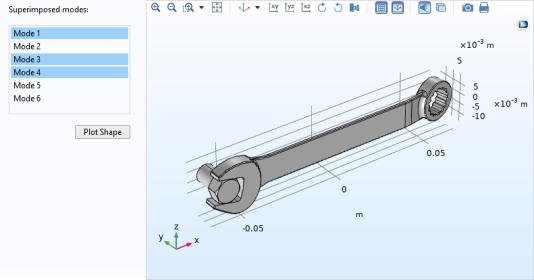
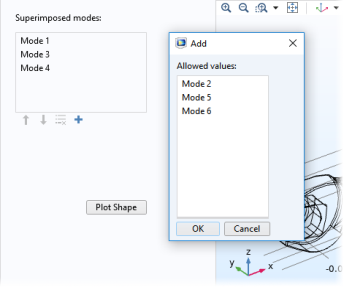
A List Box object is similar to a radio button object, except that it allows for the simultaneous selection of multiple options.
The Settings window for the list box of this example is shown in the figure below.
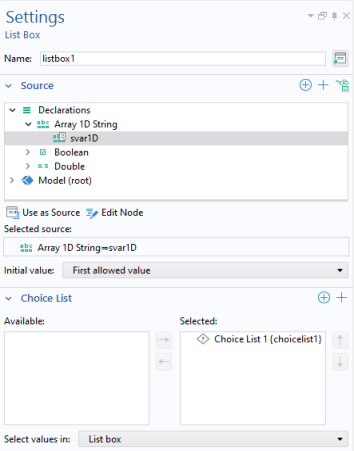
The Select values in list allows you to choose between two alternatives,
List box or
Dialog, for displaying the list.
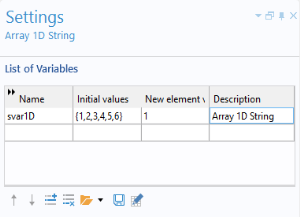
You can use any scalar or array declaration as a source. Select from the tree and click Use as Source. If you use a string array as the source, you can, in the running application, select more than one item in the list using Shift+Click or Ctrl+click. For other sources, you can only select one value from the list. This example uses a 1D string array
svar1D. Its
Settings window is shown below.
In the Choice List section, you can add choice lists that contribute allowed values to the list box. The figure below shows the choice list used in this example.
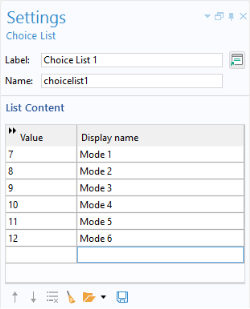
The vibrational modes 1–6 correspond to trivial rigid body modes and are not of interest in this application, hence the Value column starts at 7. The choice list allows you to hide the actual mode values in the model from the user by only displaying the strings in the
Display name column. The first nonrigid body modes are named Mode 1, Mode 2, and so on.
The method below uses the COMSOL Multiphysics operator with() to visualize the superimposed modes. This example is somewhat simplified, since it ignores the effects of amplitude and phase for the modes.
Assuming the user selected the modes 1, 3, and 5 by using the list box, the method creates an expression with(1,u)+with(3,u)+with(5,u). This expression is then used for the
x-displacement (dependent variable
u) in a displacement plot. In a similar way, the method automatically creates expressions for the variables
v and
w associated with the
y- and
z-displacement, respectively. Note that the command
with(), used in the results in the example above, is different from the built-in
with() command used to shorten syntax that is described in
With, Get, and Set Methods.
If the list box will be used for the purpose of changing units, then a Unit Set can be used instead of a
Choice List (You still select it in the
Choice List section of the
Settings window of the list box).