
|
|
|
 . The damping coefficients are computed for all eccentricity values by solving a perturbed form of Reynolds equation.
 . The attitude angle of the journal measured from the local y direction is therefore
  .The coordinates of the journal location in the damper, in local directions, are given by


|
1
|
|
2
|
|
3
|
Click Add.
|
|
4
|
Click
 Study. Study. |
|
5
|
|
6
|
Click
 Done. Done. |
|
1
|
|
2
|
|
1
|
|
2
|
|
3
|
|
4
|
|
5
|
|
6
|
|
7
|
|
1
|
In the Model Builder window, under Component 1 (comp1) right-click Definitions and choose Variables.
|
|
2
|
|
1
|
|
2
|
|
3
|
|
1
|
|
2
|
|
3
|
|
4
|
|
5
|
|
6
|
|
7
|
|
8
|
|
9
|
|
10
|
Locate the Fluid Properties section. From the μ list, choose User defined. In the associated text field, type mu0.
|
|
11
|
|
1
|
|
2
|
|
3
|
|
1
|
|
3
|
|
4
|
|
1
|
|
3
|
|
1
|
|
2
|
|
3
|
|
4
|
Click
 Add. Add. |
|
7
|
|
1
|
|
1
|
|
2
|
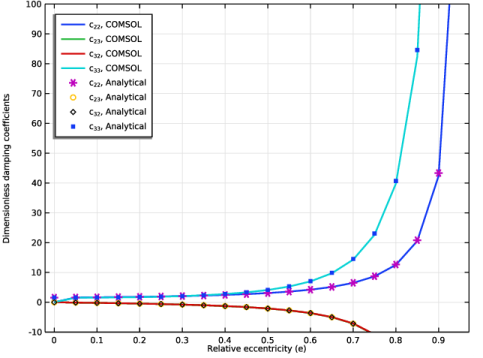
In the Settings window for 1D Plot Group, type Damping coefficients (Dimensionless) in the Label text field.
|
|
1
|
|
2
|
In the Settings window for Global, click Replace Expression in the upper-right corner of the y-Axis Data section. From the menu, choose Component 1 (comp1)>Hydrodynamic Bearing>Dynamic coefficients>hdb.sfd1.c22 - Bearing damping coefficient, local yy-component - N·s/m.
|
|
3
|
|
4
|
|
1
|
|
2
|
|
4
|
Locate the Coloring and Style section. Find the Line style subsection. From the Line list, choose None.
|
|
5
|
|
1
|
|
2
|
|
3
|
|
4
|
Select the y-axis label check box. In the associated text field, type Dimensionless damping coefficients.
|
|
5
|
|
6
|
|
7
|
|
8
|
|
9
|
|
10
|


