|
|
|





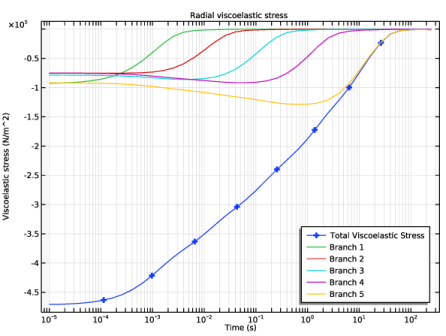
 . The viscoelastic stress relaxes from its initial value to zero.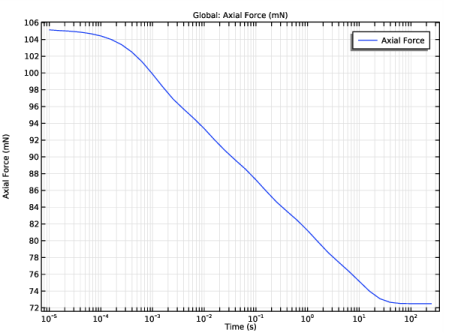
|
1
|
|
2
|
In the Application Libraries window, select Nonlinear Structural Materials Module>Hyperelasticity>arterial_wall_mechanics in the tree.
|
|
3
|
Click
 Open. Open. |
|
1
|
|
2
|
|
1
|
|
2
|
|
3
|
|
4
|
|
5
|
|
6
|
|
7
|
Click
 Plot. Plot. |
|
1
|
In the Model Builder window, expand the Component 1 (comp1)>Solid Mechanics (solid) node, then click Hyperelastic Material (Media).
|
|
1
|
|
3
|
|
4
|
Click
 Add four times. Add four times. |
|
1
|
In the Model Builder window, under Component 1 (comp1)>Solid Mechanics (solid) right-click Prescribed Displacement 1 and choose Duplicate.
|
|
2
|
|
3
|
|
1
|
|
2
|
|
3
|
|
1
|
|
3
|
|
4
|
|
5
|
|
6
|
|
7
|
|
1
|
|
3
|
|
4
|
|
5
|
|
1
|
|
2
|
|
3
|
|
4
|
|
5
|
|
1
|
|
2
|
|
3
|
Click
 Add. Add. |
|
1
|
|
2
|
|
3
|
|
4
|
Click to expand the Values of Dependent Variables section. Find the Initial values of variables solved for subsection. From the Settings list, choose User controlled.
|
|
5
|
|
6
|
|
7
|
|
1
|
|
2
|
|
3
|
|
4
|
|
5
|
|
6
|
|
7
|
|
8
|
|
1
|
|
2
|
|
3
|
|
1
|
|
2
|
|
3
|
|
4
|
|
5
|
|
6
|
|
7
|
|
1
|
|
2
|
|
4
|
|
1
|
|
2
|
|
3
|
|
4
|
|
5
|
|
6
|
|
7
|
|
8
|
|
9
|
In the associated text field, type Viscoelastic stress (N/m^2).
|
|
10
|
|
1
|
|
3
|
In the Settings window for Point Graph, click Replace Expression in the upper-right corner of the y-Axis Data section. From the menu, choose Component 1 (comp1)>Solid Mechanics>Stress>Viscoelastic stress tensor (material and geometry frames) - N/m²>solid.SqRR - Viscoelastic stress tensor, RR component.
|
|
4
|
|
5
|
|
1
|
|
2
|
|
3
|
|
4
|
Locate the Legends section. In the table, enter the following settings:
|
|
1
|
|
2
|
|
3
|
|
1
|
|
2
|
|
3
|
|
1
|
|
2
|
|
3
|
|
4
|
|
5
|
Click
 Disable. Disable. |
|
6
|
In the tree, select Component 1 (Comp1)>Solid Mechanics (Solid)>Hyperelastic Material (Media)>Viscoelasticity 1.
|
|
7
|
Click
 Disable. Disable. |