You are viewing the documentation for an older COMSOL version. The latest version is available here.
PDF

Lumped Composite Thermal Barrier
Introduction
This example shows how to connect two 3D finite element domains though a Thermal Lumped System for heat transfer modeling.
The model is a variant of the Composite Thermal Barrier model, in which two ceramic thin layers with different thermal conductivities are sandwiched in a steel column.
Two modeling approaches are compared for the computation of the temperature distribution through the whole column. First, the composite (made of the ceramic layers) is modeled as a 3D object. In the second approach, to avoid resolving the thin domains, the Lumped Thermal System interface is used and coupled to the remaining domains through boundary conditions.
The technique is useful when modeling heat transfer through thermal barriers like multilayer coatings.
Model Definition
Geometry
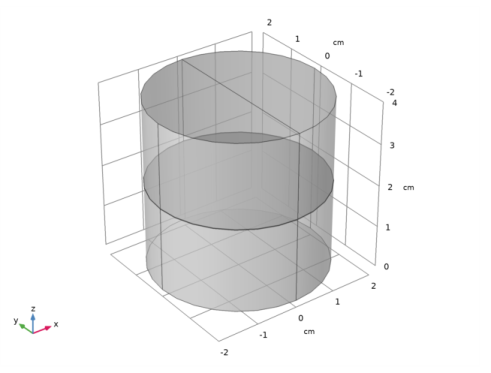
This tutorial uses a simple geometry as shown in Figure 1. The cylinder has a radius of 2 cm and a height of 4 cm.
Figure 1: Geometry.
The composite consists of two layers with different thermal conductivities. The first approach resolves each layer as a 3D domain. The height of the layers is about three orders of magnitude smaller than the bulk height. This often requires to build a mesh manually to accurately resolve the thin structure.
Network Representation of the Thermal System
COMSOL Multiphysics provides the Lumped Thermal System physics interface, available from the Heat Transfer Module, and in which the Conductive Thermal Resistor feature allows to model conductive heat transfer without representing the underlying geometry.
The Lumped Thermal System physics interface uses a network representation of thermal systems to model heat transfer by analogy with electrical circuits. The domain and boundary conditions for heat transfer are idealized by components joined by a network of perfectly thermally conductive wires.
This 0D approach simplifies the geometry and thus the mesh. In complex geometries, this lumped approach can reduce the amount of memory and time required for the simulation significantly.
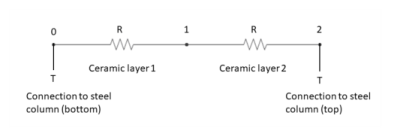
For the modeling of the thermally resistive ceramic layers, two Conductive Thermal Resistor components are connected in a serial circuit.
In the steel column, the Heat Transfer in Solids interface is applied, and the coupling between the two physics, Heat Transfer in Solids (3D approach) and Lumped Thermal System (0D approach), is performed through the following features:
Lumped System Connector boundary feature in the Heat Transfer in Solids interface
External Terminal feature in the Lumped Thermal System interface
The complete thermal circuit modeled by the Lumped Thermal System interface is as shown on Figure 2.
Figure 2: Thermal circuit for heat transfer in the ceramic layers
Conductive Thermal Resistor
The Conductive Thermal Resistor feature models heat conduction in a thin shell of constant conductivity. In this example, a plane shell configuration is assumed, and the thermal resistance R (SI unit: K/W) of each layer is expressed from the thermal conductivity k (SI unit: W/(m·K)), the thickness L (SI unit: m), and the surface area A (SI unit: m²) as follows:
It then assumes that the heat rate P (SI unit: W) through each layer is proportional to the temperature difference ΔT (SI unit: K) across it:
See Theory for the Lumped Thermal System Interface in the Heat Transfer Module User’s Guide for more details about the underlying theory.
Material Properties
The cylinder is made of steel. The composite consists of two layers of different ceramics.
Boundary Conditions
The temperature at the bottom is fixed to 20°C whereas one half of the top boundary is held at 1220°C (1493 K). All other outer boundaries are perfectly insulated.
Results and Discussion
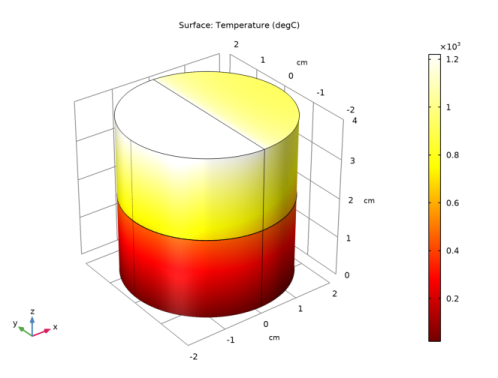
Figure 3 shows the temperature distribution in the cylinder. The composite acts as a thermal barrier resulting in a jump of the temperature over the layer.
Figure 3: Temperature distribution.
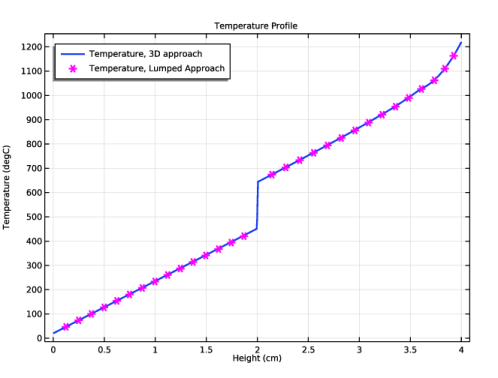
Of interest is if the Lumped Thermal System approach produces reliable results compared to resolving the thin layers in 3D. This can be done with a comparative line graph as in Figure 4. It shows that the Lumped Thermal System approach produces accurate results for the bulk temperatures.
Figure 4: Temperature profile for 3D and 0D approaches.
Another important question for simulating is the influence on the mesh size and on the required RAM.
With the default tetrahedral mesh the number of mesh elements is about 130,000 elements and the meshing algorithm gives some warnings.
With the swept mesh feature you can significantly reduce the number of elements to about 2,800 elements which is only 2%. In complex geometries the swept mesh algorithm is often not applicable. Using the Lumped Thermal System approach, the number of mesh elements reduces from 2,800 to 2,000 which is about 30% less, even in this simple geometry. You can see the number of mesh elements used in the Messages window below the Graphics window.
Notes About the COMSOL Implementation
To compare the results directly, both approaches are handled within one mph-file.
Application Library path: Heat_Transfer_Module/Tutorials,_Thin_Structure/lumped_composite_thermal_barrier
Modeling Instructions
From the File menu, choose New.
New
In the New window, click  Model Wizard.
Model Wizard
1
In the Model Wizard window, click  3D.
2
In the Select Physics tree, select Heat Transfer>Heat Transfer in Solids (ht).
3
Click Add.
4
Click  Study.
5
In the Select Study tree, select General Studies>Stationary.
6
Global Definitions
Parameters 1
1
In the Model Builder window, under Global Definitions click Parameters 1.
2
In the Settings window for Parameters, locate the Parameters section.
3
Geometry 1
1
In the Model Builder window, under Component 1 (comp1) click Geometry 1.
2
In the Settings window for Geometry, locate the Units section.
3
From the Length unit list, choose cm.
Cylinder 1 (cyl1)
1
In the Geometry toolbar, click  Cylinder.
2
In the Settings window for Cylinder, locate the Size and Shape section.
3
In the Radius text field, type 2.
4
In the Height text field, type 4.
5
In the Geometry toolbar, click  Build All.
Now, create thin cylinders to define the ceramic layers between the two steel domains.
Cylinder 2 (cyl2)
1
In the Geometry toolbar, click  Cylinder.
2
In the Settings window for Cylinder, locate the Size and Shape section.
3
In the Radius text field, type 2.
4
In the Height text field, type d_ceram1.
5
Locate the Position section. In the z text field, type 2-(d_ceram1+d_ceram2)/2.
6
In the Geometry toolbar, click  Build All.
Cylinder 3 (cyl3)
1
In the Geometry toolbar, click  Cylinder.
2
In the Settings window for Cylinder, locate the Size and Shape section.
3
In the Radius text field, type 2.
4
In the Height text field, type d_ceram2.
5
Locate the Position section. In the z text field, type 2-(d_ceram1+d_ceram2)/2+d_ceram1.
6
In the Geometry toolbar, click  Build All.
Polygon 1 (pol1)
1
In the Geometry toolbar, click  More Primitives and choose Polygon.
2
In the Settings window for Polygon, locate the Coordinates section.
3
4
In the Geometry toolbar, click  Build All.
Materials
Material Link 1 (matlnk1)
1
In the Model Builder window, under Component 1 (comp1) right-click Materials and choose More Materials>Material Link.
2
In the Settings window for Material Link, locate the Link Settings section.
3
Click  Add Material from Library.
Add Material to Material Link 1 (matlnk1)
1
Go to the Add Material to Material Link 1 (matlnk1) window.
2
In the tree, select Built-in>Steel AISI 4340.
3
Click  Add to Material Link 1 (matlnk1).
Materials
Material Link 2 (matlnk2)
1
Right-click Materials and choose More Materials>Material Link.
2
In the Settings window for Material Link, locate the Geometric Entity Selection section.
3
Click  Paste Selection.
4
In the Paste Selection dialog box, type 2 in the Selection text field.
5
6
In the Settings window for Material Link, locate the Link Settings section.
7
Click  Blank Material.
8
In the Model Builder window, click Material Link 2 (matlnk2).
9
Click  Go to Material.
Global Definitions
Ceramic 1
1
In the Model Builder window, under Global Definitions>Materials click Material 2 (mat2).
2
In the Settings window for Material, type Ceramic 1 in the Label text field.
3
Locate the Material Contents section. In the table, enter the following settings:
Materials
Material Link 3 (matlnk3)
1
In the Model Builder window, under Component 1 (comp1) right-click Materials and choose More Materials>Material Link.
2
In the Settings window for Material Link, locate the Geometric Entity Selection section.
3
Click  Paste Selection.
4
In the Paste Selection dialog box, type 3 in the Selection text field.
5
6
In the Settings window for Material Link, locate the Link Settings section.
7
Click  Blank Material.
8
In the Model Builder window, click Material Link 3 (matlnk3).
9
Click  Go to Material.
Global Definitions
Ceramic 2
1
In the Model Builder window, under Global Definitions>Materials click Material 3 (mat3).
2
In the Settings window for Material, type Ceramic 2 in the Label text field.
3
Locate the Material Contents section. In the table, enter the following settings:
Heat Transfer in Solids (ht)
Temperature 1
1
In the Model Builder window, under Component 1 (comp1) right-click Heat Transfer in Solids (ht) and choose Temperature.
2
Temperature 2
1
In the Physics toolbar, click  Boundaries and choose Temperature.
2
3
In the Settings window for Temperature, locate the Temperature section.
4
In the T0 text field, type T_hot.
Mesh 1
First, mesh the top surface with a free triangular mesh and extrude it in layers through the cylindrical geometry. With a Distribution node, specify how many mesh layers are to be created within the domain. Resolve the composite layers with two elements in thickness.
Free Triangular 1
1
In the Mesh toolbar, click  Boundary and choose Free Triangular.
2
3
In the Settings window for Free Triangular, click  Build Selected.
Swept 1
In the Mesh toolbar, click  Swept.
Distribution 1
1
Right-click Swept 1 and choose Distribution.
2
3
In the Settings window for Distribution, locate the Distribution section.
4
In the Number of elements text field, type 2.
5
Click  Build All.
Study 1
In the Home toolbar, click  Compute.
Results
Temperature (ht)
The following plots are produced by default: temperature profile on the surface as in Figure 3, and isothermal contours.
Surface
1
In the Model Builder window, expand the Temperature (ht) node, then click Surface.
2
In the Settings window for Surface, locate the Expression section.
3
From the Unit list, choose degC.
4
In the Temperature (ht) toolbar, click  Plot.
Next, create a temperature profile along the height of the cylinder. You will later compare the graph with the results of the lumped approach.
Temperature Profile
1
In the Home toolbar, click  Add Plot Group and choose 1D Plot Group.
2
In the Settings window for 1D Plot Group, type Temperature Profile in the Label text field.
3
Locate the Plot Settings section. Select the x-axis label check box.
4
5
Click to expand the Title section. From the Title type list, choose Manual.
6
In the Title text area, type Temperature Profile.
7
Locate the Legend section. From the Position list, choose Upper left.
Line Graph 1
1
In the Temperature Profile toolbar, click  Line Graph.
2
3
In the Settings window for Line Graph, locate the y-Axis Data section.
4
From the Unit list, choose degC.
5
Locate the x-Axis Data section. From the Parameter list, choose Expression.
6
In the Expression text field, type z.
7
Click to expand the Coloring and Style section. In the Width text field, type 2.
8
Click to expand the Legends section. Select the Show legends check box.
9
From the Legends list, choose Manual.
10
11
In the Temperature Profile toolbar, click  Plot.
Group the plots corresponding to the 3D approach under a single node.
3D Approach
1
In the Model Builder window, right-click Results and choose Node Group.
2
In the Settings window for Group, type 3D Approach in the Label text field.
Isothermal Contours (ht)
Now let all the plots being regenerated after solving.
1
In the Model Builder window, click Results.
2
In the Settings window for Results, locate the Update of Results section.
3
Select the Recompute all plot data after solving check box.
Create now the second model which uses the Lumped Thermal System physics interface and compare the results to the first approach.
Add Component
In the Model Builder window, right-click the root node and choose Add Component>3D.
Add Physics
1
In the Home toolbar, click  Add Physics to open the Add Physics window.
2
Go to the Add Physics window.
3
In the tree, select Heat Transfer>Heat Transfer in Solids (ht).
4
Find the Physics interfaces in study subsection. In the table, clear the Solve check box for Study 1.
5
Click Add to Component 2 in the window toolbar.
6
In the tree, select Heat Transfer>Lumped Thermal System (lts).
7
In the table, clear the Solve check box for Study 1.
8
Click Add to Component 2 in the window toolbar.
9
In the Home toolbar, click  Add Physics to close the Add Physics window.
Add Study
1
In the Home toolbar, click  Add Study to open the Add Study window.
2
Go to the Add Study window.
3
Find the Studies subsection. In the Select Study tree, select General Studies>Stationary.
4
Find the Physics interfaces in study subsection. In the table, clear the Solve check box for Heat Transfer in Solids (ht).
5
Click Add Study in the window toolbar.
6
In the Model Builder window, click the root node.
7
In the Home toolbar, click  Add Study to close the Add Study window.
Geometry 2
1
In the Settings window for Geometry, locate the Units section.
2
From the Length unit list, choose cm.
Cylinder 1 (cyl1)
1
Right-click Component 2 (comp2)>Geometry 2 and choose Cylinder.
2
In the Settings window for Cylinder, locate the Size and Shape section.
3
In the Radius text field, type 2.
4
In the Height text field, type 2-(d_ceram1+d_ceram2)/2.
Cylinder 2 (cyl2)
1
In the Geometry toolbar, click  Cylinder.
2
In the Settings window for Cylinder, locate the Size and Shape section.
3
In the Radius text field, type 2.
4
In the Height text field, type 2-(d_ceram1+d_ceram2)/2.
5
Locate the Position section. In the z text field, type 2+(d_ceram1+d_ceram2)/2.
6
In the Geometry toolbar, click  Build All.
Polygon 1 (pol1)
1
In the Geometry toolbar, click  More Primitives and choose Polygon.
2
In the Settings window for Polygon, locate the Coordinates section.
3
4
In the Geometry toolbar, click  Build All.
Materials
Material Link 4 (matlnk4)
In the Model Builder window, under Component 2 (comp2) right-click Materials and choose More Materials>Material Link.
Lumped Thermal System (lts)
In the Model Builder window, under Component 2 (comp2) click Lumped Thermal System (lts).
Ceramic 1
1
In the Physics toolbar, click  Global and choose Conductive Thermal Resistor.
2
In the Settings window for Conductive Thermal Resistor, type Ceramic 1 in the Label text field.
3
Locate the Component Parameters section. From the Specify list, choose Thermal and geometric properties.
4
From the Material list, choose Ceramic 1 (mat2).
5
In the A text field, type pi*(2[cm])^2.
6
In the L text field, type d_ceram1.
Ceramic 2
1
Right-click Ceramic 1 and choose Duplicate.
2
In the Settings window for Conductive Thermal Resistor, type Ceramic 2 in the Label text field.
3
Locate the Component Parameters section. From the Material list, choose Ceramic 2 (mat3).
4
In the L text field, type d_ceram2.
5
Locate the Node Connections section. In the table, enter the following settings:
External Terminal 1 (term1)
1
In the Physics toolbar, click  Global and choose External Terminal.
2
In the Settings window for External Terminal, locate the Node Connections section.
3
In the Node name text field, type 0.
External Terminal 2 (term2)
1
In the Physics toolbar, click  Global and choose External Terminal.
2
In the Settings window for External Terminal, locate the Node Connections section.
3
In the Node name text field, type 2.
Heat Transfer in Solids 2 (ht2)
Add two Lumped System Connector features on top and bottom boundaries of the composite barrier to connect the External Terminal features added previously.
1
In the Model Builder window, under Component 2 (comp2) click Heat Transfer in Solids 2 (ht2).
Lumped System Connector 1
1
In the Physics toolbar, click  Boundaries and choose Lumped System Connector.
2
Lumped System Connector 2
1
In the Physics toolbar, click  Boundaries and choose Lumped System Connector.
2
3
In the Settings window for Lumped System Connector, locate the Terminal Inputs section.
4
From the Pext list, choose External Terminal 2 (term2) (lts/term2).
Temperature 1
1
In the Physics toolbar, click  Boundaries and choose Temperature.
2
Temperature 2
1
In the Physics toolbar, click  Boundaries and choose Temperature.
2
3
In the Settings window for Temperature, locate the Temperature section.
4
In the T0 text field, type T_hot.
Mesh 2
Free Triangular 1
1
In the Mesh toolbar, click  Boundary and choose Free Triangular.
2
3
In the Settings window for Free Triangular, click  Build Selected.
Swept 1
In the Mesh toolbar, click  Swept.
Mesh 1
Swept 1
In the Model Builder window, under Component 1 (comp1)>Mesh 1 right-click Swept 1 and choose Build All.
Study 2
In the Home toolbar, click  Compute.
Results
Surface
1
In the Model Builder window, expand the Temperature (ht2) node, then click Surface.
2
In the Settings window for Surface, locate the Expression section.
3
From the Unit list, choose degC.
Group the plots corresponding to the lumped approach under a single node.
Lumped Approach
1
In the Model Builder window, right-click Results and choose Node Group.
2
In the Settings window for Group, type Lumped Approach in the Label text field.
Line Graph 2
1
In the Model Builder window, right-click Temperature Profile and choose Line Graph.
2
In the Settings window for Line Graph, locate the Data section.
3
From the Dataset list, choose Study 2/Solution 2 (3) (sol2).
4
Locate the Selection section. Clear the  Activate Selection toggle button.
5
Click  Paste Selection.
6
In the Paste Selection dialog box, type 14 in the Selection text field.
7
8
In the Settings window for Line Graph, locate the y-Axis Data section.
9
In the Expression text field, type T2.
10
From the Unit list, choose degC.
11
Locate the x-Axis Data section. From the Parameter list, choose Expression.
12
In the Expression text field, type z.
13
Locate the Coloring and Style section. Find the Line style subsection. From the Line list, choose None.
14
From the Color list, choose Magenta.
15
Find the Line markers subsection. From the Marker list, choose Asterisk.
16
In the Number text field, type 15.
Line Graph 3
1
Right-click Line Graph 2 and choose Duplicate.
2
In the Settings window for Line Graph, locate the Selection section.
3
4
Click  Clear Selection.
5
Click  Paste Selection.
6
In the Paste Selection dialog box, type 11 in the Selection text field.
7
8
In the Settings window for Line Graph, locate the Legends section.
9
Select the Show legends check box.
10
From the Legends list, choose Manual.
11
12
In the Temperature Profile toolbar, click  Plot.
The plot should look like that in Figure 4.