Almost all physics nodes that you add in The Electric Currents in Shells Interface have either a section named
Shell Properties, or
Layer Selection or
Interface Selection. Selections there interact with the standard selections of geometrical objects (boundaries and edges) in order to provide a complete specification of where a material property or boundary condition is to be applied within a layered material.
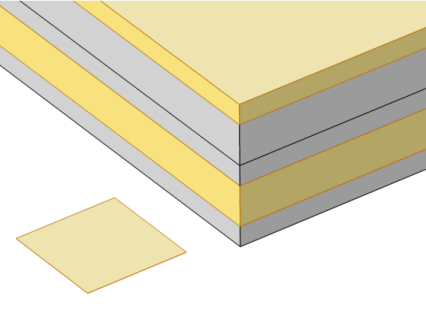
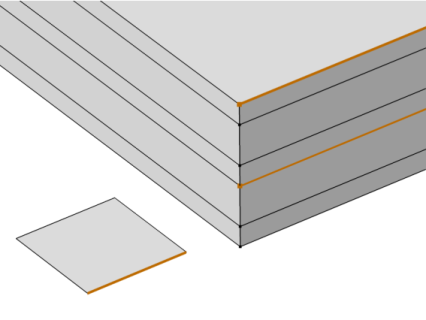
This is illustrated by Figure 4-1 and
Figure 4-2, where the patch at the lower left is the actual shell, and the 3D sketch shows an expanded view of what it would represent in the physical world.
In the Shell Properties section, it is possible to limit the contributions to individually selected layers of the selections made in the
Boundary Selection section. For a given
Layered Material Link,
Layered Material Stack, or
Single Layer Material, you get access to a list of check boxes for the selection of the individual layers.
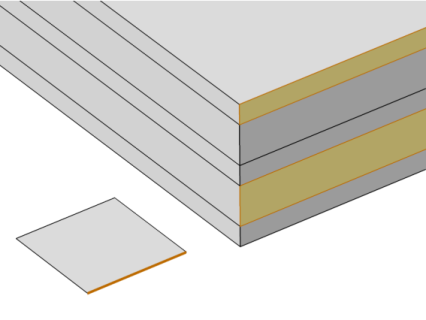
This is illustrated by Figure 4-3 and
Figure 4-4, where the patch at the lower left is the actual shell, and the 3D sketch shows an expanded view of what it would represent in the physical world.
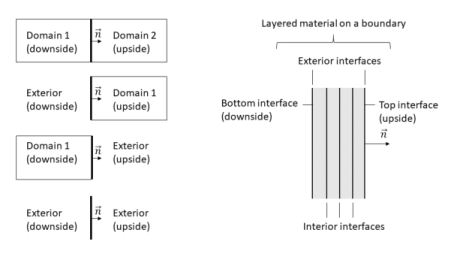
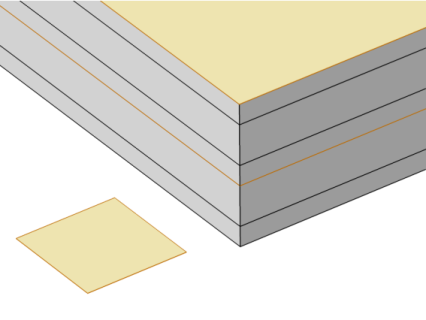
In the Interface Selection section, it is possible to select the interfaces between layers where the contribution should be added, including the top and bottom interfaces (see
Figure 4-5 for the interfaces description). For a given
Layered Material Link,
Layered Material Stack, or
Single Layer Material, you get access to a list of predefined interfaces subsets.