You are viewing the documentation for an older COMSOL version. The latest version is
available here
.
Global Definitions - Parameters and Variables
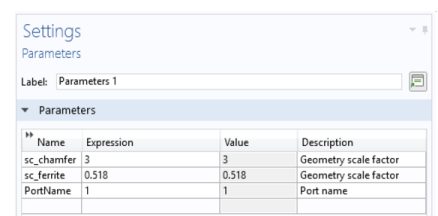
The geometry is set up using a parameterized approach. This allows you to match the input impedance to that of the connecting waveguide sections by variation of two geometric design parameters. These are dimensionless numbers used to scale selected geometric building blocks.
In this section, two parameters are entered and a set of variables imported from a file to prepare for drawing the circulator geometry, which is described in the section
Geometry Sequence
. Alternatively, a predefined application library file containing the geometry, parameters, and variables can be imported, as described in
Geometry
. If you import the geometry, you only need to review this section for information.
1
On the Home toolbar click Parameters
(or in the Model Builder, right-click Global Definitions
and select Parameters
).
Note:
On Linux and Mac, the Home toolbar refers to the specific set of controls near the top of the Desktop.
2
In the Settings window under Parameters, enter these settings in the table.
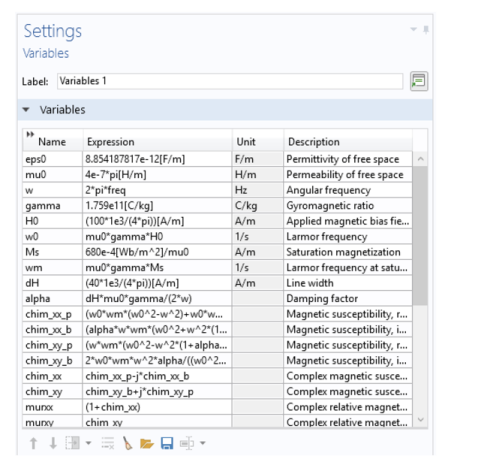
The lossy ferrite material model is set up by referring to global variables. For convenience the definitions are stored in an external text file that is imported into the model. The external text file also contains comments.
Note:
The location of the text files vary based on the installation. For example, if the installation is on your hard drive, the file path might be similar to
C:\Program Files\COMSOL\COMSOL55\Multiphysics\applications\
.
1
On the Home toolbar click Variables
and select Global Variables
.
2
Go to the Settings window for Variables. Under Variables click Load from File
.
3
Browse to the application library folder \RF_Module\Ferrimagnetic_Devices and double-click the file
lossy_circulator_3d_parameters.txt
. The variables are imported into the table.