Study, Bidirectional, Mode Expansion
Step 1: Boundary Mode Analysis
1
In the Model Builder window, right-click Study, Bidirectional, Mode Expansion
and choose Paste Multiple Items
.
2
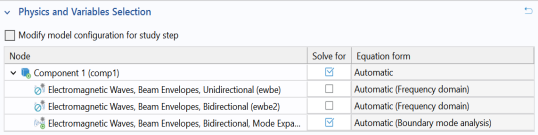
In the Settings window for Boundary Mode Analysis, locate the Physics and Variables Selection section.
3
In the table, clear the Solve for checkbox for the Electromagnetic Waves, Beam Envelopes, Bidirectional physics interface.
4
Repeat step 2 and 3 above for Step 2: Boundary Mode Analysis 1
, Step 3: Boundary Mode Analysis 2
, Step 4: Boundary Mode Analysis 3
, and Step 5: Frequency Domain
.
5
In the Home toolbar, click Compute
.
 and choose Paste Multiple Items
  .
.
 , Step 3: Boundary Mode Analysis 2
  , Step 4: Boundary Mode Analysis 3
  , and Step 5: Frequency Domain
  .
. .
.