Study 1
Time Dependent
1
In the Model Builder under the Study 1 node click Step 1: Time Dependent
.
2
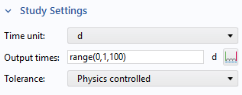
Go to the Settings window, under Study Settings, select
d
(for days) from the Time unit list.
3
In the Times text field enter
range(0,1,100)
.
4
In the Home toolbar click Compute
.
You can also right-click Study 1
in the Model Builder and select Compute
.
Note:
On Linux and Mac, the Home toolbar refers to the specific set of controls near the top of the Desktop.
 .
. 
 .
.  in the Model Builder and select Compute
  .
.