 |
|
 |
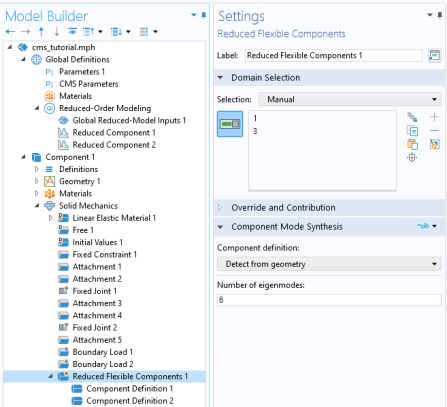
The Reduced Flexible Components node is only applicable on domains where the material behavior is determined by a Linear Elastic Material node or a Section Stiffness node in the Shell interface. You can, however, have several such nodes with different properties and settings within one reduced component.
|
 |
 ) button in the Reduced Flexible Components node, the setup of this special study sequence is automated. In the model tree, a generated ROM is represented as a node with the label Reduced Component under Global Definitions as seen in Figure 2-31.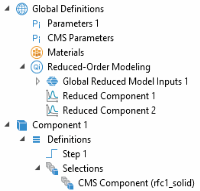
 |
|
 ) button is used, all load type features are disabled in the study steps of the CMS study.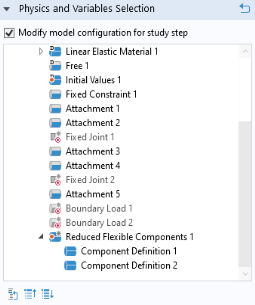
 ) button is used. When selected, all loads are enabled in the study steps of the generated CMS study.
 |
|
 ) button. The reason is that they are considered to contribute to the acceleration of the frame. If necessary, use control inputs to parameterize, for example, the gravity vector or rotation speed.
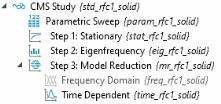
 ) button in a Reduced Flexible Components node. The auto-generated study and solver sequences have a number of built-in features and settings that greatly simplifies the process of creating a reduced component; especially when there are multiple components to be reduced. The study sequence is shown in Figure 2-33 and consists of:
|
•
|
A Parametric sweep over the components to be reduced
|
|
•
|
A Stationary training study step to compute the constraint modes from the static load cases
|
|
•
|
An Eigenfrequency training study step to compute the constrained eigenmodes
|
|
•
|
A Model Reduction study step to generate the ROM. This step can either use a Time Dependent or Frequency Domain study step as a reference.
|
 |
If the global model is to be used in a frequency domain analysis, use a Frequency Domain study step as a reference during model reduction. If not, use a Time Dependent study step. Both steps are added by the Configure CMS study (
 ) action, and can be enabled or disabled depending on the use case. By default, the Time Dependent study step is enabled. ) action, and can be enabled or disabled depending on the use case. By default, the Time Dependent study step is enabled. |
|
•
|
The Reduced Model Data datasets contains the solution that is used to create a ROM, including the constraint modes and eigenmodes. It also contains the matrices of the ROM, which can be inspected by using the System Matrix derived values node.
|
|
•
|
Depending on the chosen reference study step during model reduction, Frequency Domain, Modal Reduced-Order Model or Time Dependent, Modal Reduced-Order Model nodes are created under Global Definitions. When created from a CMS Study, these are always created with a default label Reduced Component and names that are related to the generating study and physics. Moreover, the CMS study generates ROMs with a stateful interface, which is a requirement for it to connect to other parts of the model. You can use Model Control Inputs and other settings in the generated ROMs to modify their behavior when used in a global analysis.
|
 |
Once the ROMs have been created, you can in principle delete the CMS study to clean up the model tree. In fact, you only need to keep the Reduced Flexible Components node and the generated ROMs under Global Definitions.
|
 |
Neither the names, nor the order of the list of ROMs in the Reduced-Order Modeling node under Global Definitions should be changed, as this will break the connection between the ROMs, the physics, and the reduced component. The automatic naming convention has the structure <rom>_n_<feat>_<phys>_<i>, where <rom> is a generic tag for the generating ROM, <feat> is the tag of the Reduced Flexible Components node that generated the CMS study, <phys> is the physics tag, and <i> is a number. For example, the ROM of the first component in a Solid Mechanics interface is typically named rom1_n_rfc1_solid_1.
|
 |
If all the domains of the physics interface are reduced, it is possible to turn off the synchronization of the Solve for status, since in such cases it is only necessary to solve for the states of the ROMs. By not solving for the dependent variables of the physics, it is made sure that no double contributions are added by, for example, load features. Clear the Synchronize ‘Solve for’ study setting for Reduced Components checkbox in the Reduced Flexible Components node to make this possible.
|
 |
 |
For a more detailed discussion on how to work with ROM control inputs and their limitations, see Reduced-Order Model Inputs in the COMSOL Multiphysics Reference Manual.
|
|
•
|
Do not modify the content of automatically generated nodes in the model tree, such as the CMS Parameters node, and the CMS Component selection.
|
|
-
|
|
-
|
|
•
|
|
•
|
Added Mass, Spring Foundation, and Thin Elastic Layer are special features that add either mass or stiffness to the reduced component, and can therefore be considered as part of its basic properties. By default, these are enabled in the CMS Study when using the Configure CMS study (
 ) button. No mass nor stiffness is added in a global study on selections intersecting with that of a Reduced Flexible Components node. ) button. No mass nor stiffness is added in a global study on selections intersecting with that of a Reduced Flexible Components node. |
|
•
|
When working with CMS, the following subnodes to Linear Elastic Material and Section Stiffness are supported when creating reduced components:
|
|
-
|
 ) button. Some options in the supported features may, however, not be supported. For example, the External material option in External Strain is not supported with CMS.
|
•
|
In the Damping subnode to Linear Elastic Material or Section Stiffness, the following Damping types are supported:
|
 ) button, the Damping subnode is disabled in the training steps to avoid complex eigenpairs, but active in the reference step to the model reduction. Any contributions are removed on selections that intersects with that of a Reduced Flexible Components node in a global study.
|
•
|
Damping can also be added to reduced components by Spring Foundation, Thin Elastic Layer, and Low-Reflecting Boundary nodes. For these features, damping contributions are only added on selections intersecting with that of a Reduced Flexible Components node in the reference step to the model reduction. No contributions are added in the training steps for such selections to avoid complex eigenpairs.
|
|
•
|
Reduced components are by definition linear. Do not use any features that are nonlinear such as Creep, Damage, or Plasticity on the same selection as a Reduced Flexible Components node. Also, make sure not to induce nonlinearity by user defined expressions in features that are to be reduced. This also applies to boundary, edge, and point features adjacent to the domains selected in a Reduced Flexible Components node.
|
|
•
|
It is not possible to compute dissipated energy due to for example damping on selections that intersect that of a Reduced Flexible Components node. The Calculate dissipated energy setting is ignored for such selections.
|
|
•
|
Certain features that add weak contributions on domain, boundary, edge, or point level should be used with care if their selections intersect that of a Reduced Flexible Components node. To get consistent results and avoid double contributions, it may be necessary to manually disable some features in the model tree of the training study step of a generated CMS study, or in the global study that uses a ROM. Examples of such features, other than loads, include Weak Contribution. By default, these are disabled in the CMS Study when using the Configure CMS study (
 ) button. ) button. |
|
•
|
Most features that add global dependent variables are not applicable together with reduced components. The reason is that it is difficult to automatically determine to which part of the model such variables belong. Hence, do not use features such as Average Rotation, Rigid Body Contact, Rigid Connector, Prescribed Velocity, or Point Load, Free when setting up reduced components. By default, all such features are disabled in the CMS Study when using the Configure CMS study (
 ) button. The only exception is the Attachment feature which is specially designed to work with reduced components. ) button. The only exception is the Attachment feature which is specially designed to work with reduced components. |
|
-
|
|
-
|
 ) action is executed.
 ) action. Note that this will delete any ROMs that have previously been generated. To save these in the model, you can temporarily change the name of the existing