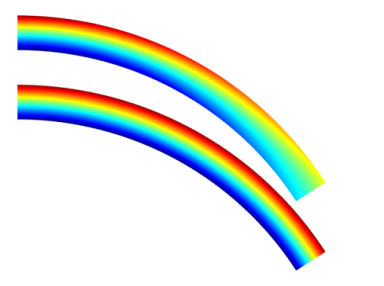
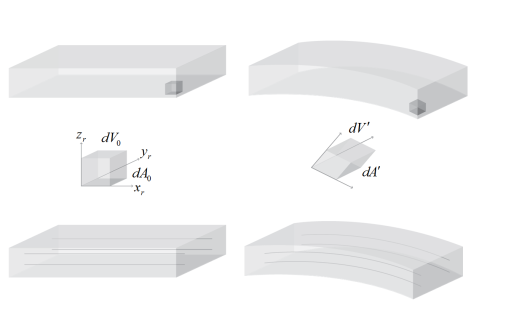
Consider the bending of a beam in the general case of a large deformation (see Figure 2-24). In this case the deformation of the beam introduces an effect known as
geometric nonlinearity into the equations of solid mechanics.
Figure 2-24 shows that as the beam deforms, the shape, orientation, and position of the element at its tip changes significantly. Each edge of the infinitesimal cube undergoes both a change in length and a rotation that depends on position. Additionally, the three edges of the cube are no longer orthogonal in the deformed configuration (although typically for practical strains the effect of the nonorthogonality can be neglected in comparison to the rotation).
From a simulation perspective it is possible to solve the equations of solid mechanics on either a fixed domain (this is often called a Total Lagrangian formulation), or on a domain that changes continuously with the deformation. The latter approach is often called an
Updated Lagrangian formulation. These two approaches also stand in contrast to the
Eulerian formulation, which is often used for fluid mechanics. In an Eulerian formulation, the flow through a domain fixed in space is considered, while in the Lagrangian formulation, a fixed volume of material is considered.
Solid mechanics in COMSOL Multiphysics is formulated on the material frame. This is achieved by defining a displacement field for every point in the solid, usually with the components u,
v, and
w. At a given coordinate (
X,
Y,
Z) in the reference configuration (on the left of
Figure 2-24), the value of
u describes the displacement of the point relative to its original position. The displacement is considered as a function of the material coordinates (X, Y, Z), but it is not explicitly a function of the spatial coordinates (x, y, z). The spatial coordinates give the current location in space of a point in the deformed solid. As a consequence, it is only possible to compute derivatives with respect to the material coordinates.
Taking derivatives of the displacement with respect to X,
Y, and
Z enables the definition of a strain tensor. There are possible representations of the deformation. Any reasonable representation must however be able to represent a rigid rotation of an unstrained body without producing any strain. The engineering strain fails here, thus it cannot be used for general geometrically nonlinear cases. One common choice for representing large strains is the
Green–
Lagrange strain. It contains derivatives of the displacements with respect to the original configuration. The values therefore represent strains in material directions. This choice allows a physical interpretation, but it must be realized that even for a uniaxial case, the Green–Lagrange strain is strongly nonlinear with respect to the displacement. If an object is stretched to twice its original length, the Green–Lagrange strain is 1.5 in the stretching direction. If the object is compressed to half its length, the strain would read
−0.375.
An element at a point (X,
Y,
Z) specified in the material frame moves with a single piece of material throughout a solid mechanics simulation. It is often convenient to define material properties in the material frame as these properties move and rotate naturally together with the volume element at the point at which they are defined as the simulation progresses. In
Figure 2-24 this point is illustrated by the small cube highlighted at the end of the beam, which is stretched, translated, and rotated as the beam deforms. The three mutually perpendicular faces of the cube in the Lagrange frame are no longer perpendicular in the deformed (spatial) frame. The deformed frame coordinates in this frame are denoted (
x,
y,
z) in COMSOL.
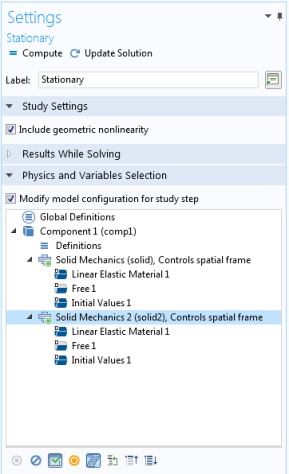
When you select a physics interface in the tree view, you can click the Control Frame Deformation button (

) to toggle whether that interface should control the spatial frame or not.
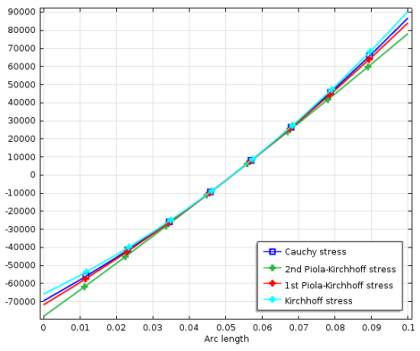
For example, in the spatial frame it is easy to define forces per reference area (known as tractions) that act within the solid and to define a stress tensor that represents all of these forces that act on a volume element. Such forces could be physically measured, for example, using an implanted piezoresistor. The stress tensor in the spatial frame is called the Cauchy or true stress tensor (in COMSOL Multiphysics this is referred to as the spatial stress tensor). To construct the stress tensor in the Lagrangian frame a tensor transformation must be performed on the
Cauchy stress. This produces the
second Piola–Kirchhoff (or material) stress, which can be used with the material strain to solve the solid mechanics problem in the (fixed) material frame. This is how the Solid Mechanics interface works when geometric nonlinearities are enabled.
In the case of solid mechanics, the material and spatial frames are associated directly with the Lagrangian and Eulerian frames, respectively. In a more general case (for example, when tracking the deformation of a fluid, such as a volume of air surrounding a moving structure) tying the Lagrangian frame to the material frame becomes less desirable. Fluid must be able to flow both into and out of the computational domain, without taking the mesh with it. The arbitrary Lagrangian-Eulerian (ALE) method allows the material frame to be defined with a more general mapping to the spatial or Eulerian frame. In COMSOL Multiphysics, a separate equation is solved to produce this mapping — defined by the mesh smoothing method (Laplacian, Winslow, hyperelastic, or Yeoh) with boundary conditions that determine the limits of deformation (these are usually determined by the physics of the system, whilst the domain level equations are typically being defined for numerical convenience). The ALE method offers significant advantages since the physical equations describing the system can be solved in a moving domain.