Results
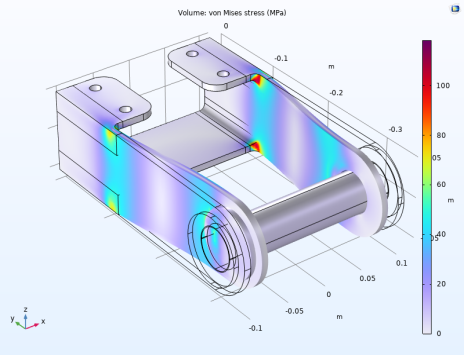
The default plot shows the von Mises stress in the bracket.
The results show how the pin compresses the bracket arms, and that the largest stresses are found in the region where the bracket arms are joined to the supporting plates.
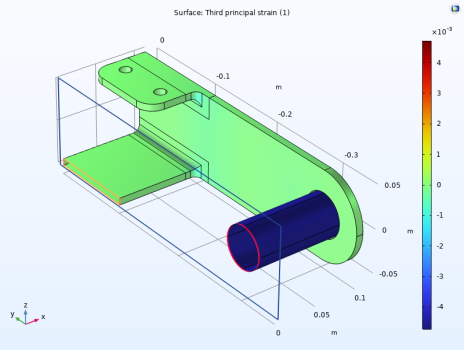
You can also plot a principal strain to visualize the resulting strain in the structure. As the pin is stiff in comparison to the bracket, the total strain in the pin is almost the same as the initial strain given as input.
Third Principal Strain
1
In the Home toolbar, click Add Plot Group
and choose 3D Plot Group
.
2
In the Settings window for 3D Plot Group, type
Third Principal Strain
in the Label text field (replace the default).
3
On the Third Principal Strain toolbar click Surface
(or right-click the Third principal strain node and choose Surface).
4
In the Settings window for Surface, click Replace Expression
in the upper-right corner of the Expression section. From the menu, choose Component 1 > Solid Mechanics > Strain > Principal strains > solid.ep3 - Third principal strain - 1.
5
Locate the Coloring and Style section. From the Scale list, choose Linear symmetric.
6
In the Graphics window toolbar, click
next to
Clipping, then choose Add Clip Plane.
7
In the Graphics window toolbar, click
next to
Clipping Active, then deselect Show Gizmos.
 and choose 3D Plot Group
  .
. (or right-click the Third principal strain node and choose Surface).
 in the upper-right corner of the Expression section. From the menu, choose Component 1 > Solid Mechanics > Strain > Principal strains > solid.ep3 - Third principal strain - 1.
 next to
  Clipping, then choose Add Clip Plane.
 next to
  Clipping Active, then deselect Show Gizmos.