Study - Auxiliary Sweep
Parametric studies can be set up from scratch or, as in this example, added to an existing study. This model computes the stress in the bracket for different load orientations. Start by selecting the sweep parameter, in this case the load direction angle. Then run the analysis.
Step 1: Stationary
1
In the Model Builder expand the Study 1 node and click Step 1: Stationary.
2
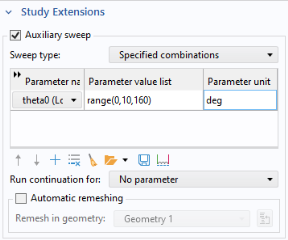
In the Settings window for Stationary, click to expand the Study Extensions section. Select the Auxiliary sweep checkbox.
3
Under the table, click Add
.
4
Choose
theta0 (Load direction angle)
from the list. In the table, enter the additional settings:
Parameter name
Parameter value list
Parameter unit
theta0 (Load direction angle)
range(0,10,160)
deg
5
From the Run continuation for list, choose No parameter, since you are analyzing a set of independent loads.
6
In the Settings window for Stationary click Compute
.
 .
.
 .
.