Study
To check the actual load distribution, you can compute the initial value. For a large model, this is much faster than computing the actual solution, but the approach is only relevant as long as the loads are independent of the solution. The steps below show how to visualize the load distribution in the current geometry.
1
In the Study toolbar click Get Initial Value
.
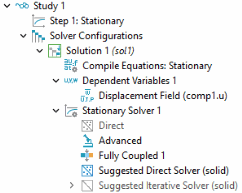
The Study node automatically defines a solver sequence for the simulation based on the selected physics interface (Solid Mechanics) and study type (Stationary). If a mesh had not been created yet, the Study node automatically generates it at the same time as the solver sequence.
If you expand the Study 1 node and its subnodes, you can see the details of the solver sequence generated.
Note:
In practice, do not rely only on the standard mesh settings. For most real life problems, suitable meshing parameters should be set up from the Mesh toolbar, just as in this example.
 .
.