Study 2
Now add an additional study to plot the source current as a function of drain voltage at a range of different gate voltages.
1
On the Home ribbon/toolbar click Add Study
.
2
In the Add Study window, find the Studies subsection. In the tree under General Studies, click Stationary
.
3
Click Add Study
in the window toolbar.
4
On the Home ribbon/toolbar click Add Study
to close the Add Study window.
Step 1: Stationary
1
In the Model Builder under Study 2, click Step 1: Stationary
.
2
In the Settings window for Stationary locate the Study Extensions section.
3
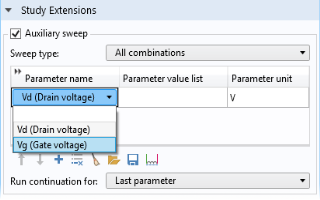
Select the Auxiliary sweep checkbox.
4
From the “Sweep type” list, choose “All combinations”.
5
Click Add
. Select Vg from the Parameter name list.
Now set up the study to sweep over Vg.
6
Click Range
. Go to the Range dialog.
-
In the Start text field, type 2.
-
In the Step text field, type
1
.
-
In the Stop text field, type
4
.
7
Click Replace.
8
Click Add
. In this case the default Auxiliary Parameter Vd is the desired parameter for the sweep.
9
In the table cell for the parameter value list for Vd, enter
range(0,0.25,1.5) 2 3 4 5
.
The
inner
sweep over Vd, the last parameter, should be used for the continuation solver (this is the default), since the solution will only change slightly between close values of Vd.
Configure the solver to reuse the solution from the previous step of the continuation parameter sweep as the initial value for the next step for the
outer
sweep parameter Vg, using the first value of the
inner
parameter Vd
10
From the “Reuse solution for previous step” list, choose Auto.
11
On the Home ribbon/toolbar click Compute
.