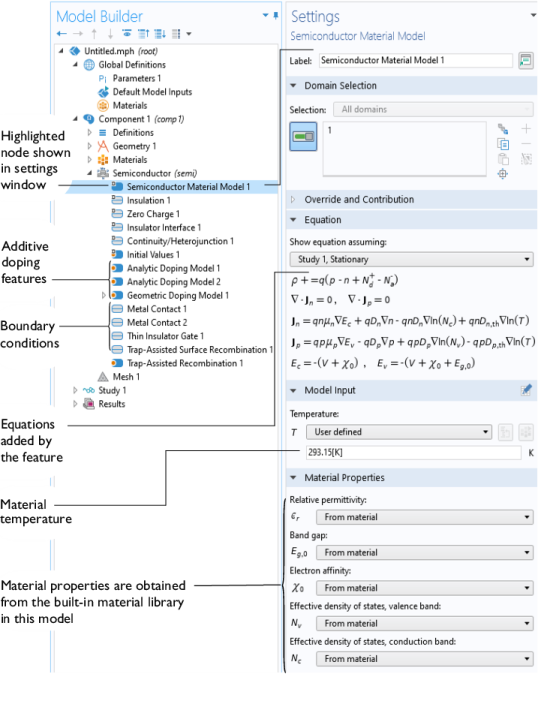
Figure 5 uses a model similar to the MOSFET application library example to show the Model Builder tree structure, and the Settings window for the selected Semiconductor Material Model 1 feature node. This node adds the semiconductor equations to the simulation within the domains selected. In the Model Inputs section the temperature of the material is specified. It is straightforward to link this temperature to a separate Heat Transfer interface to solve nonisothermal problems — the Semiconductor interface automatically defines an appropriate heat source term that can be readily accessed in a Heat Transfer interface. In the Material Properties section, the Settings window indicates that the relative permittivity and the band gap are inherited from the material properties assigned to the domain. The material properties can be set up as functions of other dependent variables in the model, for example, the temperature. The dopant density is specified by means of multiple additive doping features, which can be used to combine Gaussian and user-defined dopant density profiles to produce the desired profile. Several boundary conditions are also indicated in the model tree. The Ohmic Contact boundary condition is commonly used to model nonrectifying interconnects. The Thin Insulating Gate feature models a gate with a thickness smaller than the typical length scale of the mesh. It is also possible to model gates explicitly, solving Poisson’s equation within the dielectric.
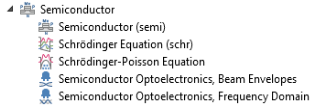
Figure 6 shows the physics interfaces included with the Semiconductor Module. The two Semiconductor Optoelectronics interfaces are only available with an additional Wave Optics module license.
Also see Physics Interface Guide by Space Dimension and Study Type. Below, a brief overview of each of the Semiconductor Module physics interfaces is given.
 AC/DC
AC/DC

 Electric Discharge
 Semiconductor


 ), found under the AC/DC branch in the Model Wizard, solves for the electric potential given the charge distribution in the domain and the voltages applied to boundaries. It is used to model electrostatic devices under static or quasistatic conditions, that is at frequencies sufficiently low that wave propagation effects can be neglected. Many of the features of the Electrostatics interface are included in the Semiconductor interface, where they affect the solution of the electric potential.
 ), found under the AC/DC branch in the Model Wizard, has the equations to model electrical circuits with or without connections to a distributed fields model. The interface solves for the voltages, currents, and charges associated with the circuit elements. Circuit models can contain passive elements like resistors, capacitors, and inductors as well as active elements such as diodes and transistors. Circuits can be imported from an existing SPICE net list. A typical application of this interface would be to consider the effect of series or parallel lumped components on device behavior.
 ) is used to solve the number density of one or multiple charge carriers. The charge carriers can be charged species such as electrons, ions, and neutral species like molecules and their excited states. Transport and reactions of charge carriers can be handled with this interface. The driving forces for transport can be drift when coupled to an electromagnetic field, convection when coupled to a flow field, and diffusion.
 ), found under the Semiconductor branch in the Model Wizard, solves the drift–diffusion and Poisson’s equations. The physics interface allows both insulating and semiconducting domains to be modeled. The equations account fully for thermal effects, and the interface can be coupled to a heat transfer interface using the temperature model input and the predefined heat source term. This physics interface is appropriate for modeling semiconductor devices.
 ) multiphysics interface combines the Semiconductor interface with the Electromagnetic Waves, Beam Envelopes interface. The coupling occurs through the Optical Transitions feature, which adds a stimulated emission generation term (appropriate for direct band-gap materials) on domains in the Semiconductor interface. This term is proportional to the optical intensity in the corresponding Wave Equation, Beam Envelopes feature in the Electromagnetic Waves, Beam Envelopes interface. Additionally spontaneous emission (for direct band-gap materials) can be accounted for. The effect of the light adsorption or emission is accounted for by a corresponding change in the complex permittivity or refractive index in the Wave Equation, Beam Envelopes feature.
 ) multiphysics interface combines the Semiconductor interface with the Electromagnetic Waves, Frequency Domain interface. The coupling occurs through the Optical Transitions feature, which adds a stimulated emission generation term (appropriate for direct band-gap materials) on domains in the Semiconductor interface. This term is proportional to the optical intensity in the corresponding Wave Equation, Electric feature in the Electromagnetic Waves, Frequency Domain interface. Additionally spontaneous emission (for direct band-gap materials) is accounted for. The effect of the light adsorption or emission is accounted for by a corresponding change in the complex permittivity or refractive index in the Wave Equation, Electric feature.
 ), found under the Semiconductor branch in the Model Wizard, solves the Schrödinger equation for a single particle in an external potential. This physics interface is useful for general quantum mechanical problems as well as for quantum confined systems such as quantum wells, wires, and dots (with the envelope function approximation).
 ) combines the Schrödinger Equation interface with the Electrostatics interface to model charge carriers in quantum-confined systems. The electric potential from the Electrostatics contributes to the potential energy term in the Schrödinger Equation. A statistically weighted sum of the probability densities from the eigenstates of the Schrödinger Equation contributes to the space charge density in the Electrostatics. A dedicated Schrödinger–Poisson Study Type is available to automatically generate the solver sequence iterations for the self-consistent solution of the bidirectionally coupled system.