The Label is the physics interface name. The default is
Geometrical Optics.
The Name is used primarily as a scope prefix for variables defined by the physics interface. Refer to such physics interface variables in expressions using the pattern
<name>.<variable_name>. In order to distinguish between variables belonging to different physics interfaces, the
name string must be unique. Only letters, numbers, and underscores (_) are permitted in the
Name field. The first character must be a letter.
The default Name (for the first physics interface in the model) is
gop.
Select an option from the Wavelength distribution of released rays list:
Monochromatic (the default),
Polychromatic, specify vacuum wavelength, or
Polychromatic, specify frequency.
|
•
|
For Monochromatic, all rays in the model have the same vacuum wavelength and frequency, which is entered as a value or expression in the Ray Properties node.
|
|
•
|
For Polychromatic, specify vacuum wavelength, a degree of freedom is allocated for the vacuum wavelength of each ray in the model. These degrees of freedom are initialized when the rays are released and are controlled by the Vacuum Wavelength section in the settings for the ray release features, such as Release from Grid.
|
|
•
|
For Polychromatic, specify frequency, a degree of freedom is allocated for the frequency of each ray in the model. These degrees of freedom are initialized when the rays are released, and are controlled by the Initial Ray Frequency section in the settings for the ray release features, such as Release from Grid.
|
The Maximum number of secondary rays limits the total number of secondary rays that can be created by capping them at the specified number. Secondary rays are released when an existing ray is subjected to certain boundary conditions. For example, when a ray arrives at a
Material Discontinuity or
Scattering Boundary between different media, the incident ray is refracted and a reflected ray is created; the degrees of freedom for this reflected ray are taken from one of the available secondary rays, which are preallocated when the study begins. Secondary rays are also used to model the interaction of rays with diffraction gratings, using the
Grating boundary condition.
By default, the Use geometry normals for ray-boundary interactions checkbox is checked. In this case, the surface normal is computed from an analytic representation of the geometry surfaces, if such a representation can be obtained. If this checkbox is cleared, the surface normal is computed using the underlying mesh discretization of the boundary rather than the exact shape of the geometry itself.
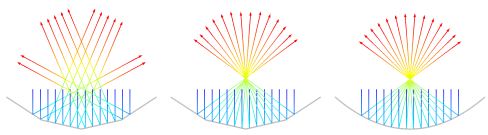
For the simple case of ray reflection by a parabolic edge in 2D, three example plots are shown in Figure 3-1 below. In the leftmost plot, linear geometry shape order has been specified; in other words,
Linear has been selected from the
Geometry shape order list in the settings for the model component. The left figure also uses mesh normals. The reflected ray directions are visibly inaccurate because the boundary mesh is very coarse. The center figure uses
Linear geometry shape order and geometry normals. Although the mesh is equally coarse, the reflected ray directions are much more accurate. The rightmost figure uses
Quadratic shape order; because the edge is parabolic, this shape order results in reflected ray directions that are exact (to within machine precision) no matter whether mesh normals or geometry normals are used, because quadratic elements can perfectly represent a parabola.
The Use geometry normals for ray-boundary interactions checkbox has no effect on the solution if the mesh can deform. This is true, for example, when the geometry is subjected to structural loads or thermal stresses. Then the mesh normal is always used.
By default the Only store accumulated variables in solution checkbox is cleared. If this checkbox is selected, then the degrees of freedom associated with individual rays (such as the ray position, wave vector, intensity, power, and normalized Stokes parameters) will be solved for but not stored in the solution data. However, certain physics features define degrees of freedom in domains or on boundaries rather than on the individual rays, and these degrees of freedom will be retained in the solution. These quantities, called accumulated variables, are defined by the following features:
While the Only store accumulated variables in solution checkbox is selected, if you run a study for the first time, the default
Ray dataset and
Ray Trajectories plot will not be created. If you later clear the checkbox and recompute the study, you may need to add these
Results features manually.
Select an option from the Optical dispersion model list:
Absolute vacuum,
Specify refractive index (the default), or
Air, Edlén (1953). This setting controls the refractive index in the empty space outside the geometry, called the void region. It also controls the refractive index for domains that are not included in the selection of the Geometrical Optics interface.
|
•
|
For Absolute vacuum, the Refractive index of exterior domains, real part (dimensionless) is next = 1. If ray power and/or intensity is being computed, the void region is assumed to be nonabsorbing.
|
|
•
|
For Specify refractive index, enter a value or expression for the Refractive index of exterior domains, real part. The default is next = 1. Enter a user defined value for Refractive index of exterior domains, imaginary part if power and/or intensity is being computed. The default is kext = 0.
|
|
•
|
For Air, Edlén (1953), the temperature and pressure dependent Refractive index of exterior domains, real part is computed using the model described in Ref. 2. The model accepts user defined values of the Exterior domain temperature Text (SI unit: K) and Exterior domain pressure Pext (SI unit: Pa). The defaults are Text = 293.15K and Pext = 1 atm. See Optical Dispersion Models, The Refractive Index of Air for details.
|
Select an option from the Intensity computation list:
None (the default),
Compute intensity,
Compute power,
Compute intensity and power,
Compute intensity in graded media, or
Compute intensity and power in graded media. For
None no additional variables are computed along the rays. For other options, the ray intensity or ray power is computed as described below.
|
•
|
For Compute intensity, auxiliary dependent variables are used to compute the intensity and polarization of each ray. For a complete list of the auxiliary dependent variables that are defined, see Intensity, Wavefront Curvature, and Polarization in Theory for the Geometrical Optics Interface. This option is only valid for computing intensity in homogeneous media; for graded-index media, use Compute intensity in graded media instead. The refractive index can still change discontinuously at boundaries, where the Fresnel equations are automatically used to compute the intensity of the reflected and refracted rays.
|
|
•
|
For Compute power, the total power transmitted by each ray is defined as an auxiliary dependent variable. Information about the ray polarization is also available. The Deposited Ray Power (Boundary) subnode is available for the Wall feature. In addition, if a heat transfer interface such as the Heat Transfer in Solids interface is included in the model, the Ray Heat Source multiphysics node can be used to compute the heat source due to attenuation of rays within domains.
|
|
•
|
The option Compute intensity and power functions as a combination of the Compute intensity and Compute power options.
|
|
•
|
The Compute intensity in graded media option functions like Compute intensity but is valid for both homogeneous and graded-index media. If all media in the model are homogeneous then it is recommended to select Compute intensity instead, since it is the more accurate method.
|
|
•
|
The Compute intensity and power in graded media option functions like Compute intensity and power but is valid for both homogeneous and graded-index media. If all media in the model are homogeneous then it is recommended to select Compute intensity and power instead, since it is the more accurate method.
|
The Compute phase checkbox is only shown if the ray intensity is computed. Select the checkbox to allocate an auxiliary dependent variable for the phase of each ray. When the phase of each ray is computed, it is possible to plot interference patterns and visualize the instantaneous electric field components of polarized rays in postprocessing. When this checkbox is selected, the total number of degrees of freedom increases by 1 per ray. This option is based on the assumption that the coherence length of the radiation is arbitrarily large.
The Use corrections for strongly absorbing media checkbox is shown if the ray intensity is computed. Select the checkbox to accurately model reflection and refraction of rays at boundaries between strongly absorbing media, in which the imaginary part of the refractive index is very large. This option allocates two or three auxiliary dependent variables per ray based on space dimension. For more information about the way this option affects the intensity calculation, see
Refraction in Strongly Absorbing Media in
Theory for the Geometrical Optics Interface.
When the Intensity computation is set to
Compute intensity in graded media or
Compute intensity and power in graded media enter a
Tolerance for curvature tensor computation (dimensionless). This tolerance is used internally when computing the principal radii of curvature of propagating wavefronts in a graded medium. A larger tolerance makes the solution less accurate but more stable.
|
•
|
Compute intensity in graded media or Compute intensity and power in graded media is selected from the Intensity computation list in the physics interface node’s Intensity Computation section and
|
Select the Compute optical path length checkbox to allocate an auxiliary dependent variable for the optical path length of each ray. The default variable name is
gop.L. It is possible to reset the optical path length to 0 when rays interact with boundaries.
Select the Count reflections checkbox to allocate an auxiliary dependent variable for the number of reflections undergone by each ray, including reflections by the
Wall and
Material Discontinuity features. The default variable name is
gop.Nrefl. The auxiliary variable begins at 0 when rays are released and is incremented by 1 every time a ray is reflected at a boundary.
Select the Store ray status data checkbox to add new variables for quantities that cannot necessarily be recovered from the ray trajectory data alone. This is especially true if automatic remeshing is used in a model. The variables created include the following, all of which would be preceded by the physics interface tag (for example,
gop.):
The global variable names in Table 3-1 all take the unreleased secondary rays into account. For example, suppose an instance of the Geometrical Optics interface includes
100 primary rays and
100 allocated secondary rays. At the last time step, suppose that
80 of the primary rays have disappeared at boundaries and that
40 secondary rays have been emitted, all of which are still active. Then the variable
gop.fac, the fraction of active rays at the final time step, would have the value
(20 + 40)/(100 + 100) or
0.3.
Select an option from the Results list:
None (the default),
Plot spot diagram, or
Plot spot diagram and geometric MTF. For
None, only the
Ray trajectories plot is created. For other options, the default plots are set up as follows:
|
•
|
For Plot spot diagram, an Intersection Point 3D dataset and a Spot diagram plot are created. Parameters of the Intersection Point 3D dataset are computed using the Recompute focal plane dataset functionality of the Spot diagram. It is important to check the correctness of the computed Intersection Point 3D dataset parameters after a study is performed.
|
|
•
|
For Plot spot diagram and geometric MTF, in addition to the steps described above, the geometric modulation function (MTF) is created. Line spread function is estimated from the Intersection Point 3D dataset by using an Evaluation Group for each release feature which then feed into Kernel Density Estimation (KDE) datasets. Each Kernel Density Estimation (KDE) dataset is subsequently fed into Spatial FFT datasets. Finally, Spatial FFT datasets are used to create a Line Graph for each release feature.
|
The datasets created have the unique tag of the preceding data source in the label. For example, an Evaluation Group that uses data from a
Release from Grid has the label
LSF Data (relg1), where
relg1 is the unique tag of the
Release from Grid feature. Subsequently, the
Kernel Density Estimation (KDE) datasets generated from such an
Evaluation Group have the labels
LSFx (eg1) or
LSFy (eg1) for the
x and
y coordinates of the
Intersection Point 3D dataset space variables, where
eg1 is the unique tag of the
Evaluation Group feature. These naming conventions are propagated to the
Spatial FFT datasets, the
Line Graph plots, and their legends.
The Plot MTF in single plot group checkbox is only shown if
Plot spot diagram and geometric MTF is selected. If it is checked (default), then MTF for all release features are plotted in the same plot group. Otherwise, a new plot group is created for every release feature.
This section is only shown when Advanced Physics Options are enabled (click the
Show More Options button

in the
Model Builder toolbar, and select
Advanced Physics Options in the
Show More Options dialog). These options are hidden by default because it is only necessary to modify them under very specific circumstances.
The Wall accuracy order sets the accuracy order of the time stepping used for time steps during which a ray-wall interaction happens. Select an order of
1 to use a forward Euler step and compute the direction or ray propagation both before and after the wall interaction. Select an order of
2 (the default) to use a second-order Taylor method to compute the trajectory before the wall interaction. After the ray-wall interaction a second-order Runge–Kutta method is used. Usually this setting has no effect on the ray tracing calculation because the rays move along straight lines, but the higher wall accuracy order is more accurate if graded-index media are present.
Select an option from the Arguments for random number generation list:
Generate unique arguments (the default),
Generate random arguments, or
User defined. This setting determines the behavior of the different random number generators (RNGs) used in the Ray Optics Module.
Certain features such as the Wall boundary condition with the
Diffuse scattering wall condition utilize the
random and
randomnormal functions to generate random numbers. Typically the random numbers are functions of the ray index, time, a unique input argument for different variable definitions, and another argument
i, which is controlled by this setting.
|
•
|
For Generate unique arguments the additional argument is based on the position of each node in the Model Builder. As a result, random numbers generated in different nodes are created independently of each other. The seed for the internal RNGs are set to a predetermined arbitrary value.
|
|
•
|
For Generate random arguments the additional argument i and the seed are randomly created each time the study is run.
|
|
•
|
For User defined the additional argument i and the seed are defined by a user input in the Settings window for each feature. Uncorrelated sets of random numbers can be obtained by running a Parametric Sweep for different values of i.
|
Note that the random function is a pseudorandom number generator (PRNG), not a true random number generator (RNG) in the sense that an observer with perfect knowledge of the algorithm and a history of previously generated values could predict the ensuing values. However, PRNG is sufficient for most purposes.
The Allow multiple release times checkbox, which is cleared by default, allows an array of release times for the rays to be specified in any of the ray release features. If the checkbox is cleared, all rays are released at time
t = 0.
By default the Exclude Jacobian contributions from ray equations checkbox is cleared. If this checkbox is selected, then expressions for the time derivatives of the degrees of freedom on rays are not included in the Jacobian matrix. Excluding contributions to the Jacobian can significantly improve solution time if the number of rays in the model is very large. The drawback is that the Jacobian is not exact, so smaller time steps or path length intervals may be needed to obtain an accurate solution. This drawback is most noticeable when computing the ray intensity or power in an absorbing medium.
By default the Treat unmeshed releasing entities as errors checkbox is selected. Certain ray release features, such as the
Release and
Release from Boundary features, compute the ray release positions based on a geometric entity, which must be meshed. While this checkbox is selected, failure to mesh the selections of such features will result in an error message when running any study in the model. If this checkbox is cleared, failure to mesh the selections of such features will result in them releasing zero rays, but will otherwise not interrupt the computation. Other physics features will still be able to release rays normally.
Enter a value for the Maximum number of wall interactions per time step. The default value is 1000. If a ray undergoes more than the specified number of boundary interactions in a single time step taken by the solver, the ray will disappear. This is included as a safeguard to prevent rays from getting stuck in infinite loops if the time between successive ray-wall interactions becomes infinitesimally small.
The dependent variables (field variables) are the components of the Ray position and
Wave vector. The name can be changed but the names of fields and dependent variables must be unique within a model. In 3D, the default ray position vector components are
qx,
qy, and
qz; and the default wave vector components are
kx,
ky, and
kz.


