Physics Interfaces
Now that the geometry and materials have been inserted into the model, set up the physics interface. Before adding any ray sources or boundary conditions, change some of the physics interface properties that control the ray tracing simulation.
1
2
The ray tracing algorithm causes a deterministic ray split whenever a ray reaches a surfaces where the two neighboring refractive indices differ. If ray intensity is solved for, then the intensity of the reflected and refracted rays is governed by the Fresnel equations, which take ray polarization into account.
When a ray undergoes reflection and refraction at a boundary between different materials, preallocated secondary ray degrees of freedom are used to track the reflected rays. If, in a system of lenses, we are more interested in refracted rays than in reflected rays, we can set the number of secondary ray degrees of freedom to zero, to reduce computational cost and hide minor details from the result plots. In order to run a stray light analysis in which the reflected rays are tracked, it would be necessary to allocate degrees of freedom for secondary rays.
3
4
5
Other settings for the Geometrical Optics interface allow tracing of polychromatic light, or enable tracking of ray intensity and polarization. However, for this simple model, monochromatic light will be traced and intensity will not be plotted.
Medium Properties 1
Each of the materials added above contain optical dispersion coefficients that can be used to define the refractive index as a function of vacuum wavelength.
1
2
3
Material Discontinuity 1
The Material Discontinuity is the default boundary condition in the Geometrical Optics interface. It reflects and refracts the rays based on the refractive index on either side of the boundary.
1
2
3
Note that the Geometrical Optics interface always uses deterministic ray splitting at Material Discontinuities, producing both a reflected and a refracted ray, unless either (i) reflected rays are intentionally suppressed (as is the case here), (ii) there is total internal reflection, or (iii) intensity and/or power is being computed, and the reflected ray would have intensity or power below a specified threshold.
Ray Properties 1
The default Ray Properties node controls the wavelength of monochromatic light. If polychromatic light is traced, then the range or distribution of wavelengths is governed by individual ray release features, leaving this settings window empty.
1
2
3
In the Vacuum wavelength text field, type lambda. This wavelength was defined in the Parameters node.
Release from Grid 1
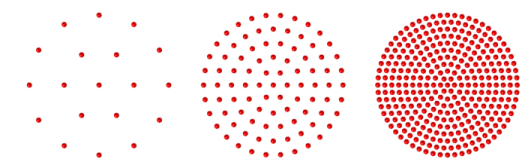
Release the rays from a hexapolar grid of points.
1
2
3
The hexapolar grid. From left to right, these grids have 2, 5, and 10 radial rings, respectively. The number of rays launched would be 19, 91, and 331 in each case.
4
Locate the input for the Center location (qc) vector. For the x, y, and z components, type dx, dy, and dz, respectively. These global parameters are defined in the Parameters 2: General  node. When editing vector inputs, a convenient shortcut is to use the Tab key to advance from one vector component to the next.
5
Locate the input for the Cylinder axis direction (rc) vector. For the x, y, and z components, type nix, niy, and niz, respectively.
The cylinder axis direction is the same as the global optical axis, the positive z direction. This is the direction normal to the ray distribution, so the hexapolar grid of release points will lie in a plane parallel to the xy-plane.
6
In the radius (Rc) text field, type P_nom/2. The parameter P_nom is the nominal pupil diameter.
7
In the number of radial positions (Nc) text field, type N_ring, a global parameter with a value of 18. Below the text field, the Settings window will report that the hexapolar grid contains a total of 1027 grid points.
8
Locate the Ray Direction Vector section. For the x, y, and z components of the Ray direction vector (L0), type vx, vy, and vz., respectively.
The ray direction vector is calculated using the field angles defined in the model parameters. In this example, the field angle is zero, but it can easily be recomputed for a nonzero field angle simply by adjusting the parameters.
Next some boundary conditions will be added to the model. Most boundary conditions override each other when applied to the same selection, so a boundary condition that absorbs or specularly reflects rays at selected surfaces will override the default Material Discontinuity 1 node on those surfaces, preventing refraction.
Obstructions
1
The Wall is a general-purpose boundary condition that can absorb rays or reflect them specularly, diffusely, or in a user-defined direction. Absorbed rays can either be removed from the simulation, or their final position and direction can be retained for results processing, depending on the choice of wall condition.
In this example, any rays that intersect the lens edges or the aperture stop will be removed, but rays that hit the image plane will be kept.
2
In the Settings window for Wall, type Obstructions in the Label text field.
3
4
Stop
1
2
In the Settings window for Wall, type Stop in the Label text field.
3
4
Image
1
2
In the Settings window for Wall, type Image in the Label text field.
3