|
1
|
|
2
|
In the Settings window for Geometry, type Double Gauss Lens in the Label text field.
|
|
4
|
Browse to the model’s Application Libraries folder and double-click the file double_gauss_lens_geom_sequence.mph. Following insertion, the lens prescription details will be available in the Parameters 1: Lens Prescriptions
 node. In addition, all expressions in the Parameters 2: General node. In addition, all expressions in the Parameters 2: General  node can now be evaluated. The beginning of the lens prescription parameter list should now look like the following: node can now be evaluated. The beginning of the lens prescription parameter list should now look like the following: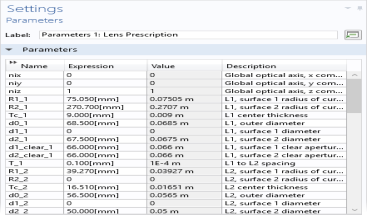 |
|
7
|
In the Graphics window toolbar, click
 next to next to  Go to Default View, then choose Go to ZY View Go to Default View, then choose Go to ZY View  . This will orient the view to place the z-axis (optical axis) horizontal and the y-axis vertical as shown in the following figure: . This will orient the view to place the z-axis (optical axis) horizontal and the y-axis vertical as shown in the following figure: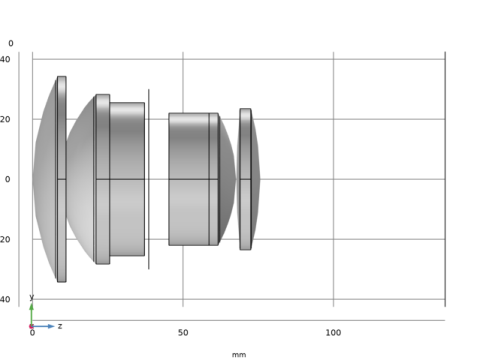 |
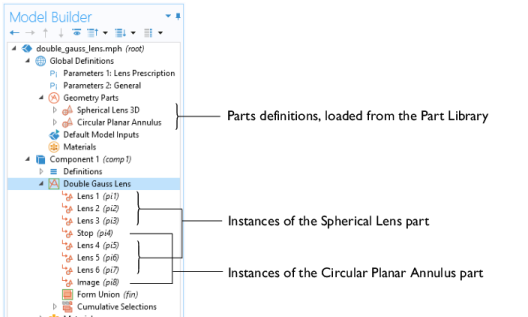
 click Geometry 1
  .
. .
. .
. button in the Graphics toolbar.
 > Geometry Parts
  , two part definitions have been loaded: the Spherical Lens 3D
  and the Circular Planar Annulus
  . Then under Component 1
  > Geometry 1
  , a number of part instances have been created.