|
1
|
|
2
|
In the Parameters 1
 settings window, type Parameters 1: Lens Prescription in the Label text field. The lens prescription will be added when the geometry sequence is inserted. settings window, type Parameters 1: Lens Prescription in the Label text field. The lens prescription will be added when the geometry sequence is inserted. |
|
4
|
In the Parameters 2
 settings window, type Parameters 2: General in the Label text field. settings window, type Parameters 2: General in the Label text field. |
|
6
|
Browse to the model’s Application Libraries folder and double-click the file double_gauss_lens_parameters.txt. The location of the files used in this exercise varies based on your installation. For example, if the installation is on your hard drive, the file path might be similar to C:\Program Files\COMSOL\COMSOL64\Multiphysics\applications\. Then the folder for this example is Ray_Optics_Module\Lenses_Cameras_and_Telescopes.
|
 and select Parameters 1. Alternatively, click the Parameters 1
  node in the Model Builder window.
 and choose Parameters under the Add submenu. This will add a second node where parameters may be entered.
 , which is in the Parameters section below the table.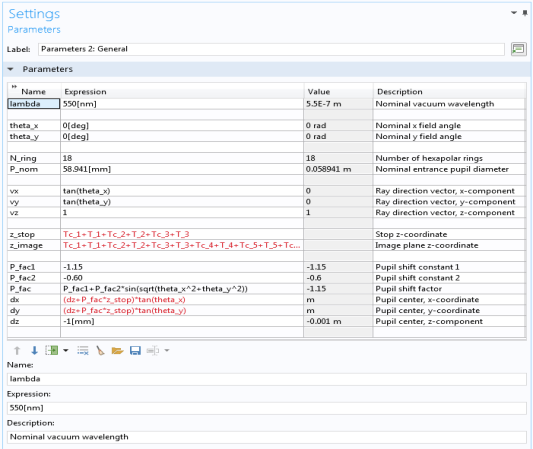
 node when the geometry sequence is inserted in the following steps.