Study 3
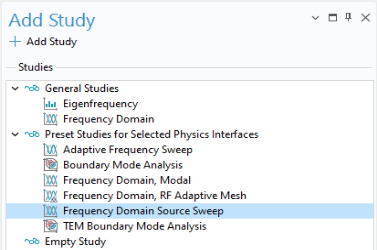
By exciting each port one at a time, each column of the full S-parameter matrix is computed, and the entire matrix can then be constructed. This process can be carried out either using a port Parametric Sweep combined with a Frequency Domain study, or more simply by running a Frequency Domain Source Sweep study.
1
In the Home toolbar, click Add Study
.
2
Under General Studies select Frequency Domain Source Sweep
.
3
Click Add Study
.
4
Click Add Study
again to close the Add Study window.
5
Go to the Settings window for Frequency Domain Source Sweep. Under Study Settings, in the Frequencies text field, enter
3[GHz]
.
6
In the Study toolbar click Compute
.
 .
. .
.
 .
. again to close the Add Study window.
 .
.