Study 1
Add the Stop condition to the time dependent solver. Recall, that the solver should stop when the minimum temperature in the packed bed reaches 70°C.
Solution 1 (sol1)
1
In the Model Builder window, under Study 1 > Solver Configurations > Solution 1 right-click Time-Dependent Solver 1and choose Stop Condition
.
2
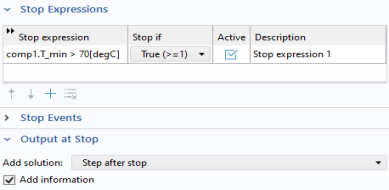
In the Settings window for Stop Condition, locate the Stop Expressions section and click Add.
3
Enter
comp1.T_min > 70[degC]
in the Stop expression field.
4
Locate the Output at Stop section. From the Add solution list, choose Step after stop.
5
In the Model Builder window, click Study 1.
6
In the Settings window, locate the Study Settings section and clear the Generate default plots checkbox, to disable the automatic generation of default plots. Instead, choose the relevant plots from the Result Templates after computation.
7
In the Study toolbar, click Compute
.
The solver automatically stops when the stop condition is fulfilled. An information message
appears and states that the stop condition is fulfilled after about 39,000 s (about 11 hours).
 .
.
 .
. appears and states that the stop condition is fulfilled after about 39,000 s (about 11 hours).