Definitions
With the next steps you define the variable
T_in
according to
Equation 1
.
Average 1
First, create an average operator to evaluate the average temperature at the outlet.
1
In the Definitions toolbar click Nonlocal Couplings
and choose Average
.
2
In the Settings window for Average locate the Source Selection section, and from the Geometric entity level list choose Boundary.
3
From the Selection list, choose Outlet.
Variables 1
1
In the Model Builder window, right-click Component 1 > Definitions and choose Variables
.
2
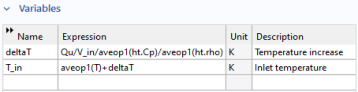
In the Settings window for Variables, locate the Variables section and enter the following expressions
The expressions
ht.Cp
and
ht.rho
refer to the heat capacity and density of water as defined by the Heat Transfer in Solids and Fluids interface. The expression
aveop1
refers to the average operator defined previously.
 and choose Average
  .
. .
.