Definitions
The tank is cooled by its surroundings. Create a selection for the outer boundary to apply the heat flux condition. Note, that here you create the selection under the Definitions node directly.
Heat Flux Boundary
1
In the Definitions toolbar, click Explicit
.
2
In the Settings window for Explicit, type
Heat Flux Boundary
in the Label text field.
3
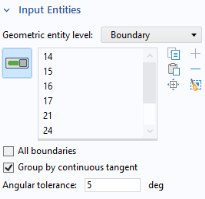
Locate the Input Entities section. From the Geometric entity level list, choose Boundary.
4
Select the Group by continuous tangent checkbox.
5
Select one of the outer boundaries and automatically all boundaries with a continuous tangent will be added to the selection list.
The Group by continuous tangent option simplifies the selection of several connected boundaries at once. Now, use the selection to for the Heat Flux boundary condition in the next step.
 .
.