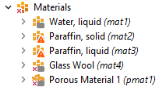
Materials
Add the material nodes for water, paraffin, and the insulating glass wool. After the physics interfaces have been set up, the software automatically detects which material properties are required and you can fill them in.
Water, liquid
1
In the Home toolbar, click Add Material
.
2
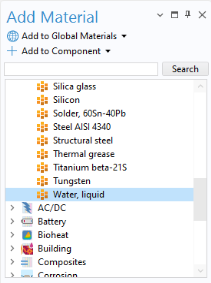
Go to the Add Material window, expand the Built-in folder and select Water, liquid. Click Add to Component
in the window toolbar to add it o the Materials list. You can also double-click on it or right-click and choose Add to Component 1 (comp 1)
.
3
In the Home toolbar click Add Material
again to close the window.
Paraffin, solid
4
In the Model Builder window, under Component 1 (comp 1)
, right-click Materials
and choose Blank Material
.
5
In the Label text field under the Settings window for Material, type
Paraffin,
solid
.
6
Repeat the last two steps to create two more material nodes, call them
Paraffin,
liquid
and
Glass wool
respectively.
7
In the Settings window for Glass wool, select Domain 4.
8
In the Model Builder window, under Component 1 (comp 1)
, right-click Materials
and choose More Materials > Porous Material
.
9
In the Settings window for Porous Material, select Domain 2 only.
The Material node indicates that not all material properties that are required have been defined.
Continue with setting up the physics interfaces and after that you can fill in the required material properties.
 .
. in the window toolbar to add it o the Materials list. You can also double-click on it or right-click and choose Add to Component 1 (comp 1)
  .
. again to close the window.
 , right-click Materials
  and choose Blank Material
  .
. , right-click Materials
  and choose More Materials > Porous Material
  .
.