Study 2
1
In the Model Builder expand the Study 2 node and click Step 1: Time Dependent
.
2
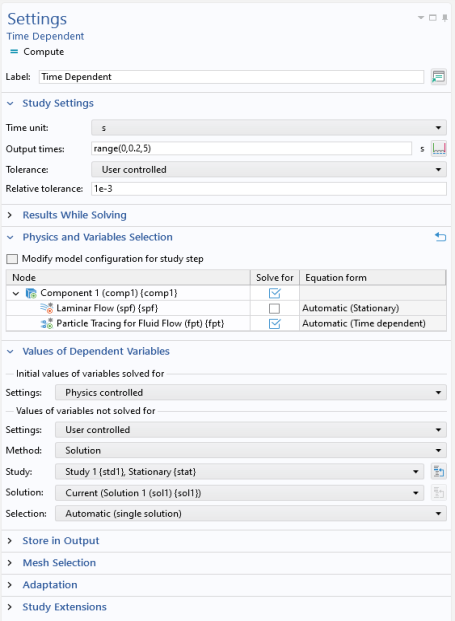
Expand the Values of Dependent Variables section. Under Values of variables not solved for, from the Settings list, choose User controlled.
3
From the Method list, choose Solution.
4
From the Study list, choose Study 1, Stationary.
Note:
The above settings are very important for coupling the fluid velocity computed in the previous study to the particle tracing analysis. If you forget to specify the Values of variables not solved for, then the initial particle velocity and background fluid velocity will both evaluate to zero everywhere. In this example, the particles would never move as a result.
5
Locate the Study Settings section. Click the Range button
.
6
Go to the Range dialog.
-
In the Step text field, type
0.2
.
-
In the Stop text field, type
5
.
7
Click the Replace button. The Settings window should look like the following screenshot.
8
In the Home toolbar click Compute
.
 .
. .
. .
.