Materials
1
In the Materials toolbar click Blank Material
. To make sure the material appears under Component 1
in the Model Builder, not under Global Definitions
, make sure the last node you clicked was under Component 1.
2
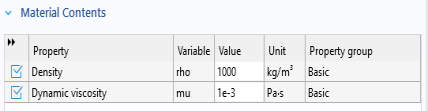
In the Settings window for Material locate the Material Contents section. In the table, enter the following settings:
By default the first material you define in the model is applied to all domains, so it is not necessary to select the flow channel.
 . To make sure the material appears under Component 1
  in the Model Builder, not under Global Definitions
  , make sure the last node you clicked was under Component 1.