Global Definitions
Set up named parameters for any quantity that you might perceivably want to change later on. The global Parameters node then gives you a direct overview of the values that are used in the model, making it easier to reproduce and modify.
Parameters
1
In the Home toolbar click Parameters
and select Parameters 1
.
2
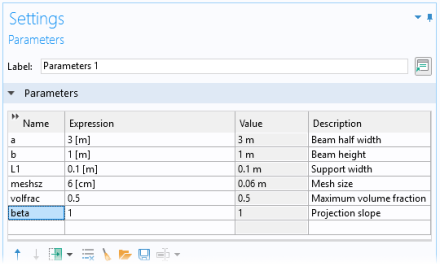
In the Settings window for Parameters locate the Parameters section and enter the following settings:
 and select Parameters 1
  .
.