Global Definitions
When your control variables are independent of geometry, it is easiest to set them up initially as global parameters. Also add the stretch parameter
lambda
that has been varied in the measured data as a global parameter.
Parameters
Note that you can click the double-arrow button
in the upper-left corner of parameter and variable tables to expand them, making editing easier.
1
In the Home toolbar click Parameters
.
2
In the Settings window locate the Parameters section.
3
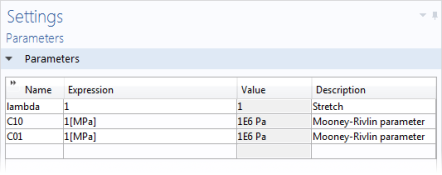
In the table, enter the following settings:
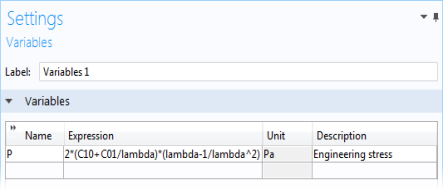
Variables 1
1
In the Home toolbar click Variables
and choose Global Variables
.
2
In the Settings window for Variables locate the Variables section.
3
In the table, enter the following settings:
 in the upper-left corner of parameter and variable tables to expand them, making editing easier.
 .
.
 and choose Global Variables
  .
.