|
|
|




 , and the electric field is expressed as



|
1
|
|
2
|
In the Select Physics tree, select Optics > Wave Optics > Electromagnetic Waves, Frequency Domain (ewfd).
|
|
3
|
Click Add.
|
|
4
|
Click
 Study. Study. |
|
5
|
|
6
|
Click
 Done. Done. |
|
1
|
|
2
|
|
1
|
In the Model Builder window, under Global Definitions right-click Materials and choose Blank Material.
|
|
2
|
|
1
|
|
2
|
|
1
|
|
2
|
|
1
|
|
2
|
|
3
|
|
4
|
Click
 Build Selected. Build Selected. |
|
1
|
|
2
|
|
3
|
|
4
|
Click
 Build Selected. Build Selected. |
|
1
|
In the Model Builder window, under Straight Fiber (comp1) right-click Materials and choose More Materials > Material Link.
|
|
2
|
|
1
|
|
2
|
|
3
|
|
1
|
|
2
|
|
1
|
|
2
|
|
1
|
In the Model Builder window, under Straight Fiber (comp1) right-click Definitions and choose Variables.
|
|
2
|
|
3
|
|
4
|
|
5
|
Locate the Variables section. In the table, enter the following settings:
|
|
1
|
|
2
|
|
3
|
|
1
|
|
2
|
|
3
|
|
4
|
|
5
|
|
6
|
|
7
|
|
1
|
|
2
|
|
3
|
|
4
|
|
5
|
|
6
|
|
1
|
|
2
|
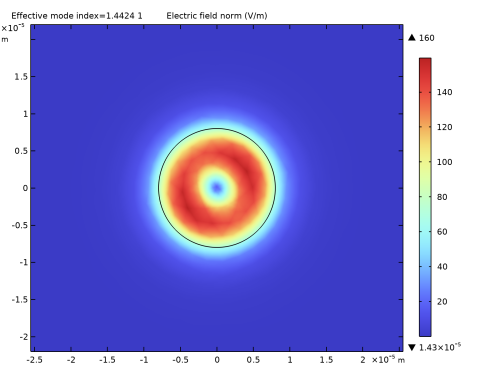
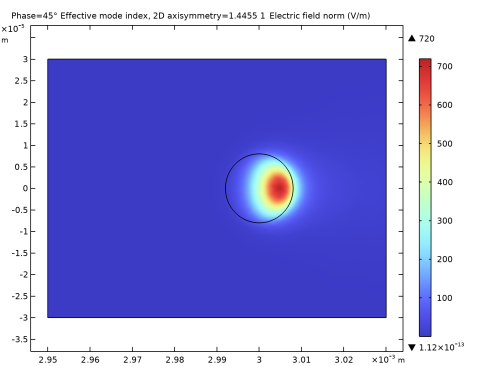
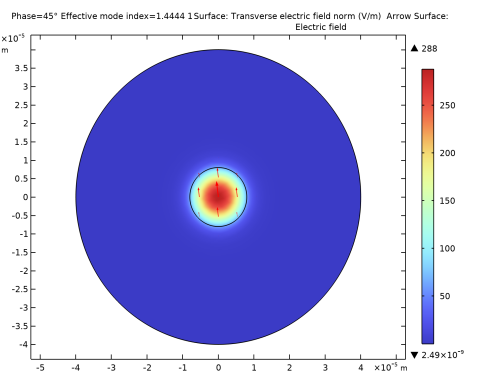
In the Settings window for Surface, click Replace Expression in the upper-right corner of the Expression section. From the menu, choose Straight Fiber (comp1) > Definitions > Variables > normEt - Transverse electric field norm - V/m. This is the variable we added in a previous step. It is clear that the plot looks almost identical to the plot of the norm of the electric field, verifying that the electric field is predominantly polarized in the transverse direction (the xy-plane).
|
|
1
|
|
2
|
In the Settings window for Arrow Surface, click Replace Expression in the upper-right corner of the Expression section. From the menu, choose Straight Fiber (comp1) > Electromagnetic Waves, Frequency Domain > Electric > ewfd.Ex,ewfd.Ey - Electric field.
|
|
3
|
In the Electric Field (ewfd) toolbar, click
 Plot. As the geometry has rotation symmetry, the polarization direction is arbitrary. Plot. As the geometry has rotation symmetry, the polarization direction is arbitrary.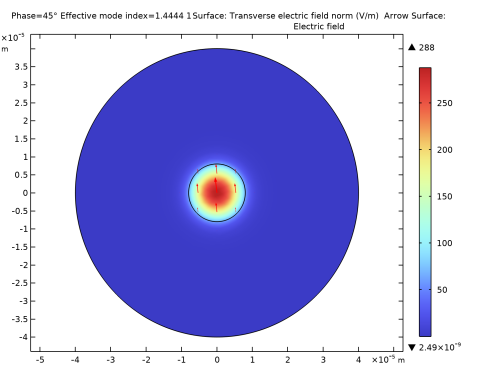 |
|
1
|
|
2
|
In the Settings window for Surface, click Replace Expression in the upper-right corner of the Expression section. From the menu, choose Straight Fiber (comp1) > Electromagnetic Waves, Frequency Domain > Electric > Electric field - V/m > ewfd.Ez - Electric field, z-component.
|
|
3
|
|
1
|
|
2
|
In the Settings window for Contour, click Replace Expression in the upper-right corner of the Expression section. From the menu, choose Straight Fiber (comp1) > Electromagnetic Waves, Frequency Domain > Magnetic > Magnetic field - A/m > ewfd.Hz - Magnetic field, z-component.
|
|
3
|
In the Electric Field (ewfd) toolbar, click
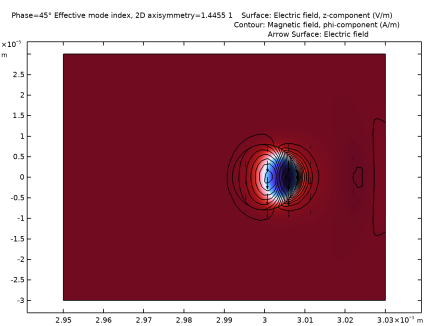
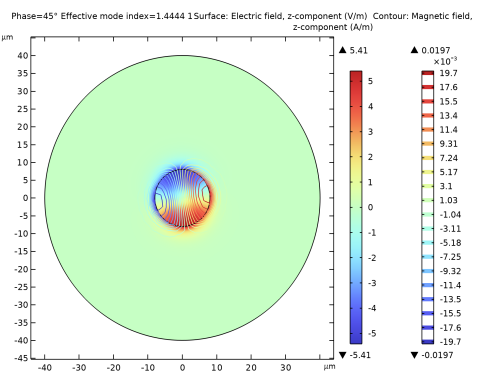
 Plot. The distribution of the transversal E and H field components confirms that this is the HE11 mode. Compare the resulting plot with the plot below. Plot. The distribution of the transversal E and H field components confirms that this is the HE11 mode. Compare the resulting plot with the plot below.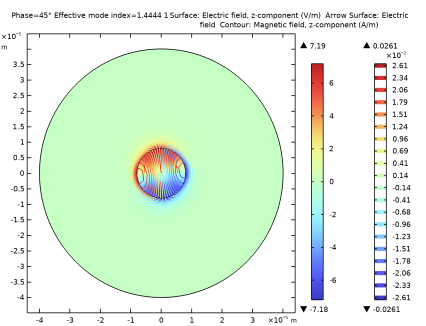 |
|
1
|
In the Model Builder window, expand the Results > Datasets node, then click Study 1 (Straight Fiber)/Solution 1 (sol1).
|
|
2
|
|
1
|
|
2
|
|
1
|
|
2
|
|
3
|
|
4
|
|
1
|
|
2
|
|
3
|
|
4
|
|
5
|
|
1
|
|
2
|
|
3
|
|
4
|
|
5
|
|
6
|
|
7
|
|
1
|
|
2
|
|
3
|
|
4
|
|
5
|
|
6
|
|
1
|
|
2
|
|
3
|
|
4
|
|
5
|
|
6
|
|
7
|
|
1
|
|
2
|
Go to the Add Physics window.
|
|
3
|
|
4
|
Find the Physics interfaces in study subsection. In the table, clear the Solve checkbox for Study 1 (Straight Fiber), as later a new study will be added where this physics interface will be used.
|
|
5
|
Click the Add to Bent Fiber button in the window toolbar.
|
|
6
|
|
1
|
|
1
|
In the Model Builder window, under Bent Fiber (comp2) right-click Materials and choose More Materials > Material Link.
|
|
2
|
|
1
|
|
2
|
|
4
|
|
1
|
|
3
|
|
4
|
|
5
|
|
6
|
|
7
|
In the Typical wavelength text field, type ldaPML. This wavelength setting approximates the transverse (in the radial direction) wavelength for the mode.
|
|
1
|
|
3
|
|
4
|
|
1
|
|
2
|
|
1
|
|
2
|
|
3
|
|
4
|
|
1
|
|
2
|
|
3
|
|
1
|
|
2
|
|
3
|
|
1
|
|
2
|
|
3
|
|
1
|
|
2
|
|
3
|
|
4
|
|
1
|
|
2
|
Go to the Add Study window.
|
|
3
|
Find the Studies subsection. In the Select Study tree, select Preset Studies for Selected Physics Interfaces > Mode Analysis.
|
|
4
|
Find the Physics interfaces in study subsection. In the table, clear the Solve checkbox for Electromagnetic Waves, Frequency Domain (ewfd).
|
|
5
|
Click the Add Study button in the window toolbar.
|
|
6
|
|
1
|
|
2
|
|
3
|
|
4
|
|
5
|
|
6
|
|
7
|
|
1
|
In the Model Builder window, under Results > Datasets click Study 2 (Bent Fiber)/Solution 2 (3) (sol2).
|
|
2
|
|
1
|
In the Model Builder window, expand the Results > Electric Field (ewfd2) node, then click Electric Field (ewfd2).
|
|
2
|
|
3
|
|
4
|
|
5
|
|
1
|
|
2
|
|
3
|
|
4
|
|
5
|
Clear the Color legend checkbox.
|
|
1
|
|
2
|
|
3
|
|
4
|
|
5
|
|
6
|
Clear the Color legend checkbox.
|
|
1
|
|
2
|
In the Settings window for Arrow Surface, click Replace Expression in the upper-right corner of the Expression section. From the menu, choose Bent Fiber (comp2) > Electromagnetic Waves, Frequency Domain 2 > Electric > ewfd2.Er,ewfd2.Ez - Electric field.
|
|
3
|
|
4
|
|
1
|
|
2
|
|
3
|
|
1
|
|
2
|
|
3
|
|
4
|
|
5
|
|
6
|
|
7
|
|
8
|
|
1
|
|
2
|
|
3
|
|
4
|
|
5
|
|
6
|
Click Replace Expression in the upper-right corner of the Expressions section. From the menu, choose Bent Fiber (comp2) > Definitions > Variables > r0 - m.
|
|
7
|
Click
 Evaluate. Evaluate. |
|
1
|
|
2
|
|
3
|
|
4
|
|
5
|
|
6
|
Locate the Expressions section. In the table, enter the following settings:
|
|
7
|
Click
 Evaluate. Evaluate. |
|
1
|
|
2
|
|
3
|
|
4
|
|
5
|
|
6
|
Locate the Expressions section. In the table, enter the following settings:
|
|
7
|
Click
 Evaluate. Evaluate. |
 ,
, .
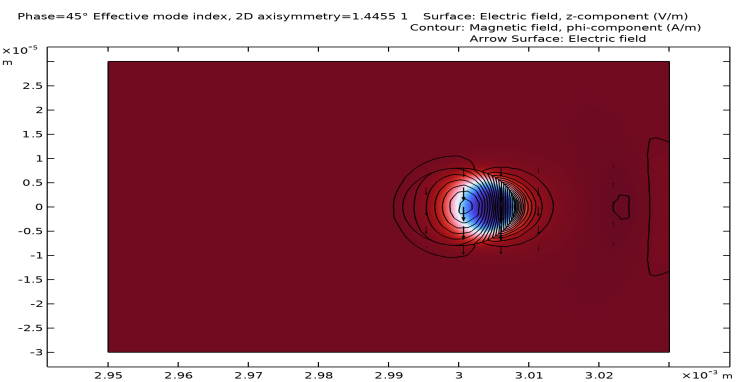
. component (in the direction of propagation) of the magnetic field and the arrow plot shows the electric field polarization.