|
|
|

|
1
|
|
2
|
Go to the Add Study window.
|
|
3
|
Find the Studies subsection. In the Select Study tree, select Preset Studies for Selected Physics Interfaces > Stationary.
|
|
4
|
Click the Add Study button in the window toolbar.
|
|
5
|
|
1
|
|
1
|
|
2
|
|
3
|
|
4
|
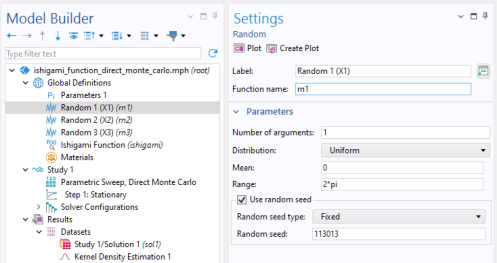
Select the Use random seed checkbox.
|
|
1
|
|
2
|
|
3
|
|
4
|
Select the Use random seed checkbox.
|
|
1
|
|
2
|
|
3
|
|
4
|
Select the Use random seed checkbox.
|
|
1
|
|
2
|
|
3
|
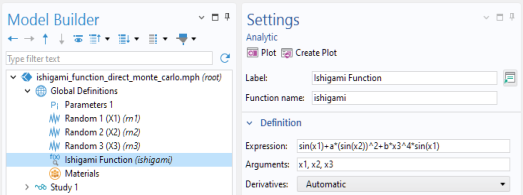
Locate the Definition section. In the Expression text field, type sin(x1)+a*(sin(x2))^2+b*x3^4*sin(x1).
|
|
4
|
|
5
|
|
1
|
|
2
|
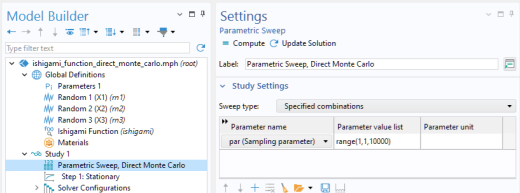
In the Settings window for Parametric Sweep, type Parametric Sweep, Direct Monte Carlo in the Label text field.
|
|
3
|
|
5
|
|
1
|
|
2
|
|
1
|
|
2
|
|
4
|
|
5
|
|
1
|
|
2
|
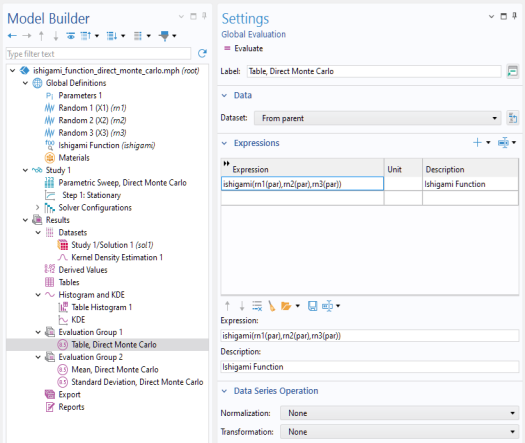
In the Settings window for Global Evaluation, type Mean, Direct Monte Carlo in the Label text field.
|
|
3
|
Locate the Expressions section. In the table, enter the following settings:
|
|
4
|
|
1
|
|
2
|
In the Settings window for Global Evaluation, type Standard Deviation, Direct Monte Carlo in the Label text field.
|
|
3
|
Locate the Expressions section. In the table, enter the following settings:
|
|
4
|
|
1
|
|
2
|
|
1
|
|
2
|
|
3
|
|
4
|
|
5
|
|
1
|
|
2
|
|
1
|
|
2
|
|
3
|
|
4
|
|
5
|
|
6
|
|
1
|
|
2
|
|
3
|
|
4
|
|
5
|
|
6
|