
|
|
|
|
104 Pa
|
|
|
1
|
|
2
|
In the Select Physics tree, select Fluid Flow > Porous Media and Subsurface Flow > Multiphase Flow in Porous Media.
|
|
3
|
Click Add.
|
|
4
|
Click
 Study. Study. |
|
5
|
|
6
|
Click
 Done. Done. |
|
1
|
|
2
|
|
3
|
Click
 Load from File. Load from File. |
|
4
|
Browse to the model’s Application Libraries folder and double-click the file carbon_dioxide_storage_parameters.txt.
|
|
5
|
|
1
|
Go to the Select System window.
|
|
2
|
Click the Next button in the window toolbar.
|
|
1
|
Go to the Select Species window.
|
|
2
|
|
3
|
Click
 Add Selected. Add Selected. |
|
4
|
Click the Next button in the window toolbar.
|
|
1
|
Go to the Select Thermodynamic Model window.
|
|
2
|
|
3
|
Select the Advanced options checkbox.
|
|
5
|
Click the Finish button in the window toolbar.
|
|
1
|
Go to the Select Phase window.
|
|
2
|
Click the Next button in the window toolbar.
|
|
1
|
Go to the Select Species window.
|
|
2
|
Click the Next button in the window toolbar.
|
|
1
|
Go to the Select Properties window.
|
|
2
|
Click the Next button in the window toolbar.
|
|
1
|
Go to the Define Material window.
|
|
2
|
|
3
|
|
4
|
|
5
|
|
6
|
|
7
|
|
8
|
|
9
|
Click the Finish button in the window toolbar.
|
|
1
|
In the Model Builder window, under Component 1 (comp1) right-click Definitions and choose Variables.
|
|
2
|
|
1
|
|
2
|
|
3
|
|
4
|
Click
 Browse. Browse. |
|
5
|
Browse to the model’s Application Libraries folder and double-click the file carbon_dioxide_storage_porper.csv.
|
|
6
|
Locate the Data Column Settings section. In the table, click to select the cell at row number 1 and column number 1.
|
|
7
|
|
9
|
|
11
|
|
13
|
|
14
|
|
15
|
|
16
|
Select the Use spatial coordinates as arguments checkbox.
|
|
17
|
|
18
|
Select the Reinterpolate interpolation data on computational mesh checkbox. This makes sure that the interpolation function is evaluated using cached values at Lagrange points on the computational mesh, resulting in a much more efficient evaluation during the computation.
|
|
1
|
|
2
|
|
3
|
|
4
|
Click
 Browse. Browse. |
|
5
|
Browse to the model’s Application Libraries folder and double-click the file carbon_dioxide_storage_porper.csv.
|
|
6
|
Locate the Data Column Settings section. In the table, click to select the cell at row number 1 and column number 1.
|
|
7
|
|
9
|
|
11
|
|
13
|
|
14
|
|
15
|
|
16
|
Select the Use spatial coordinates as arguments checkbox.
|
|
17
|
|
18
|
Select the Reinterpolate interpolation data on computational mesh checkbox.
|
|
1
|
|
2
|
|
3
|
Locate the Definition section. In the Expression text field, type rho0-rho0*alpha*(T-T0)+rho0*beta*(p-p0).
|
|
4
|
|
5
|
|
1
|
|
2
|
|
3
|
|
4
|
|
1
|
|
2
|
|
3
|
Click
 Browse. Browse. |
|
4
|
Browse to the model’s Application Libraries folder and double-click the file carbon_dioxide_storage.mphbin.
|
|
5
|
Click
 Import. Import. |
|
1
|
|
2
|
|
3
|
|
4
|
|
5
|
|
6
|
|
7
|
|
8
|
|
9
|
|
10
|
|
1
|
|
2
|
|
3
|
|
4
|
|
5
|
|
6
|
|
7
|
|
8
|
|
1
|
|
2
|
|
3
|
|
4
|
|
5
|
Select the object imp1 only.
|
|
6
|
Select the Keep tool objects checkbox.
|
|
1
|
|
2
|
|
3
|
|
4
|
On the object par1(1), select Domains 1 and 3 only.
|
|
1
|
|
2
|
|
3
|
|
4
|
On the object par1(2), select Edges 1 and 3 only.
|
|
1
|
|
2
|
On the object del2, select Edge 1 only.
|
|
3
|
|
1
|
|
2
|
|
3
|
|
4
|
On the object pare1, select Edges 1 and 3 only.
|
|
5
|
Click
 Build All Objects. Build All Objects. |
|
6
|
|
7
|
|
8
|
Clear the Automatic detection of small details checkbox.
|
|
1
|
|
2
|
Go to the Add Material window.
|
|
3
|
|
4
|
Click the Add to Component button in the window toolbar.
|
|
5
|
|
1
|
|
2
|
In the Show More Options dialog, in the tree, select the checkbox for the node Physics > Advanced Physics Options.
|
|
3
|
Click OK.
|
|
4
|
|
5
|
Select the Include gravity checkbox.
|
|
6
|
Click to expand the Quadrature Settings section. Clear the Use automatic quadrature settings checkbox.
|
|
7
|
In the Integration order text field, type 4. This increases the default integration order to guarantee a more accurate evaluation of the nonlinear coefficients in the equations.
|
|
1
|
In the Model Builder window, under Component 1 (comp1) > Phase Transport in Porous Media (phtr) > Porous Medium 1 click Fluid 1.
|
|
2
|
|
3
|
|
4
|
Locate the Capillary Pressure section. From the Capillary pressure model list, choose Brooks and Corey.
|
|
5
|
|
6
|
|
7
|
|
8
|
Locate the Phase 2 Properties section. From the Fluid s2 list, choose Gas: carbon dioxide(1) 1 (pp1mat1).
|
|
9
|
Locate the Phase 1 Properties section. From the ρs1 list, choose User defined. In the associated text field, type density_brine(Temp,dl.pA).
|
|
10
|
|
1
|
|
3
|
|
4
|
Click
 Create Selection. Create Selection. |
|
5
|
|
6
|
Click OK.
|
|
7
|
|
8
|
Select the Phase s2 checkbox.
|
|
1
|
|
2
|
|
3
|
Select the Include gravity checkbox.
|
|
1
|
In the Model Builder window, under Component 1 (comp1) > Darcy’s Law (dl) > Porous Medium 1 click Porous Matrix 1.
|
|
2
|
|
3
|
|
4
|
|
1
|
|
2
|
|
3
|
Click the Hydraulic head button.
|
|
1
|
|
2
|
|
3
|
|
1
|
|
3
|
|
4
|
|
5
|
|
1
|
|
2
|
|
3
|
|
4
|
|
5
|
Click the Custom button.
|
|
6
|
|
1
|
|
1
|
|
2
|
|
3
|
|
1
|
|
2
|
|
3
|
|
1
|
|
1
|
|
2
|
|
3
|
|
1
|
|
2
|
|
3
|
|
5
|
|
6
|
Click
 Build All. Build All. |
|
1
|
|
2
|
|
3
|
|
4
|
|
5
|
|
6
|
|
1
|
|
2
|
|
3
|
|
4
|
|
5
|
In the Model Builder window, expand the Study 1 > Solver Configurations > Solution 1 (sol1) > Time-Dependent Solver 1 node, then click Fully Coupled 1.
|
|
6
|
|
7
|
|
8
|
|
9
|
|
1
|
In the Model Builder window, expand the Component 1 (comp1) > Definitions > View 1 node, then click Camera.
|
|
2
|
|
3
|
|
4
|
|
1
|
|
2
|
|
1
|
|
2
|
|
3
|
|
4
|
|
5
|
|
6
|
|
1
|
|
2
|
|
3
|
|
4
|
|
5
|
Clear the Parameter indicator text field.
|
|
6
|
|
7
|
|
1
|
|
2
|
|
3
|
|
4
|
|
5
|
Select the Additional parallel planes checkbox.
|
|
6
|
|
1
|
|
2
|
|
3
|
|
1
|
|
2
|
|
3
|
|
4
|
|
5
|
|
6
|
|
7
|
|
8
|
|
9
|
|
10
|
|
1
|
|
1
|
|
2
|
|
3
|
|
1
|
|
2
|
|
3
|
|
4
|
|
5
|
|
6
|
Clear the Parameter indicator text field.
|
|
7
|
|
8
|
|
1
|
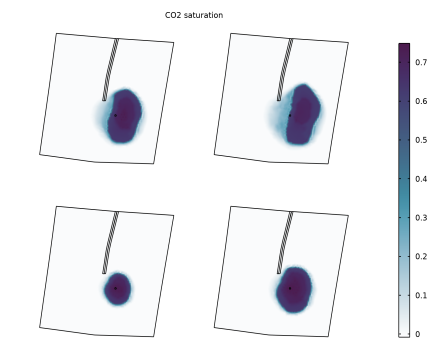
In the Model Builder window, under Results > CO2 Saturation, Top View right-click Surface 1 and choose Duplicate.
|
|
2
|
|
3
|
|
4
|
|
5
|
|
1
|
|
2
|
|
3
|
|
1
|
|
2
|
|
3
|
|
4
|


 next to


