|
|
|





|
•
|
Elastic data: The instantaneous shear modulus is G0 = 27.46 GPa, the long-term shear modulus is G = μ0G0, and the bulk modulus K = 39.88 GPa.
|
|
•
|
|
•
|
Thermal properties: A WLF shift function is used with C1 = 17.44 and C2 = 51.6. These values are reasonable approximations for many polymers.
|
|
•
|
The reference temperature is 500 K.
|
|
•
|
|
•
|
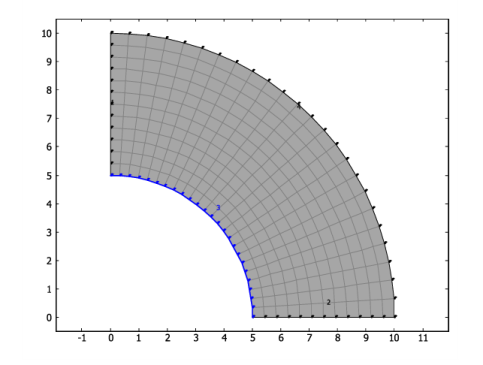
Stationary analysis: The inner and outer circular edges both have a temperature distribution varying linearly with the y-coordinate from 500 K at the y = 0 symmetry plane to 506 K at the x = 0 symmetry plane.
|
|
1
|
|
2
|
|
3
|
Click Add.
|
|
4
|
|
5
|
Click Add.
|
|
6
|
Click
 Done. Done. |
|
1
|
|
2
|
|
1
|
|
2
|
|
3
|
|
1
|
|
2
|
|
3
|
|
4
|
|
5
|
Click to expand the Layers section. In the table, enter the following settings:
|
|
1
|
|
2
|
|
3
|
|
4
|
On the object c1, select Domain 1 only.
|
|
5
|
Click
 Build All Objects. Build All Objects. |
|
1
|
|
2
|
|
3
|
From the list, choose Quasistatic.
|
|
1
|
In the Model Builder window, under Component 1 (comp1) > Solid Mechanics (solid) click Linear Elastic Material 1.
|
|
2
|
|
3
|
|
1
|
|
2
|
|
4
|
Click
 Add. Add. |
|
6
|
Click
 Add. Add. |
|
8
|
Click
 Add. Add. |
|
10
|
|
11
|
|
12
|
Locate the Viscoelasticity Model section. From the Stiffness used in stationary studies list, choose Instantaneous.
|
|
1
|
|
1
|
|
3
|
|
4
|
|
5
|
Locate the Prescribed Displacement section. From the Displacement in n direction list, choose Prescribed.
|
|
6
|
|
1
|
|
3
|
|
4
|
|
1
|
In the Model Builder window, under Component 1 (comp1) right-click Materials and choose Blank Material.
|
|
3
|
|
1
|
|
3
|
|
4
|
|
1
|
|
3
|
|
4
|
|
5
|
Click
 Build All. Build All. |
|
1
|
|
2
|
Go to the Add Study window.
|
|
3
|
|
4
|
Click the Add Study button in the window toolbar.
|
|
5
|
|
1
|
|
2
|
|
1
|
|
2
|
|
3
|
Click
 Add Physical Quantity. Add Physical Quantity. |
|
4
|
|
5
|
Click OK.
|
|
6
|
|
8
|
Click
 Apply. Apply. |
|
1
|
|
2
|
|
1
|
In the Model Builder window, under Results, Ctrl-click to select Stress (solid) and Temperature (ht).
|
|
2
|
Right-click and choose Group.
|
|
1
|
|
2
|
Go to the Add Study window.
|
|
3
|
|
4
|
Click the Add Study button in the window toolbar.
|
|
5
|
|
1
|
In the Model Builder window, under Study: Transient (Constant Temperature) click Step 1: Time Dependent.
|
|
2
|
|
3
|
In the Output times text field, type range(0,20,200) range(250,50,1000) range(1100,100,2000) range(2200,200,7200).
|
|
1
|
|
2
|
|
3
|
|
4
|
|
5
|
|
6
|
|
7
|
|
8
|
In the Model Builder window, under Study: Transient (Constant Temperature) > Solver Configurations > Solution 2 (sol2) click Time-Dependent Solver 1.
|
|
9
|
|
10
|
|
11
|
|
1
|
|
2
|
|
3
|
|
4
|
|
5
|
Locate the Data section. From the Dataset list, choose Study: Transient (Constant Temperature)/Solution 2 (sol2).
|
|
1
|
|
2
|
|
3
|
|
4
|
|
5
|
Locate the Data section. From the Dataset list, choose Study: Transient (Constant Temperature)/Solution 2 (sol2).
|
|
1
|
|
2
|
|
3
|
|
4
|
|
5
|
|
6
|
|
7
|
Locate the Plot Settings section.
|
|
8
|
|
1
|
|
2
|
|
3
|
|
4
|
Click Replace Expression in the upper-right corner of the y-Axis Data section. From the menu, choose Component 1 (comp1) > Solid Mechanics > Stress > Stress tensor (spatial frame) - N/m² > solid.sGpxx - Stress tensor, xx-component.
|
|
5
|
|
6
|
|
7
|
|
1
|
In the Model Builder window, right-click Stress Relaxation (Constant Temperature) and choose Point Graph.
|
|
2
|
|
3
|
|
4
|
Click Replace Expression in the upper-right corner of the y-Axis Data section. From the menu, choose Component 1 (comp1) > Solid Mechanics > Stress > Stress tensor (spatial frame) - N/m² > solid.sGpyy - Stress tensor, yy-component.
|
|
5
|
|
6
|
|
7
|
|
8
|
|
1
|
|
2
|
|
3
|
|
1
|
In the Model Builder window, under Results, Ctrl-click to select Stress (solid) 1, Temperature (ht) 1, and Stress Relaxation (Constant Temperature).
|
|
2
|
Right-click and choose Group.
|
|
1
|
|
2
|
Go to the Add Study window.
|
|
3
|
|
4
|
Click the Add Study button in the window toolbar.
|
|
5
|
|
1
|
|
2
|
In the Output times text field, type range(0,20,200) range(250,50,1000) range(1100,100,2000) range(2200,200,7200).
|
|
3
|
Locate the Physics and Variables Selection section. Select the Modify model configuration for study step checkbox.
|
|
4
|
|
5
|
Right-click and choose Disable.
|
|
6
|
|
7
|
In the Settings window for Study, type Study: Transient (Variable Temperature) in the Label text field.
|
|
1
|
|
2
|
|
3
|
|
4
|
|
5
|
|
6
|
|
7
|
|
8
|
In the Model Builder window, under Study: Transient (Variable Temperature) > Solver Configurations > Solution 3 (sol3) click Time-Dependent Solver 1.
|
|
9
|
|
10
|
|
11
|
|
1
|
In the Model Builder window, under Results > Datasets right-click Cut Point 2D 1 and choose Duplicate.
|
|
2
|
|
3
|
|
1
|
In the Model Builder window, under Results > Datasets right-click Cut Point 2D 2 and choose Duplicate.
|
|
2
|
|
3
|
|
1
|
In the Model Builder window, right-click Stress Relaxation (Constant Temperature) and choose Duplicate.
|
|
2
|
|
3
|
|
4
|
In the Settings window for 1D Plot Group, type Stress Relaxation (Variable Temperature) in the Label text field.
|
|
1
|
In the Model Builder window, expand the Stress Relaxation (Variable Temperature) node, then click Point Graph 1.
|
|
2
|
|
3
|
|
1
|
|
2
|
|
3
|
|
4
|
|
1
|
In the Model Builder window, under Results, Ctrl-click to select Stress Relaxation (Variable Temperature), Stress (solid) 2, and Temperature (ht) 2.
|
|
2
|
Right-click and choose Group.
|