PDF

Vibrating Membrane
Introduction
In the following example, you compute the natural frequencies of a pretensioned membrane using the 3D Membrane interface. This is an example of “stress stiffening”; where the transverse stiffness of a membrane is directly proportional to the tensile force.
The results are compared with the analytical solution.
Model Definition
The model consists of a circular membrane, supported along its outer edge.
GEOMETRY
Membrane radius, 0.25 m
Material
Young’s modulus, E = 200 GPa
Mass density, ρ = 7850 kg/m3
Constraints
The outer edge of the membrane is supported in the transverse direction. Two points have constraints in the in-plane direction in order to avoid rigid body motions.
Load
The membrane is pretensioned by in the radial direction with σi = 100 MPa, giving a membrane force T0 20 kN/m.
Results and Discussion
The analytical solution for the natural frequencies of the vibrating membrane given in Ref. 1 is:
(1)
The values kij are derived from the roots of the Bessel functions of the first kind.
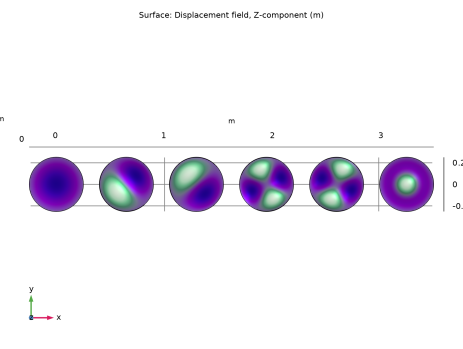
In Table 1 the computed results are compared with the results from Equation 1. The agreement is very good. The mode shapes for the first six modes are shown in Figure 1. Note that some of the modes have duplicate eigenvalues, which is a common property for structures with symmetries.
k10 = 2.4048
k11 = 3.8317
k11 = 3.8317
k12 = 5.1356
k12 = 5.1356
k20 = 5.5201
Figure 1: First six eigenmodes of the prestressed membrane.
Notes About the COMSOL Implementation
An eigenfrequency simulation with a prestressed structure can be simulated in two ways.
In a general case, the prestress is given by some external loading, and is thus the result of a previous step in the solution. Such a study would consist of two steps: One Stationary step for computing the prestressed state, followed by one Eigenfrequency step. The special study type Prestressed Analysis, Eigenfrequency can be used to set up such a sequence. This is shown in the second study in this example.
Since an unstressed membrane has no stiffness in the transverse direction, it is generally difficult to get the stationary analysis to converge without taking special measures. One such method is shown in the second study: a Stabilization feature is added during initial loading.
If stresses are known in advance, it is possible to use an initial stress condition. This is shown in the first study. Note that this is equivalent to the previous method only when the deformation induced by the prestress can be considered infinitesimal.
Reference
1. A. Bower, Applied Mechanics of Solids, CRC Press, 2010.
Application Library path: Structural_Mechanics_Module/Verification_Examples/vibrating_membrane
Modeling Instructions
From the File menu, choose New.
New
In the New window, click  Model Wizard.
Model Wizard
1
In the Model Wizard window, click  3D.
2
In the Select Physics tree, select Structural Mechanics > Membrane (mbrn).
3
Click Add.
4
Click  Study.
5
In the Select Study tree, select General Studies > Eigenfrequency.
6
Global Definitions
Parameters 1
1
In the Model Builder window, under Global Definitions click Parameters 1.
2
In the Settings window for Parameters, locate the Parameters section.
3
Definitions
Cylindrical System 2 (sys2)
1
In the Model Builder window, expand the Component 1 (comp1) > Definitions node.
2
Right-click Definitions and choose Coordinate Systems > Cylindrical System.
Geometry 1
Work Plane 1 (wp1)
1
In the Geometry toolbar, click  Work Plane.
2
In the Model Builder window, click Work Plane 1 (wp1).
3
In the Settings window for Work Plane, click  Go to Plane Geometry.
Work Plane 1 (wp1) > Circle 1 (c1)
1
In the Work Plane toolbar, click  Circle.
2
In the Settings window for Circle, locate the Size and Shape section.
3
In the Radius text field, type R.
4
In the Model Builder window, right-click Geometry 1 and choose Build All.
5
Click the  Zoom Extents button in the Graphics toolbar.
Materials
Material 1 (mat1)
1
In the Model Builder window, under Component 1 (comp1) right-click Materials and choose Blank Material.
2
In the Settings window for Material, locate the Material Contents section.
3
Membrane (mbrn)
Thickness and Offset 1
1
In the Model Builder window, under Component 1 (comp1) > Membrane (mbrn) click Thickness and Offset 1.
2
In the Settings window for Thickness and Offset, locate the Thickness and Offset section.
3
In the d0 text field, type thic.
Linear Elastic Material 1
In the Model Builder window, click Linear Elastic Material 1.
Initial Stress and Strain 1
1
In the Physics toolbar, click  Attributes and choose Initial Stress and Strain.
2
In the Settings window for Initial Stress and Strain, locate the Initial Stress and Strain section.
3
Specify the N0 matrix as
Prescribed Displacement 1
1
In the Physics toolbar, click  Edges and choose Prescribed Displacement.
2
3
In the Settings window for Prescribed Displacement, locate the Prescribed Displacement section.
4
From the Displacement in z direction list, choose Prescribed.
Fixed Constraint 1
1
In the Physics toolbar, click  Points and choose Fixed Constraint.
2
Prescribed Displacement 2
1
In the Physics toolbar, click  Points and choose Prescribed Displacement.
2
3
In the Settings window for Prescribed Displacement, locate the Prescribed Displacement section.
4
From the Displacement in y direction list, choose Prescribed.
Mesh 1
1
In the Model Builder window, under Component 1 (comp1) click Mesh 1.
2
In the Settings window for Mesh, locate the Physics-Controlled Mesh section.
3
From the Element size list, choose Coarse.
4
Click  Build All.
Study 1
Step 1: Eigenfrequency
1
In the Model Builder window, under Study 1 click Step 1: Eigenfrequency.
2
In the Settings window for Eigenfrequency, locate the Study Settings section.
3
Select the Include geometric nonlinearity checkbox.
4
In the Study toolbar, click  Compute.
Results
Mode Shape (mbrn)
1
In the Settings window for 3D Plot Group, click to expand the Title section.
2
From the Title type list, choose Custom.
3
Find the Solution subsection. Clear the Solution checkbox.
4
Locate the Plot Settings section. From the View list, choose New view.
Surface 1
1
In the Model Builder window, expand the Mode Shape (mbrn) node, then click Surface 1.
2
In the Settings window for Surface, locate the Expression section.
3
In the Expression text field, type w.
Solution Array 1
1
Right-click Surface 1 and choose Solution Array.
2
In the Mode Shape (mbrn) toolbar, click  Plot.
3
Click the  Go to XY View button in the Graphics toolbar.
Now, prepare a second study where the prestress is instead computed from an external load.
Add Study
1
In the Home toolbar, click  Add Study to open the Add Study window.
2
Go to the Add Study window.
3
Find the Studies subsection. In the Select Study tree, select Preset Studies for Selected Physics Interfaces > Eigenfrequency, Prestressed.
4
Click the Add Study button in the window toolbar.
5
In the Home toolbar, click  Add Study to close the Add Study window.
Membrane (mbrn)
Edge Load 1
1
In the Physics toolbar, click  Edges and choose Edge Load.
2
3
In the Settings window for Edge Load, locate the Coordinate System Selection section.
4
From the Coordinate system list, choose Cylindrical System 2 (sys2).
5
Locate the Force section. Specify the fL vector as
Add a Stabilization feature, in order to suppress the out-of-plane singularity of the unstressed membrane.
Stabilization 1
1
In the Physics toolbar, click  Boundaries and choose Stabilization.
Switch off the initial stress, which should not be part of the second study.
Study 2
Step 1: Stationary
1
In the Model Builder window, under Study 2 click Step 1: Stationary.
2
In the Settings window for Stationary, locate the Physics and Variables Selection section.
3
Select the Modify model configuration for study step checkbox.
4
In the tree, select Component 1 (comp1) > Membrane (mbrn), Controls spatial frame > Linear Elastic Material 1 > Initial Stress and Strain 1.
5
Step 2: Eigenfrequency
1
In the Model Builder window, click Step 2: Eigenfrequency.
2
In the Settings window for Eigenfrequency, locate the Physics and Variables Selection section.
3
Select the Modify model configuration for study step checkbox.
4
In the tree, select Component 1 (comp1) > Membrane (mbrn), Controls spatial frame > Linear Elastic Material 1 > Initial Stress and Strain 1.
5
6
In the Study toolbar, click  Compute.
Results
Mode Shape (mbrn) 1
1
In the Settings window for 3D Plot Group, locate the Title section.
2
From the Title type list, choose Custom.
3
Find the Solution subsection. Clear the Solution checkbox.
4
Locate the Plot Settings section. From the View list, choose View 3D 3.
Surface 1
1
In the Model Builder window, expand the Mode Shape (mbrn) 1 node, then click Surface 1.
2
In the Settings window for Surface, locate the Expression section.
3
In the Expression text field, type w.
Solution Array 1
1
Right-click Surface 1 and choose Solution Array.
2
In the Mode Shape (mbrn) 1 toolbar, click  Plot.
Mode Shape (mbrn) 1
The eigenfrequencies computed using this more general approach are the same as before, except some small numerical differences.
To make Study 1 behave as when it was first created, the features added for Study 2 must be disabled.
Study 1
Step 1: Eigenfrequency
1
In the Model Builder window, expand the Study 1 > Solver Configurations node, then click Study 1 > Step 1: Eigenfrequency.
2
In the Settings window for Eigenfrequency, locate the Physics and Variables Selection section.
3
Select the Modify model configuration for study step checkbox.
4
In the tree, select Component 1 (comp1) > Membrane (mbrn), Controls spatial frame > Edge Load 1.
5
Click  Disable.