PDF

Modeling Rigid Bodies
Introduction
In many structural dynamics applications, some components are stiff compared to the supporting structure. Such a stiff part only contributes to the dynamic properties of the structure through its mass and moment of inertia. It is then possible to reduce the model size significantly by treating it as a rigid body.
In this example you compute the eigenfrequencies of an assembly where one of the parts can be considered as a rigid domain.
Model Definition
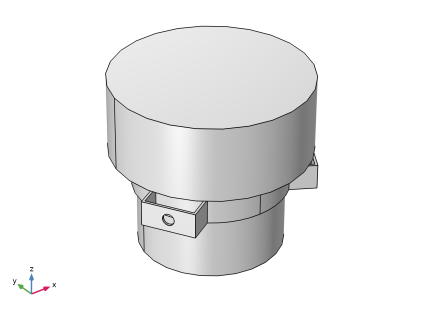
An aluminum frame supports a heavy solid part made of steel. Due to the difference in stiffness between the two domains, the steel component can be regarded as rigid.
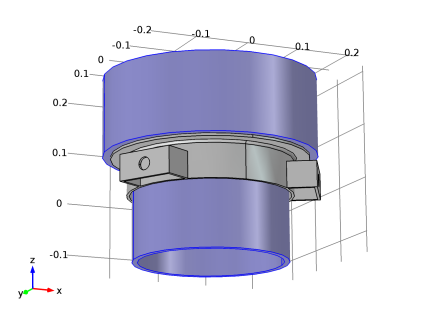
Figure 1 below shows the assembly geometry with the aluminum bracket shown in gray and the steel domain shown in blue.
Figure 1: Model geometry with the rigid steel domain shown in blue.
The mounting frame is fixed at the three bolt holes and an eigenfrequency analysis is performed to find the first six natural frequencies of the assembly.
Results and Discussion
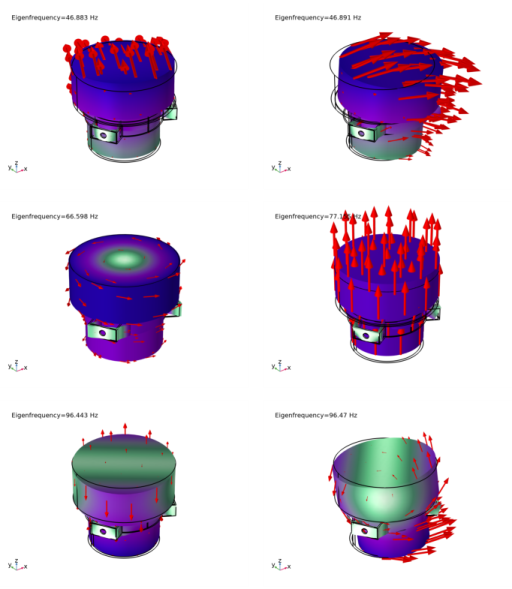
The plots in Figure 2 below show the eigenmodes for the first six natural frequencies.
Figure 2: Displacement field for the six lowest eigenmodes.
Eigenfrequencies which are close to each other indicate that corresponding eigenmodes can be similar, but due to the model symmetry the deformation occurs in different directions. Compare mode 1 with 2, and mode 5 with 6 in Figure 2.
Notes About the COMSOL Implementation
In COMSOL Multiphysics you can define a rigid domain as a special material model. The mass and moment of inertia properties are then computed, and the rigid domain is represented by only seven degrees of freedom: three for the translations and four for the rotations. The four rotational degrees of freedom are quaternion components which together represent a rotation vector and the rotation angle.
The rigid part still needs to have a mesh, because a numerical integration is performed over the domain in order to obtain the mass properties. The mesh can however be fairly coarse.
Application Library path: Structural_Mechanics_Module/Connectors_and_Mechanisms/rigid_domain
Modeling Instructions
From the File menu, choose New.
New
In the New window, click  Model Wizard.
Model Wizard
1
In the Model Wizard window, click  3D.
2
In the Select Physics tree, select Structural Mechanics > Solid Mechanics (solid).
3
Click Add.
4
Click  Study.
5
In the Select Study tree, select General Studies > Eigenfrequency.
6
Geometry 1
Import 1 (imp1)
1
In the Geometry toolbar, click  Import.
2
In the Settings window for Import, locate the Source section.
3
Click  Browse.
4
5
Click  Import.
Form Union (fin)
1
In the Model Builder window, click Form Union (fin).
2
In the Settings window for Form Union/Assembly, click  Build Selected.
Definitions
Bolt Holes
1
In the Definitions toolbar, click  Explicit.
2
In the Settings window for Explicit, locate the Input Entities section.
3
From the Geometric entity level list, choose Boundary.
4
Select the Group by continuous tangent checkbox.
5
6
In the Label text field, type Bolt Holes.
Add Material
1
In the Materials toolbar, click  Add Material to open the Add Material window.
2
Go to the Add Material window.
3
In the tree, select Built-in > Aluminum.
4
Click the Add to Component button in the window toolbar.
5
In the tree, select Built-in > Structural steel.
6
Click the Add to Component button in the window toolbar.
7
In the Materials toolbar, click  Add Material to close the Add Material window.
Materials
Structural steel (mat2)
Select Domain 2 only.
Solid Mechanics (solid)
Fixed Constraint 1
1
In the Physics toolbar, click  Boundaries and choose Fixed Constraint.
2
In the Settings window for Fixed Constraint, locate the Boundary Selection section.
3
From the Selection list, choose Bolt Holes.
Rigid Material 1
1
In the Physics toolbar, click  Domains and choose Rigid Material.
2
Study 1
In the Study toolbar, click  Compute.
Results
Mode Shape (solid)
The default plot shows the mode shape for the first resonance frequency. To improve the visualization, add an arrow plot of the displacements.
Arrow Surface 1
Right-click Mode Shape (solid) and choose Arrow Surface.
Deformation 1
In the Model Builder window, right-click Arrow Surface 1 and choose Deformation.
Arrow Surface 1
1
In the Settings window for Arrow Surface, click to expand the Title section.
2
From the Title type list, choose None.
3
Click to expand the Inherit Style section. From the Plot list, choose Surface 1.
4
Locate the Arrow Positioning section. In the Number of arrows text field, type 120.
5
Locate the Coloring and Style section.
6
Select the Scale factor checkbox. In the associated text field, type 2e5.
Surface 1
1
In the Model Builder window, click Surface 1.
2
In the Settings window for Surface, click to expand the Title section.
3
From the Title type list, choose None.
To view the solution for the other eigenfrequencies shown in Figure 2, do the following:
In the Mode shape (solid) settings window, click the button with the forward pointing arrow to display the solution for the next eigenfrequency.