
|
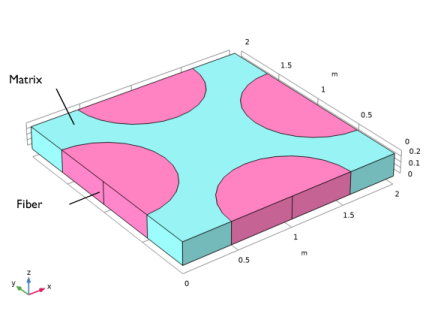
|
Value from Ref. 1 in (GPa)
|
||
|
Value from Ref. 1 in (nF/m)
|
||
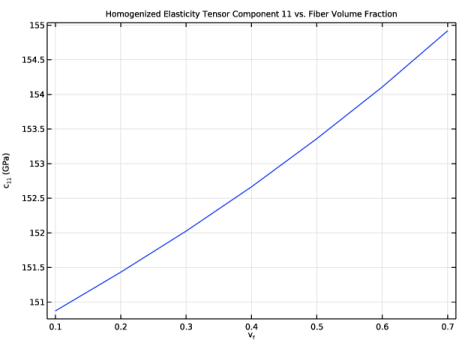

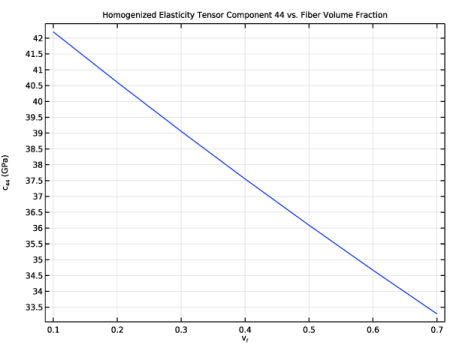
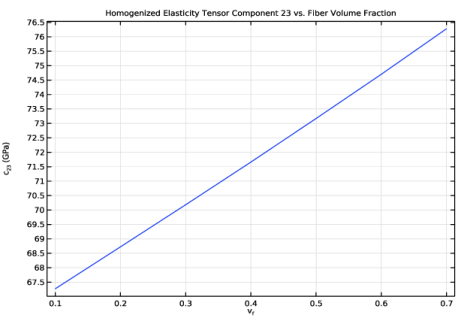

|
•
|
To get the homogenized elastic and piezoelectric coupling tensor, the Cell Periodicity node in the Solid Mechanics interface is used to apply periodic boundary conditions to the three pairs of faces of the unit cell.
|
|
•
|
In order to get homogenized permittivity tensor, the periodic conditions are applied using Pointwise Constraint nodes in the Electrostatics interface. The Piezoelectricity multiphysics coupling is needed to couple the mechanical and electrical effects.
|
|
•
|
The Cell Periodicity node has three action buttons in the toolbar of the section called Periodicity Type: Create Load Groups and Study, Create Material by Value, and Create Material by Reference. The action button Create Load Groups and Study generates load groups and a stationary study with load cases. The action button Create Material by Value generates a Global Material with homogenized material properties, with material properties as numbers. The action button Create Material by Reference generates a Global Material with homogenized material properties, with material properties as variables. The action buttons are active depending on the choices in the Periodicity Type and Calculate Average Properties lists.
|
|
•
|
The Create Load Groups and Study button does not generate a parametric study by default. In many situations, a parametric study is needed, and the homogenized elasticity matrix D needs to be based on the tag of the parametric solution. To do this use the given options in the Advanced section of the feature.
|
|
1
|
|
2
|
In the Select Physics tree, select Structural Mechanics > Electromagnetics–Structure Interaction > Piezoelectricity > Piezoelectricity, Solid.
|
|
3
|
Click Add.
|
|
4
|
Click
 Done. Done. |
|
1
|
|
2
|
|
1
|
|
2
|
|
3
|
|
4
|
|
5
|
|
6
|
Click
 Build Selected. Build Selected. |
|
1
|
|
2
|
|
3
|
|
4
|
|
5
|
|
6
|
|
7
|
Click
 Build Selected. Build Selected. |
|
1
|
|
2
|
|
3
|
|
4
|
|
5
|
|
6
|
|
7
|
|
8
|
Click
 Build Selected. Build Selected. |
|
1
|
|
2
|
|
3
|
|
4
|
|
5
|
|
6
|
|
7
|
|
8
|
Click
 Build Selected. Build Selected. |
|
1
|
|
2
|
|
3
|
|
4
|
|
5
|
|
6
|
Click
 Build Selected. Build Selected. |
|
1
|
|
2
|
|
4
|
|
5
|
Locate the Selections of Resulting Entities section. Select the Resulting objects selection checkbox.
|
|
6
|
From the Color list, choose None or — if you are running the cross-platform desktop —Custom. On the cross-platform desktop, click the Color button.
|
|
7
|
Click Define custom colors.
|
|
9
|
Click Add to custom colors.
|
|
10
|
|
11
|
Click
 Build Selected. Build Selected. |
|
1
|
|
2
|
|
3
|
Select the object blk1 only.
|
|
4
|
Locate the Difference section. Click to select the
 Activate Selection toggle button for Objects to subtract. Activate Selection toggle button for Objects to subtract. |
|
5
|
|
6
|
Select the Keep objects to subtract checkbox.
|
|
7
|
Locate the Selections of Resulting Entities section. Select the Resulting objects selection checkbox.
|
|
8
|
From the Color list, choose None or — if you are running the cross-platform desktop —Custom. On the cross-platform desktop, click the Color button.
|
|
9
|
Click Define custom colors.
|
|
11
|
Click Add to custom colors.
|
|
12
|
|
1
|
|
2
|
|
3
|
|
4
|
|
5
|
|
6
|
|
1
|
|
2
|
|
3
|
|
4
|
|
5
|
|
6
|
|
1
|
|
2
|
|
3
|
|
4
|
|
5
|
|
6
|
|
1
|
|
2
|
|
3
|
|
4
|
|
5
|
|
6
|
|
1
|
|
2
|
|
3
|
|
4
|
|
5
|
|
6
|
|
1
|
|
2
|
|
3
|
|
4
|
|
5
|
|
6
|
|
1
|
|
2
|
|
3
|
|
4
|
|
5
|
|
6
|
Click OK.
|
|
7
|
|
1
|
|
2
|
|
3
|
|
4
|
|
5
|
|
6
|
Click OK.
|
|
7
|
|
1
|
|
2
|
|
3
|
|
4
|
|
5
|
|
6
|
Click OK.
|
|
7
|
|
1
|
|
2
|
Go to the Add Material window.
|
|
3
|
|
4
|
Right-click and choose Add to Component 1 (comp1).
|
|
1
|
In the Model Builder window, under Component 1 (comp1) > Materials click Barium Titanate (poled) (mat1).
|
|
2
|
|
3
|
|
1
|
Go to the Add Material window.
|
|
2
|
|
3
|
Right-click and choose Add to Component 1 (comp1).
|
|
4
|
|
1
|
In the Settings window for Material, type Fiber: Lead Zirconate Titanate (PZT-7A) in the Label text field.
|
|
2
|
|
1
|
|
2
|
|
3
|
|
4
|
Locate the Effective Properties section. Select the Compute elasticity matrix, Voigt notation checkbox.
|
|
1
|
|
2
|
|
3
|
|
4
|
|
5
|
|
1
|
|
2
|
|
3
|
|
4
|
|
5
|
|
1
|
|
2
|
|
3
|
|
4
|
|
5
|
|
1
|
|
2
|
In the Show More Options dialog, in the tree, select the checkbox for the node Physics > Advanced Physics Options.
|
|
3
|
Click OK.
|
|
4
|
|
5
|
|
6
|
|
7
|
In the Parameters table, enter the following settings:
|
|
8
|
Click Automated Model Setup in the upper-right corner of the Periodicity Settings section. From the menu, choose Create Load Groups and Study.
|
|
1
|
|
2
|
|
1
|
|
2
|
|
3
|
|
4
|
|
5
|
|
1
|
|
2
|
|
3
|
|
1
|
|
2
|
|
3
|
|
4
|
|
5
|
In the Show More Options dialog, in the tree, select the checkbox for the node Physics > Equation Contributions.
|
|
6
|
Click OK.
|
|
1
|
|
2
|
In the Settings window for Pointwise Constraint, type Periodic Condition, Boundary Pair 1 in the Label text field.
|
|
3
|
|
4
|
Locate the Pointwise Constraint section. In the Constraint expression text field, type V+group.lg1*1[V/m]*W-genext1(V).
|
|
1
|
|
2
|
In the Settings window for Pointwise Constraint, type Periodic Condition, Boundary Pair 2 in the Label text field.
|
|
3
|
|
4
|
Locate the Pointwise Constraint section. In the Constraint expression text field, type V+group.lg2*1[V/m]*D-genext2(V).
|
|
1
|
|
2
|
In the Settings window for Pointwise Constraint, type Periodic Condition, Boundary Pair 3 in the Label text field.
|
|
3
|
|
4
|
Locate the Pointwise Constraint section. In the Constraint expression text field, type V+group.lg3*1[V/m]*H-genext3(V).
|
|
1
|
|
1
|
|
2
|
|
3
|
|
1
|
|
2
|
|
3
|
Click
 Load from File. Load from File. |
|
4
|
Browse to the model’s Application Libraries folder and double-click the file micromechanical_model_of_a_piezoelectric_composite_variables.txt.
|
|
1
|
|
2
|
|
3
|
|
4
|
Click
 Build All. Build All. |
|
1
|
|
2
|
|
3
|
Click
 Add three times. Add three times. |
|
5
|
|
1
|
|
2
|
In the Settings window for 1D Plot Group, type Homogenized Elasticity Tensor Component 11 in the Label text field.
|
|
3
|
Locate the Data section. From the Dataset list, choose Cell Periodicity Study/Solution 2 (solidcp1solp).
|
|
4
|
|
5
|
|
6
|
|
7
|
Locate the Plot Settings section.
|
|
8
|
|
9
|
|
10
|
|
1
|
|
2
|
|
4
|
|
5
|
Click to expand the Coloring and Style section. Duplicate or add this plot group five times in order to plot the remaining elastic properties. The labels, titles, and the expressions to be defined in the Global 1 node are shown in the table below.
|
|
1
|
|
2
|
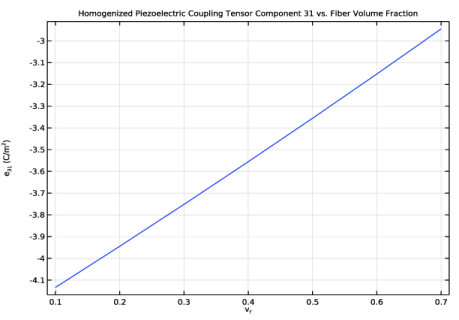
In the Settings window for 1D Plot Group, type Homogenized Piezoelectric Coupling Tensor Component 31 in the Label text field.
|
|
3
|
Locate the Data section. From the Dataset list, choose Cell Periodicity Study/Solution 2 (solidcp1solp).
|
|
4
|
|
5
|
|
6
|
In the Title text area, type Homogenized Piezoelectric Coupling Tensor Component 31 vs. Fiber Volume Fraction.
|
|
7
|
Locate the Plot Settings section.
|
|
8
|
|
9
|
Select the y-axis label checkbox. In the associated text field, type e<sub>31</sub> (C/m<sup>2</sup>).
|
|
10
|
|
1
|
|
2
|
|
4
|
|
5
|
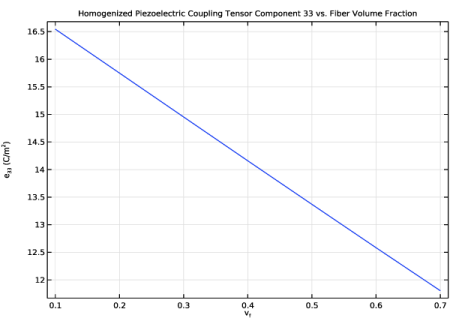
Duplicate or add this plot group twice in order to plot the remaining piezoelectric coupling properties. The labels, titles, and expressions to be defined in the Global 1 node are shown in the table below.
|
|
1
|
|
2
|
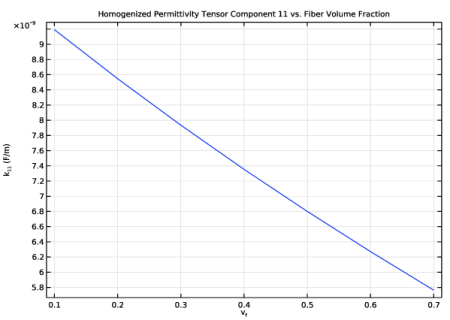
In the Settings window for 1D Plot Group, type Homogenized Permittivity Tensor Component 11 in the Label text field.
|
|
3
|
Locate the Data section. From the Dataset list, choose Cell Periodicity Study/Solution 2 (solidcp1solp).
|
|
4
|
|
5
|
|
6
|
In the Title text area, type Homogenized Permittivity Tensor Component 11 vs. Fiber Volume Fraction.
|
|
7
|
Locate the Plot Settings section.
|
|
8
|
|
9
|
|
10
|
|
1
|
|
2
|
|
4
|
|
5
|
Duplicate or add this plot group one time in order to plot the remaining permittivity properties. The labels, titles, and expressions to be defined in the Global 1 node are shown in the table below.
|
|
1
|
In the Model Builder window, under Results click Effective Material Properties (Cell Periodicity Study).
|
|
2
|
In the Settings window for Evaluation Group, type Homogenized Elasticity Tensor (70% Fiber Volume Fraction) in the Label text field.
|
|
1
|
|
2
|
In the Settings window for Evaluation Group, type Homogenized Piezoelectric Coupling Tensor (70% Fiber Volume Fraction) in the Label text field.
|
|
3
|
Locate the Data section. From the Dataset list, choose Cell Periodicity Study/Solution 2 (solidcp1solp).
|
|
4
|
|
5
|
|
6
|
|
7
|
|
1
|
Right-click Homogenized Piezoelectric Coupling Tensor (70% Fiber Volume Fraction) and choose Global Evaluation.
|
|
2
|
|
1
|
|
2
|
|
1
|
|
2
|
|
4
|
In the Homogenized Piezoelectric Coupling Tensor (70% Fiber Volume Fraction) toolbar, click
 Evaluate. Evaluate. |
|
1
|
|
2
|
In the Settings window for Evaluation Group, type Homogenized Permittivity Tensor (70% Fiber Volume Fraction) in the Label text field.
|
|
3
|
Locate the Data section. From the Dataset list, choose Cell Periodicity Study/Solution 2 (solidcp1solp).
|
|
4
|
|
5
|
|
6
|
|
7
|
|
1
|
Right-click Homogenized Permittivity Tensor (70% Fiber Volume Fraction) and choose Global Evaluation.
|
|
2
|
|
1
|
|
2
|
|
1
|
|
2
|
|
4
|


