PDF

Bracket — Initial-Strain Analysis
Introduction
The various examples based on a bracket geometry form a suite of tutorials which summarizes the fundamentals when modeling structural mechanics problems in COMSOL Multiphysics and the Structural Mechanics Module.
In this example you learn how to introduce a prestrain to a structure and investigate how it affects the assembly.
It is recommended that you review the Introduction to the Structural Mechanics Module, which includes background information.
Model Definition
This tutorial is an extension of the example described in the section “The Fundamentals: A Static Linear Analysis” in the Introduction to the Structural Mechanics Module. That same model is also available as a standalone model in the Application Libraries as Bracket — Static Analysis.
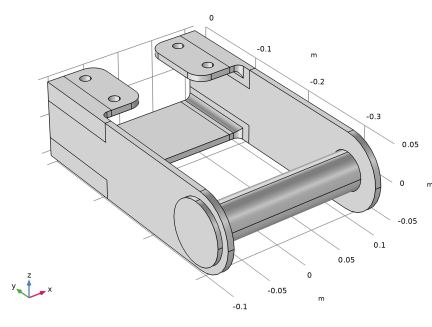
In the previous example, the pin was only considered as providing a load, whereas in this example, a pin is actually modeled as shown in Figure 1.
Figure 1: Bracket geometry.
An initial strain simulates that the pin is 1 mm too short in the axial direction. This could, for example, happen if there was a mismatch in dimensions due to manufacturing tolerances.
Results
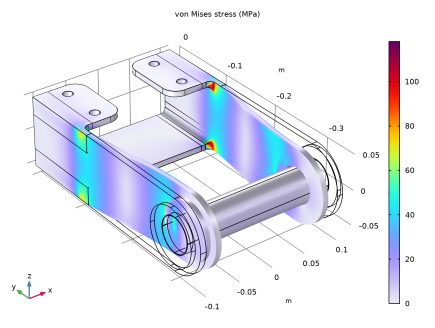
Figure 2 shows how the pin compresses the bracket arms, and that the largest stresses are found in the region where the bracket arms are joined to the bolt supports.
Figure 2: Von Mises stress distribution in the bracket. The deformation is exaggerated.
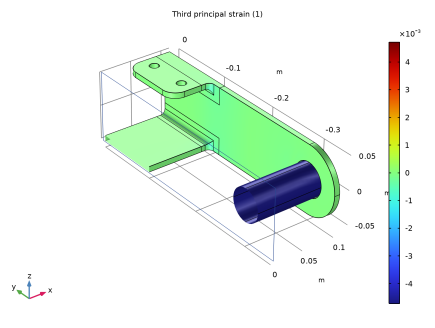
Figure 3 shows the third principal strain in order to visualize the total strain in the structure. As the pin is stiff when compared to the bracket, the total strain in the pin is almost the same as the initial strain given in the example.
Figure 3: Strain distribution in the bracket.
Notes About the COMSOL Implementation
Initial stresses and strains can be specified in the Initial Stress and Strain subnode to a material model. Think of the strain or stress that you introduce as an inelastic contribution, which is not necessarily constant over the simulation. You can define a stress/strain distribution with constant values or as an expression which can, for example, be space or time dependent. The initial stresses and strains can also be results from another study, or even from another physics interface in the same study. The External Stress and External Strain subnodes can be used for similar purposes, but provide more options.
The structure is modeled as an assembly, so that the pin and bracket are considered as different objects. They are then connected using a Continuity condition. This means that the bracket and the pin can be meshed independently, so that the original mesh on the bracket can be kept unaltered.
Application Library path: Structural_Mechanics_Module/Tutorials/bracket_initial_strain
Modeling Instructions
Application Libraries
1
From the File menu, choose Application Libraries.
2
In the Application Libraries window, select Structural Mechanics Module > Tutorials > bracket_basic in the tree.
3
Global Definitions
Parameters 1
In the Parameters table, define a strain value that corresponds to a reduction of the pin length from 215 mm to 214 mm.
1
In the Model Builder window, under Global Definitions click Parameters 1.
2
In the Settings window for Parameters, locate the Parameters section.
3
Geometry 1
Add the pin geometry to the bracket assembly by importing it into the existing geometry.
Import 2 (imp2)
1
In the Geometry toolbar, click  Import.
2
In the Settings window for Import, locate the Source section.
3
From the Source list, choose COMSOL Multiphysics file.
4
Click  Browse.
5
6
Click  Import.
Form Union (fin)
1
In the Model Builder window, under Component 1 (comp1) > Geometry 1 click Form Union (fin).
2
In the Settings window for Form Union/Assembly, locate the Form Union/Assembly section.
3
From the Action list, choose Form an assembly.
4
Click  Build Selected.
Solid Mechanics (solid)
Adding Initial Stress and Strain
Specify the initial strain under the Linear Elastic Material node.
1
In the Model Builder window, expand the Component 1 (comp1) > Solid Mechanics (solid) node, then click Linear Elastic Material 1.
Initial Stress and Strain 1
1
In the Physics toolbar, click  Attributes and choose Initial Stress and Strain.
2
In the Settings window for Initial Stress and Strain, locate the Domain Selection section.
3
From the Selection list, choose Manual.
4
The prestrain direction is the axial direction of the pin, which coincides with the global X direction.
5
Locate the Initial Stress and Strain section. Specify the ε0 matrix as
Mesh 1
In the Model Builder window, expand the Component 1 (comp1) > Mesh 1 node.
Size 1
1
In the Model Builder window, expand the Component 1 (comp1) > Mesh 1 > Free Tetrahedral 1 node, then click Size 1.
2
In the Settings window for Size, locate the Geometric Entity Selection section.
3
From the Geometric entity level list, choose Domain.
4
5
Click  Build All.
Add Study
1
In the Home toolbar, click  Add Study to open the Add Study window.
2
Go to the Add Study window.
3
Find the Studies subsection. In the Select Study tree, select General Studies > Stationary.
4
Click the Add Study button in the window toolbar.
5
In the Home toolbar, click  Add Study to close the Add Study window.
Study 1
In the Study toolbar, click  Compute.
Results
Stress (solid)
Click the  Zoom Extents button in the Graphics toolbar.
Third Principal Strain
1
In the Results toolbar, click  3D Plot Group.
2
In the Settings window for 3D Plot Group, type Third Principal Strain in the Label text field.
Surface 1
1
Right-click Third Principal Strain and choose Surface.
2
In the Settings window for Surface, click Replace Expression in the upper-right corner of the Expression section. From the menu, choose Component 1 (comp1) > Solid Mechanics > Strain > Principal strains > solid.ep3 - Third principal strain - 1.
3
In the Third Principal Strain toolbar, click  Plot.
4
Locate the Coloring and Style section. From the Scale list, choose Linear symmetric.
5
In the Third Principal Strain toolbar, click  Plot.
6
Click the  Clipping button in the Graphics toolbar.
7
In the Graphics window toolbar, clicknext to  Clipping, then choose Add Clip Plane.
8
In the Graphics window toolbar, clicknext to  Clipping Active, then choose Show Gizmos.
9
Click the  Zoom Extents button in the Graphics toolbar.