
|
|
|
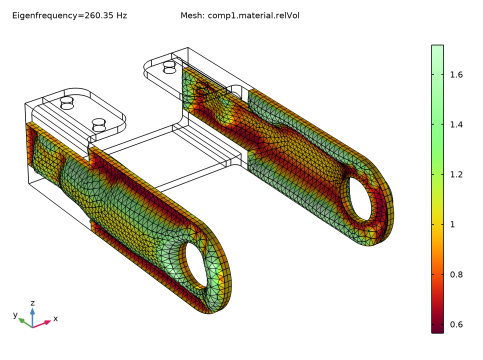
|
1
|
|
2
|
|
3
|
Click
 Clear Selection. Clear Selection. |
|
1
|
|
3
|
|
4
|
|
6
|
|
7
|
In the text field, type 1[cm].
|
|
1
|
|
3
|
|
4
|
|
5
|
|
1
|
|
2
|
|
3
|
|
5
|
|
6
|
|
7
|
|
8
|
|
1
|
In the Model Builder window, right-click Component 1 (comp1) and choose Deformed Geometry > Prescribed Deformation.
|
|
2
|
|
3
|
|
5
|
|
1
|
|
2
|
|
1
|
|
2
|
|
1
|
|
2
|
|
1
|
|
2
|
|
3
|
|
1
|
In the Model Builder window, under Study 2, Ctrl-click to select Step 1: Stationary, Step 2: Eigenfrequency, and Solver Configurations > Solution 2 (sol2).
|
|
2
|
Right-click and choose Delete.
|
 More Study Steps and choose Eigenfrequency > Stationary Then Eigenfrequency.
|
1
|
|
2
|
|
3
|
|
4
|
|
5
|
Locate the Objective Function section. In the table, enter the following settings:
|
|
6
|
|
7
|
|
8
|
Find the Objective settings subsection. From the Objective scaling list, choose Initial solution based.
|
|
1
|
|
2
|
|
1
|
|
2
|
|
3
|
|
4
|
|
1
|
|
2
|
|
3
|
Select the Plot checkbox.
|
|
5
|


