PDF

Silicon Carbide Diode Breakdown
Introduction
Silicon carbide (SiC) diodes have several advantages over silicon diodes, which makes them very useful in power electronic applications. They can operate at high temperatures and have a high breakdown voltage.
By applying a noticeably high reverse-biased voltage across the diode, the charge carriers get accelerated due to the high electric field. As a result of impact ionization, avalanche process in the SiC diode starts. Collision of high velocity carriers with the lattice atoms, leads to generation of additional electron–hole pairs. These generated electron–hole pairs lead to additional collisions leading to generation of more electron–hole pairs. Therefore, avalanche breakdown in diode, allows the flow of a large current in its reverse mode.
This example shows how to model the avalanche breakdown due to impact ionization in a SiC diode.
Model Definition
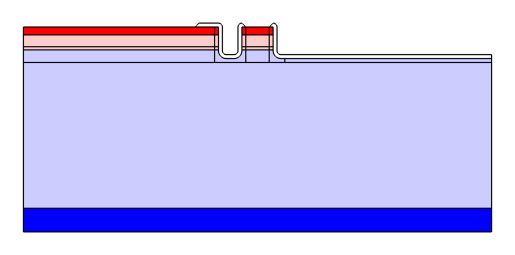
Figure 1 shows the model geometry, indicating different domains, doping profiles, and the field plates. The device is 60 μm in width and 26 μm in height, and is modeled in 2D axisymmetric. An impact ionization generation is defined as the mechanism responsible for the avalanche breakdown. To account for the recombination, a trap-assisted recombination is added using Shockley–Read–Hall trapping model. The material used for diode part is silicon carbide [solid, 4H Polytype] and the field plates are silicon oxide as available in the Semiconductors material library.
Figure 1: Model geometry showing the doping levels. p-type and n-type domains are shown in red and blue color, respectively. The field plates are placed over the device shown in white.
The procedure of the implementation is described in detail in the Modeling Instructions section.
Results and Discussion
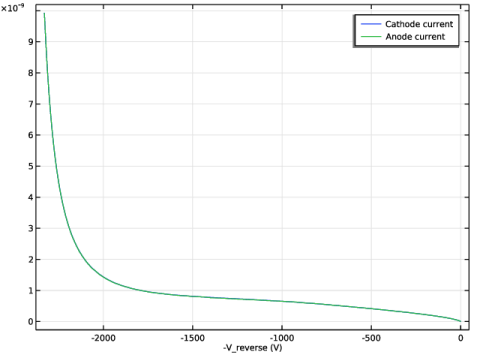
Figure 2 shows the reverse I–V characteristics of the SiC diode.
Figure 2: Current–voltage Characteristics of the SiC diode in reverse bias.
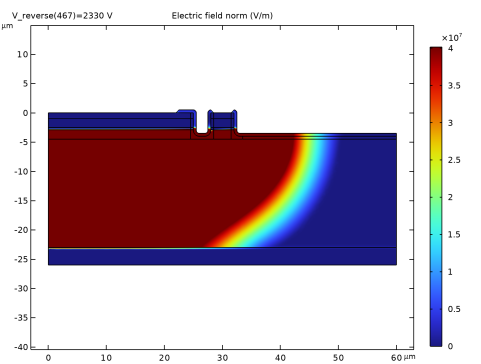
Figure 3 shows the high breakdown electric field of the SiC diode.
Figure 3: Electric field distribution of the SiC diode in breakdown.
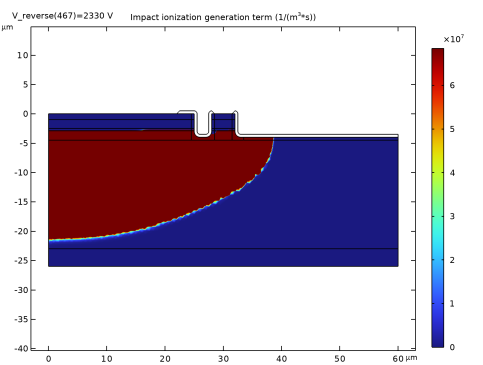
Figure 4 shows the carrier generation terms demonstrating the paths of breakdown current.
Figure 4: 2D demonstration of the carrier generation of SiC diode in breakdown.
Application Library path: Semiconductor_Module/Device_Building_Blocks/sic_diode_breakdown
Modeling Instructions
From the File menu, choose New.
New
In the New window, click  Model Wizard.
Model Wizard
1
In the Model Wizard window, click  2D Axisymmetric.
2
In the Select Physics tree, select Semiconductor > Semiconductor (semi).
3
Click Add.
4
Click  Study.
5
In the Select Study tree, select Preset Studies for Selected Physics Interfaces > Semiconductor Equilibrium.
6
Global Definitions
Simulation Parameters
1
In the Model Builder window, under Global Definitions click Parameters 1.
2
In the Settings window for Parameters, type Simulation Parameters in the Label text field.
3
In the Model Builder window, click Simulation Parameters.
4
Locate the Parameters section. In the table, enter the following settings:
Geometry 1
1
In the Model Builder window, under Component 1 (comp1) click Geometry 1.
2
In the Settings window for Geometry, locate the Units section.
3
From the Length unit list, choose µm.
Semiconductor
1
In the Geometry toolbar, click  Rectangle.
2
In the Settings window for Rectangle, type Semiconductor in the Label text field.
3
Locate the Size and Shape section. In the Width text field, type W_device.
4
In the Height text field, type H_device.
5
Locate the Position section. In the z text field, type -H_device.
6
Click to expand the Layers section. In the table, enter the following settings:
7
Clear the Layers on bottom checkbox.
8
Select the Layers on top checkbox.
Etch box 1
1
In the Geometry toolbar, click  Rectangle.
2
In the Settings window for Rectangle, type Etch box 1 in the Label text field.
3
Locate the Size and Shape section. In the Width text field, type W_etch1+2*d_box.
4
In the Height text field, type D_etch1+d_box.
5
Locate the Position section. In the r text field, type W_anode-d_box.
6
In the z text field, type -D_etch1-d_box.
Etch 1
1
In the Geometry toolbar, click  Rectangle.
2
In the Settings window for Rectangle, type Etch 1 in the Label text field.
3
Locate the Size and Shape section. In the Width text field, type W_etch1.
4
In the Height text field, type D_etch1.
5
Locate the Position section. In the r text field, type W_anode.
6
In the z text field, type -D_etch1.
7
Locate the Assigned Attributes section. Select the Construction geometry checkbox.
Etch final
1
In the Geometry toolbar, click  Rectangle.
2
In the Settings window for Rectangle, type Etch final in the Label text field.
3
Locate the Size and Shape section. In the Width text field, type W_device-R_final_etch.
4
In the Height text field, type D_etch1.
5
Locate the Position section. In the r text field, type R_final_etch.
6
In the z text field, type -D_etch1.
7
Locate the Assigned Attributes section. Select the Construction geometry checkbox.
Etch box 2
1
In the Geometry toolbar, click  Rectangle.
2
In the Settings window for Rectangle, type Etch box 2 in the Label text field.
3
Locate the Size and Shape section. In the Width text field, type W_device+d_box-R_final_etch.
4
In the Height text field, type D_etch1+d_box.
5
Locate the Position section. In the r text field, type R_final_etch-d_box.
6
In the z text field, type -D_etch1-d_box.
7
Locate the Layers section. In the table, enter the following settings:
8
Select the Layers to the left checkbox.
9
Clear the Layers on bottom checkbox.
Fillet 1 (fil1)
1
In the Geometry toolbar, click  Fillet.
2
On the object r3, select Points 1 and 2 only.
3
On the object r4, select Point 1 only.
4
In the Settings window for Fillet, locate the Radius section.
5
In the Radius text field, type 1.
Difference 1 (dif1)
1
In the Geometry toolbar, click  Booleans and Partitions and choose Difference.
2
Select the objects r1, r2, and r5 only.
3
In the Settings window for Difference, locate the Difference section.
4
Click to select the  Activate Selection toggle button for Objects to subtract.
5
Select the objects fil1(1) and fil1(2) only.
Contact boundary
1
In the Geometry toolbar, click  Point.
2
In the Settings window for Point, type Contact boundary in the Label text field.
3
Locate the Point section. In the r text field, type W_anode-d_cont2edg.
P-Contact
1
In the Geometry toolbar, click  Selections and choose Box Selection.
2
In the Settings window for Box Selection, type P-Contact in the Label text field.
3
Locate the Box Limits section. In the r minimum text field, type -1.
4
In the r maximum text field, type W_device+1.
5
In the z minimum text field, type -D_p_cont-0.1.
6
In the z maximum text field, type 0.1.
P-Anode
1
In the Geometry toolbar, click  Selections and choose Box Selection.
2
In the Settings window for Box Selection, type P-Anode in the Label text field.
3
Locate the Box Limits section. In the r minimum text field, type -1.
4
In the r maximum text field, type W_device+1.
5
In the z minimum text field, type -D_p_anode-D_p_drift-D_p_cont-0.1.
6
In the z maximum text field, type -D_p_cont+0.1.
N-Drift
1
In the Geometry toolbar, click  Selections and choose Box Selection.
2
In the Settings window for Box Selection, type N-Drift in the Label text field.
3
Locate the Box Limits section. In the r minimum text field, type -1.
4
In the r maximum text field, type W_device+1.
5
In the z minimum text field, type -H_device+H_substrate-0.1.
6
In the z maximum text field, type -D_p_region+0.1.
N-Substrate
1
In the Geometry toolbar, click  Selections and choose Box Selection.
2
In the Settings window for Box Selection, type N-Substrate in the Label text field.
3
Locate the Box Limits section. In the r minimum text field, type -1.
4
In the r maximum text field, type W_device+1.
5
In the z minimum text field, type -H_device-0.1.
6
In the z maximum text field, type -H_device+H_substrate+0.1.
7
Click  Build All Objects.
All domains before oxide
1
In the Geometry toolbar, click  Selections and choose Explicit Selection.
2
In the Settings window for Explicit Selection, type All domains before oxide in the Label text field.
3
Locate the Entities to Select section. From the Geometric entity level list, choose Object.
4
5
Locate the Resulting Selection section. From the Show in physics list, choose Off.
All exterior boundaries before oxide
1
In the Geometry toolbar, click  Selections and choose Adjacent Selection.
2
In the Settings window for Adjacent Selection, type All exterior boundaries before oxide in the Label text field.
3
Locate the Input Entities section. Click  Add.
4
In the Add dialog, select All domains before oxide in the Input selections list.
5
Top boundaries box
1
In the Geometry toolbar, click  Selections and choose Box Selection.
2
In the Settings window for Box Selection, type Top boundaries box in the Label text field.
3
Locate the Geometric Entity Level section. From the Level list, choose Boundary.
4
Locate the Box Limits section. In the r minimum text field, type 1.
5
In the r maximum text field, type 49.
6
In the z minimum text field, type -4.2.
7
Locate the Resulting Selection section. From the Show in physics list, choose Off.
Top boundaries for oxide
1
In the Geometry toolbar, click  Selections and choose Intersection Selection.
2
In the Settings window for Intersection Selection, type Top boundaries for oxide in the Label text field.
3
Locate the Geometric Entity Level section. From the Level list, choose Boundary.
4
Locate the Input Entities section. Click  Add.
5
In the Add dialog, select All exterior boundaries before oxide in the Selections to intersect list.
6
7
In the Settings window for Intersection Selection, locate the Input Entities section.
8
9
In the Add dialog, select Top boundaries box in the Selections to intersect list.
10
11
In the Settings window for Intersection Selection, locate the Resulting Selection section.
12
From the Show in physics list, choose Off.
Oxide offset
1
In the Geometry toolbar, click  Offset.
2
In the Settings window for Offset, type Oxide offset in the Label text field.
3
Locate the Input section. From the Geometric entity level list, choose Boundary.
4
From the Input entities list, choose Top boundaries for oxide.
5
Locate the Options section. In the Distance text field, type t_ox.
Move 1 (mov1)
1
In the Geometry toolbar, click  Transforms and choose Move.
2
3
In the Settings window for Move, locate the Displacement section.
4
In the z text field, type t_ox.
5
6
Locate the Input section. Select the Keep input objects checkbox.
Line Segment 1 (ls1)
1
In the Geometry toolbar, click  More Primitives and choose Line Segment.
2
On the object off1, select Point 1 only.
3
In the Settings window for Line Segment, locate the Endpoint section.
4
Click to select the  Activate Selection toggle button for End vertex.
5
On the object dif1, select Point 7 only.
Line Segment 2 (ls2)
1
In the Geometry toolbar, click  More Primitives and choose Line Segment.
2
On the object pt1, select Point 1 only.
3
In the Settings window for Line Segment, locate the Endpoint section.
4
Click to select the  Activate Selection toggle button for End vertex.
5
On the object mov1, select Point 1 only.
Line Segment 3 (ls3)
1
In the Geometry toolbar, click  More Primitives and choose Line Segment.
2
On the object off1, select Point 17 only.
3
In the Settings window for Line Segment, locate the Endpoint section.
4
Click to select the  Activate Selection toggle button for End vertex.
5
On the object dif1, select Point 29 only.
Line Segment 4 (ls4)
1
In the Geometry toolbar, click  More Primitives and choose Line Segment.
2
On the object off1, select Point 18 only.
3
In the Settings window for Line Segment, locate the Endpoint section.
4
Click to select the  Activate Selection toggle button for End vertex.
5
On the object dif1, select Point 34 only.
Line Segment 5 (ls5)
1
In the Geometry toolbar, click  More Primitives and choose Line Segment.
2
On the object off1, select Point 27 only.
3
In the Settings window for Line Segment, locate the Endpoint section.
4
Click to select the  Activate Selection toggle button for End vertex.
5
On the object dif1, select Point 46 only.
Line Segment 1 (ls1), Line Segment 2 (ls2), Line Segment 3 (ls3), Line Segment 4 (ls4), Line Segment 5 (ls5)
1
In the Model Builder window, under Component 1 (comp1) > Geometry 1, Ctrl-click to select Line Segment 1 (ls1), Line Segment 2 (ls2), Line Segment 3 (ls3), Line Segment 4 (ls4), and Line Segment 5 (ls5).
2
Oxide connecting lines
In the Settings window for Group, type Oxide connecting lines in the Label text field.
Convert to Solid 1 (csol1)
1
In the Geometry toolbar, click  Conversions and choose Convert to Solid.
2
Select the objects dif1, ls1, ls2, ls3, ls4, ls5, mov1, and off1 only.
Delete Entities 1 (del1)
1
In the Model Builder window, right-click Geometry 1 and choose Delete Entities.
2
In the Settings window for Delete Entities, locate the Entities or Objects to Delete section.
3
From the Geometric entity level list, choose Domain.
4
On the object csol1, select Domains 7 and 20 only.
Chamfer 1 (cha1)
1
In the Geometry toolbar, click  Chamfer.
2
On the object del1, select Points 9, 47, and 53 only.
3
In the Settings window for Chamfer, locate the Distance section.
4
In the Distance from vertex text field, type t_ox.
All domains
1
In the Geometry toolbar, click  Selections and choose Explicit Selection.
2
In the Settings window for Explicit Selection, type All domains in the Label text field.
3
Locate the Entities to Select section. From the Geometric entity level list, choose Object.
4
5
Locate the Resulting Selection section. From the Show in physics list, choose Off.
All exterior boundaries
1
In the Geometry toolbar, click  Selections and choose Adjacent Selection.
2
In the Settings window for Adjacent Selection, type All exterior boundaries in the Label text field.
3
Locate the Input Entities section. Click  Add.
4
In the Add dialog, select All domains in the Input selections list.
5
6
In the Settings window for Adjacent Selection, locate the Resulting Selection section.
7
From the Show in physics list, choose Off.
Anode contact box
1
In the Geometry toolbar, click  Selections and choose Box Selection.
2
In the Settings window for Box Selection, type Anode contact box in the Label text field.
3
Locate the Geometric Entity Level section. From the Level list, choose Boundary.
4
Locate the Box Limits section. In the r minimum text field, type 1.
5
In the r maximum text field, type 26.5.
6
In the z minimum text field, type -3.8.
7
Locate the Resulting Selection section. From the Show in physics list, choose Off.
Anode contact
1
In the Geometry toolbar, click  Selections and choose Intersection Selection.
2
In the Settings window for Intersection Selection, type Anode contact in the Label text field.
3
Locate the Geometric Entity Level section. From the Level list, choose Boundary.
4
Locate the Input Entities section. Click  Add.
5
In the Add dialog, select Anode contact box in the Selections to intersect list.
6
7
In the Settings window for Intersection Selection, locate the Input Entities section.
8
9
In the Add dialog, select All exterior boundaries in the Selections to intersect list.
10
Field contact ring 1 box
1
In the Geometry toolbar, click  Selections and choose Box Selection.
2
In the Settings window for Box Selection, type Field contact ring 1 box in the Label text field.
3
Locate the Geometric Entity Level section. From the Level list, choose Boundary.
4
Locate the Box Limits section. In the r minimum text field, type 27.8.
5
In the r maximum text field, type 35.
6
In the z minimum text field, type -3.8.
7
In the z maximum text field, type 1.
8
Locate the Output Entities section. From the Include entity if list, choose Entity inside box.
9
Locate the Resulting Selection section. From the Show in physics list, choose Off.
Field contact for ring 1
1
In the Geometry toolbar, click  Selections and choose Intersection Selection.
2
In the Settings window for Intersection Selection, type Field contact for ring 1 in the Label text field.
3
Locate the Geometric Entity Level section. From the Level list, choose Boundary.
4
Locate the Input Entities section. Click  Add.
5
In the Add dialog, select All exterior boundaries in the Selections to intersect list.
6
7
In the Settings window for Intersection Selection, locate the Input Entities section.
8
9
In the Add dialog, select Field contact ring 1 box in the Selections to intersect list.
10
Add Material
1
In the Home toolbar, click  Add Material to open the Add Material window.
2
Go to the Add Material window.
3
In the tree, select Semiconductors > SiC - Silicon Carbide > SiC - Silicon Carbide [solid,4H Polytype].
4
Click the Add to Component button in the window toolbar.
5
In the tree, select MEMS > Insulators > SiO2 - Silicon oxide.
6
Click the Add to Component button in the window toolbar.
7
In the Home toolbar, click  Add Material to close the Add Material window.
Materials
SiO2 - Silicon oxide (mat2)
Select Domains 7 and 23 only.
Semiconductor (semi)
1
Click the  Show More Options button in the Model Builder toolbar.
2
In the Show More Options dialog, click  Select All.
3
4
In the Model Builder window, under Component 1 (comp1) click Semiconductor (semi).
5
In the Settings window for Semiconductor, click to expand the Reference Temperature section.
6
In the T0 text field, type T_lattice.
Semiconductor Material Model 1
1
In the Model Builder window, under Component 1 (comp1) > Semiconductor (semi) click Semiconductor Material Model 1.
2
In the Settings window for Semiconductor Material Model, locate the Model Input section.
3
From the T list, choose Common model input.
4
Click  Go to Source for Temperature.
Global Definitions
Default Model Inputs
1
In the Model Builder window, under Global Definitions click Default Model Inputs.
2
In the Settings window for Default Model Inputs, locate the Browse Model Inputs section.
3
In the tree, select General > Temperature (K) - minput.T.
4
Find the Expression for remaining selection subsection. In the Temperature text field, type T_lattice.
Semiconductor (semi)
Semiconductor Material Model 1
1
In the Model Builder window, under Component 1 (comp1) > Semiconductor (semi) click Semiconductor Material Model 1.
2
In the Settings window for Semiconductor Material Model, click to expand the Dopant Ionization section.
3
From the Dopant ionization list, choose Incomplete ionization.
4
In the ΔEdEc Ed text field, type 0.060[V].
5
In the ΔEaEa Ev text field, type 0.190[V].
Arora Mobility Model (LI) 1
In the Physics toolbar, click  Attributes and choose Arora Mobility Model (LI).
Charge Conservation 1
1
In the Physics toolbar, click  Domains and choose Charge Conservation.
2
3
In the Settings window for Charge Conservation, locate the Model Input section.
4
From the T list, choose Common model input.
Impact Ionization Generation 1
1
In the Physics toolbar, click  Domains and choose Impact Ionization Generation.
2
In the Settings window for Impact Ionization Generation, locate the Domain Selection section.
3
From the Selection list, choose All domains.
Trap-Assisted Recombination 1
1
In the Physics toolbar, click  Domains and choose Trap-Assisted Recombination.
2
In the Settings window for Trap-Assisted Recombination, locate the Domain Selection section.
3
From the Selection list, choose All domains.
Impact Ionization Generation 1, Trap-Assisted Recombination 1
1
In the Model Builder window, under Component 1 (comp1) > Semiconductor (semi), Ctrl-click to select Impact Ionization Generation 1 and Trap-Assisted Recombination 1.
2
Generation and Recombination
In the Settings window for Group, type Generation and Recombination in the Label text field.
P-type contact doping
1
In the Physics toolbar, click  Domains and choose Analytic Doping Model.
2
In the Settings window for Analytic Doping Model, type P-type contact doping in the Label text field.
3
4
Locate the Impurity section. In the NA0 text field, type 5e19[1/cm^3].
P-type anode doping
1
In the Physics toolbar, click  Domains and choose Analytic Doping Model.
2
In the Settings window for Analytic Doping Model, type P-type anode doping in the Label text field.
3
4
Locate the Impurity section. In the NA0 text field, type 1e18[1/cm^3].
N-type drift region
1
In the Physics toolbar, click  Domains and choose Analytic Doping Model.
2
In the Settings window for Analytic Doping Model, type N-type drift region in the Label text field.
3
4
Locate the Impurity section. From the Impurity type list, choose Donor doping (n-type).
5
In the ND0 text field, type 2e15[1/cm^3].
N-type substrate
1
In the Physics toolbar, click  Domains and choose Analytic Doping Model.
2
In the Settings window for Analytic Doping Model, type N-type substrate in the Label text field.
3
4
Locate the Impurity section. From the Impurity type list, choose Donor doping (n-type).
5
In the ND0 text field, type 2e18[1/cm^3].
N-type drift region, N-type substrate, P-type anode doping, P-type contact doping
1
In the Model Builder window, under Component 1 (comp1) > Semiconductor (semi), Ctrl-click to select P-type contact doping, P-type anode doping, N-type drift region, and N-type substrate.
2
Doping
In the Settings window for Group, type Doping in the Label text field.
Anode Contact (voltage)
1
In the Physics toolbar, click  Boundaries and choose Metal Contact.
2
In the Settings window for Metal Contact, type Anode Contact (voltage) in the Label text field.
3
Locate the Boundary Selection section. From the Selection list, choose Anode contact.
4
In the list box, select 31 (not applicable).
5
Locate the Terminal section. In the Terminal name text field, type anode.
6
In the V0 text field, type -V_reverse.
Anode field contact
1
In the Physics toolbar, click  Boundaries and choose Electric Potential.
2
In the Settings window for Electric Potential, type Anode field contact in the Label text field.
3
Locate the Boundary Selection section. From the Selection list, choose Anode contact.
4
Locate the Electric Potential section. In the V0 text field, type -V_reverse.
Cathode contact
1
In the Physics toolbar, click  Boundaries and choose Metal Contact.
2
In the Settings window for Metal Contact, type Cathode contact in the Label text field.
3
4
Locate the Terminal section. In the Terminal name text field, type cathode.
Field contact ring 1
1
In the Physics toolbar, click  Boundaries and choose Electric Potential.
2
In the Settings window for Electric Potential, type Field contact ring 1 in the Label text field.
3
Locate the Boundary Selection section. From the Selection list, choose Field contact for ring 1.
4
Locate the Electric Potential section. In the V0 text field, type semi.V0_ring1.
Contact ring 1
1
In the Physics toolbar, click  Boundaries and choose Metal Contact.
2
In the Settings window for Metal Contact, type Contact ring 1 in the Label text field.
3
Locate the Boundary Selection section. From the Selection list, choose Field contact for ring 1.
4
Locate the Terminal section. In the Terminal name text field, type ring1.
5
From the Terminal type list, choose Current.
Mesh 1
In the Model Builder window, under Component 1 (comp1) right-click Mesh 1 and choose Edit Physics-Induced Sequence.
Size 3
1
In the Model Builder window, under Component 1 (comp1) > Mesh 1 right-click Size 1 and choose Duplicate.
2
Drag and drop Size 3 below Size 2.
3
4
In the Settings window for Size, locate the Element Size section.
5
From the Predefined list, choose Finer.
6
Click  Build All.
High-Temperature Reverse Sweep
1
In the Model Builder window, click Study 1.
2
In the Settings window for Study, type High-Temperature Reverse Sweep in the Label text field.
Step 2: Stationary
1
In the Study toolbar, click  Stationary.
2
In the Settings window for Stationary, click to expand the Study Extensions section.
3
Select the Auxiliary sweep checkbox.
4
5
Solution 1 (sol1)
1
In the Model Builder window, right-click Solver Configurations and choose Show Default Solver.
2
Expand the Solution 1 (sol1) node.
3
In the Model Builder window, click Dependent Variables 2.
4
In the Settings window for Dependent Variables, locate the Scaling section.
5
From the Method list, choose Initial-value based.
6
In the Model Builder window, click Total Normal Current Density (comp1.semi.nJw).
7
In the Settings window for Field, locate the Scaling section.
8
From the Method list, choose Manual.
9
In the Scale text field, type 1e4.
10
In the Model Builder window, click Electric Potential (comp1.V).
11
In the Settings window for Field, locate the Scaling section.
12
From the Method list, choose Manual.
13
In the Scale text field, type 100.
14
In the Model Builder window, click Terminal Voltage (comp1.semi.mc3.V0_ode).
15
In the Settings window for State, locate the Scaling section.
16
From the Method list, choose Manual.
17
In the Scale text field, type 10.
18
In the Model Builder window, expand the High-Temperature Reverse Sweep > Solver Configurations > Solution 1 (sol1) > Stationary Solver 2 node, then click Parametric 1.
19
In the Settings window for Parametric, click to expand the Continuation section.
20
Select the Tuning of step size checkbox.
21
In the Initial step size text field, type 0.05.
22
In the Minimum step size text field, type 0.01.
23
In the Maximum step size text field, type 1.
24
Right-click Parametric 1 and choose Stop Condition.
25
In the Settings window for Stop Condition, type Stop at breakdown current in the Label text field.
26
Locate the Stop Expressions section. Click  Add.
27
28
Locate the Output at Stop section. From the Add solution list, choose Step before stop.
29
Clear the Add information checkbox.
30
In the Study toolbar, click  Compute.
Results
I-V
1
In the Results toolbar, click  1D Plot Group.
2
In the Settings window for 1D Plot Group, type I-V in the Label text field.
Global 1
1
Right-click I-V and choose Global.
2
In the Settings window for Global, locate the y-Axis Data section.
3
4
Locate the x-Axis Data section. From the Parameter list, choose Expression.
5
In the Expression text field, type -V_reverse.
6
In the I-V toolbar, click  Plot.
Electric Field
1
In the Results toolbar, click  2D Plot Group.
2
In the Settings window for 2D Plot Group, type Electric Field in the Label text field.
Surface 1
1
Right-click Electric Field and choose Surface.
2
In the Settings window for Surface, click Replace Expression in the upper-right corner of the Expression section. From the menu, choose Component 1 (comp1) > Semiconductor > Electric > semi.normE - Electric field norm - V/m.
3
In the Electric Field toolbar, click  Plot.
4
Click  Plot First.
5
Click to expand the Range section. Select the Manual color range checkbox.
6
In the Electric Field toolbar, click  Plot.
7
Click  Plot Last.
Carrier Generation
1
In the Results toolbar, click  2D Plot Group.
2
In the Settings window for 2D Plot Group, type Carrier Generation in the Label text field.
Surface 1
1
Right-click Carrier Generation and choose Surface.
2
In the Settings window for Surface, click Replace Expression in the upper-right corner of the Expression section. From the menu, choose Component 1 (comp1) > Semiconductor > Generation and recombination > semi.Gii - Impact ionization generation term - 1/(m³·s).
3
In the Carrier Generation toolbar, click  Plot.
4
Click to expand the Range section. Select the Manual color range checkbox.
5
In the Maximum text field, type 6.84739599908922E7.
6
In the Carrier Generation toolbar, click  Plot.