PDF

Schottky Contact
This benchmark simulates the behavior of an ideal Schottky barrier diode made of a tungsten contact deposited on a silicon wafer. The resulting J–V (current density versus applied voltage) curve obtained from the model under forward bias is compared with experimental measurements found in the literature.
Introduction
When a metal is brought in contact to a semiconductor, a potential barrier forms at the contact. This is mainly a consequence of the work function difference between the metal and the semiconductor.
In this model, the ideal Schottky contact is used to model the behavior of a simple Schottky barrier diode. The use of the word “ideal” implies here that surface states, image force lowering, tunneling, and diffusion effects are neglected in the computation of the current transferred between the semiconductor and the metal at the interface.
Note that ideal Schottky contacts are characterized by a thermionic current that depends mostly on the applied bias and barrier height of the metal–semiconductor contact. These contacts usually occur in nondegenerate semiconductors with doping concentrations less than × 1016 cm-3 at room temperature.
Model Definition
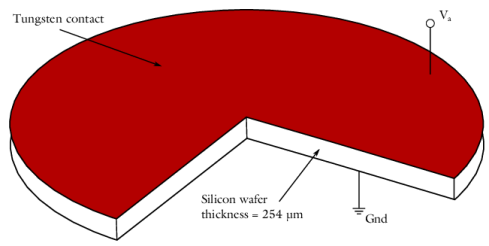
This model simulates the behavior of a tungsten–semiconductor Schottky barrier diode. Figure 1 shows the geometry of the modeled devices. It consists of an n-doped silicon wafer (Nd=× 1016 cm-3) on top of which a tungsten contact has been deposited.
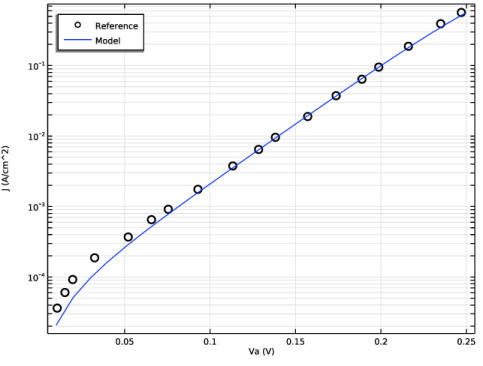
The model computes the current density obtained under forward bias (from 0 to 0.25 V) and compares the resulting J–V curve with experimental measurements presented in Ref. 1.
This model uses the default silicon material properties as well as an ideal barrier height defined by:
Where ΦB is the barrier height, Φm is the metal work function, and χ0 is the electron affinity of the semiconductor.
The work function of the tungsten contact has been chosen to be Φm = 4.72 V, which gives a barrier height of ΦB = 0.67 V.
Figure 1: Schematic of the geometry. The Schottky contact is displayed in red and the silicon wafer in white. The thickness of the n-doped silicon wafer is 254 μm (0.01 inches) and the diameter of the diode is twenty times larger than its thickness.
Results and Discussion
Figure 2 shows the current density obtained under forward bias with our model (solid line) and compares it with the experimental measurements presented in Ref. 1 (circles).
Figure 2: The current density obtained with the model (solid line) and the measurements (circles) presented in Ref. 1 under forward bias.
Reference
1. C.R. Crowell, J.C. Sarace, and S.M. Sze, “Tungsten-Semiconductor Schottky-Barrier Diodes,” Transaction of the Metallurgical Society of AIME, vol. 233, pp. 478–481, 1965.
Application Library path: Semiconductor_Module/Device_Building_Blocks/schottky_contact
Modeling Instructions
From the File menu, choose New.
New
In the New window, click  Model Wizard.
Model Wizard
1
In the Model Wizard window, click  2D Axisymmetric.
2
In the Select Physics tree, select Semiconductor > Semiconductor (semi).
3
Click Add.
4
Click  Study.
5
In the Select Study tree, select General Studies > Stationary.
6
Global Definitions
Parameters 1
1
In the Model Builder window, under Global Definitions click Parameters 1.
2
In the Settings window for Parameters, locate the Parameters section.
3
Choose um as default length units.
Geometry 1
1
In the Model Builder window, under Component 1 (comp1) click Geometry 1.
2
In the Settings window for Geometry, locate the Units section.
3
From the Length unit list, choose µm.
Rectangle 1 (r1)
1
In the Geometry toolbar, click  Rectangle.
2
In the Settings window for Rectangle, locate the Size and Shape section.
3
In the Width text field, type w.
4
In the Height text field, type th.
Rectangle 2 (r2)
1
Right-click Rectangle 1 (r1) and choose Duplicate.
Create another rectangle in order to resolve the depletion region near the Schottky contact.
2
In the Settings window for Rectangle, locate the Size and Shape section.
3
In the Height text field, type 1[um].
4
Locate the Position section. In the z text field, type th-1[um].
5
In the Geometry toolbar, click  Build All.
Create an integration coupling variable. This will be used to display the normal current density at the boundary.
Definitions
Integration 1 (intop1)
1
In the Definitions toolbar, click  Nonlocal Couplings and choose Integration.
2
In the Settings window for Integration, locate the Source Selection section.
3
From the Geometric entity level list, choose Boundary.
4
5
Locate the Advanced section. Clear the Compute integral in revolved geometry checkbox.
Load the material properties of silicon.
Add Material
1
In the Materials toolbar, click  Add Material to open the Add Material window.
2
Go to the Add Material window.
3
In the tree, select Semiconductors > Si - Silicon.
4
Click the Add to Component button in the window toolbar.
5
In the Materials toolbar, click  Add Material to close the Add Material window.
Materials
Si - Silicon (mat1)
Set the lattice temperature to T0.
Semiconductor (semi)
Semiconductor Material Model 1
1
In the Model Builder window, under Component 1 (comp1) > Semiconductor (semi) click Semiconductor Material Model 1.
2
In the Settings window for Semiconductor Material Model, locate the Model Input section.
3
In the T text field, type T0.
Add a doping model. Keep the default values, that is, n-type with impurity concentration of 1E16 cm^-3.
Analytic Doping Model 1
1
In the Physics toolbar, click  Domains and choose Analytic Doping Model.
2
In the Settings window for Analytic Doping Model, locate the Domain Selection section.
3
From the Selection list, choose All domains.
4
Locate the Impurity section. From the Impurity type list, choose Donor doping (n-type).
Since the doping feature adds a highly nonlinear contribution to the equation system, it is better to ramp the impurity concentration up from a small value. First set the continuation option to use the interface continuation parameter.
5
Click to expand the Continuation Settings section. Next set the interface continuation parameter as a parameter "ramp" at the main physics node.
6
In the Model Builder window, click Semiconductor (semi).
7
In the Settings window for Semiconductor, click to expand the Continuation Settings section.
8
In the Cp text field, type ramp.
9
From the Doping and trap density continuation parameter list, choose Use interface continuation parameter.
Finally enter the parameter "ramp" in the parameter table. Later on this can be used in an auxiliary sweep in a study step to ramp the impurity concentration up from a small value.
Global Definitions
Parameters 1
1
In the Model Builder window, under Global Definitions click Parameters 1.
2
In the Settings window for Parameters, locate the Parameters section.
3
Semiconductor (semi)
Metal Contact 1
1
In the Physics toolbar, click  Boundaries and choose Metal Contact.
Add an ideal Schottky contact. Set the metal work function to phim and the applied voltage to Va.
2
3
In the Settings window for Metal Contact, locate the Contact Type section.
4
From the Type list, choose Ideal Schottky.
5
Locate the Terminal section. In the V0 text field, type Va.
6
Locate the Contact Properties section. In the Φ text field, type phim.
Metal Contact 2
1
In the Physics toolbar, click  Boundaries and choose Metal Contact.
Set the potential on the ohmic side of the silicon wafer to V = 0 V.
2
Click the  Zoom Extents button in the Graphics toolbar.
3
4
Click the  Zoom Extents button in the Graphics toolbar.
Mesh 1
Mapped 1
1
In the Mesh toolbar, click  Mapped.
2
In the Settings window for Mapped, locate the Domain Selection section.
3
From the Geometric entity level list, choose Entire geometry.
Distribution 1
1
Right-click Mapped 1 and choose Distribution.
Add a fine mesh along the thickness of the top rectangle where the depletion region will occur.
2
3
In the Settings window for Distribution, locate the Distribution section.
4
From the Distribution type list, choose Predefined.
5
In the Number of elements text field, type 40.
6
In the Element ratio text field, type 50.
7
From the Growth rate list, choose Exponential.
8
Select the Reverse direction checkbox.
Distribution 2
1
In the Model Builder window, right-click Mapped 1 and choose Distribution.
2
3
In the Settings window for Distribution, locate the Distribution section.
4
From the Distribution type list, choose Predefined.
5
In the Number of elements text field, type 50.
6
In the Element ratio text field, type 100.
7
From the Growth rate list, choose Exponential.
8
Select the Symmetric distribution checkbox.
9
Click the  Zoom Extents button in the Graphics toolbar.
Distribution 3
1
Right-click Mapped 1 and choose Distribution.
2
3
In the Settings window for Distribution, locate the Distribution section.
4
In the Number of elements text field, type 10.
5
In the Model Builder window, right-click Mesh 1 and choose Build All.
Study 1
Step 1: Stationary
Set up an auxiliary continuation sweep for the ’ramp’ parameter.
1
In the Model Builder window, under Study 1 click Step 1: Stationary.
2
In the Settings window for Stationary, click to expand the Study Extensions section.
3
Select the Auxiliary sweep checkbox.
4
5
Add a second study step to perform an auxiliary continuation sweep for the ’Va’ parameter.
Step 2: Stationary 2
1
In the Study toolbar, click  Stationary.
2
In the Settings window for Stationary, click to expand the Study Extensions section.
3
Select the Auxiliary sweep checkbox.
4
5
Click  Range.
6
In the Range dialog, type 0.01 in the Start text field.
7
In the Step text field, type 0.01.
8
In the Stop text field, type 0.25.
9
Click Add.
10
In the Settings window for Stationary, locate the Study Extensions section.
11
From the Run continuation for list, choose No parameter.
12
From the Reuse solution from previous step list, choose Yes.
13
In the Study toolbar, click  Compute.
Results
Net Dopant Concentration (semi)
The model has a uniform n-doping therefore, we remove the generated default plot, Net Dopant Concentration.
1
In the Model Builder window, under Results right-click Net Dopant Concentration (semi) and choose Delete.
Table 1
1
In the Results toolbar, click  Table.
Load the measurements from the reference in a table.
2
In the Settings window for Table, locate the Data section.
3
Click  Import.
4
J vs. V
1
In the Results toolbar, click  1D Plot Group.
2
In the Settings window for 1D Plot Group, type J vs. V in the Label text field.
3
Click to expand the Title section. From the Title type list, choose None.
4
Locate the Plot Settings section.
5
Select the x-axis label checkbox. In the associated text field, type Va (V).
6
Select the y-axis label checkbox. In the associated text field, type J (A/cm^2).
7
Locate the Legend section. From the Position list, choose Upper left.
Table Graph 1
1
Right-click J vs. V and choose Table Graph.
2
In the Settings window for Table Graph, locate the Coloring and Style section.
3
Find the Line style subsection. From the Line list, choose None.
4
From the Color list, choose Black.
5
From the Width list, choose 3.
6
Find the Line markers subsection. From the Marker list, choose Circle.
7
Click to expand the Legends section. Select the Show legends checkbox.
8
From the Legends list, choose Manual.
9
10
Click the  y-Axis Log Scale button in the Graphics toolbar.
Global 1
1
In the Model Builder window, right-click J vs. V and choose Global.
2
In the Settings window for Global, locate the y-Axis Data section.
3
4
Click to expand the Legends section. From the Legends list, choose Manual.
5
6
In the J vs. V toolbar, click  Plot.