










PDF

Surface Trapping in a Silicon Nanowire Gate-All-Around Device
Introduction
This example demonstrates the use of various traps. In particular the effect of gate field screening by surface trap charges is studied. A nanoscale gate-all-around MOSFET is modeled and the shift of turn-on voltage due to the screening effect is computed.
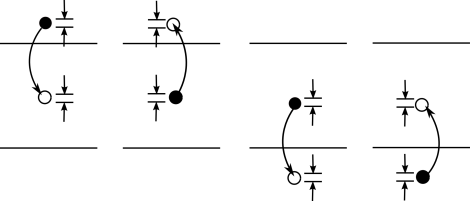
Surface traps can have important effects on the operation of many semiconductor devices. These traps are associated with donor and acceptor atoms, with other impurity atoms, or with “dangling bonds” that occur at defects or exterior surfaces and grain boundaries. It is useful to consider the processes that can occur when trap states at a given energy, Et, exchange electrons or holes with states in the valence or conduction bands at energy E. This situation is shown in Figure 1. There are four processes that occur, corresponding to the emission and capture of both electrons and holes between states in the bands
Figure 1: The four processes that contribute to SRH recombination. Left: An electron in the conduction band with energy E is captured by a trap with energy Et (ec). Center left: An electron in a trap at energy Et is emitted to an empty state with energy E in the conduction band (ee). Center right: An electron in a trap at energy Et moves to an empty state in the valence band at energy E. Equivalently a hole in the valence band is trapped (hc). Right: An electron from an occupied state in the valence band at energy E is excited into a trap with energy Et. Equivalently a hole in the trap is emitted (he).
In practice one may want to consider a set of discrete trap levels or a continuum of trap states (with a density of states gt(Et)). Both of these approaches are possible in the Semiconductor Module, but in this model a discrete set of traps is considered, with trap density per unit area Nt at a trap energy, Et.
For the trap energy Et, carriers in the conduction band or valence band with energy E make the following contributions to the total recombination or generation rate per unit area for each process:
where Nt is the number of traps per area and cec(E), cee(E) chc(E) and che(E) are rate constants. The net rate of capture for electrons and holes in the energy interval dE can be written as:
(1)
In thermal equilibrium the principle of detailed balance implies the reversibility of each microscopic process that leads to equilibrium. Consequently at equilibrium the expressions in the square brackets must be equal to zero. This leads to the following relationships between the rate constants:
In thermal equilibrium the occupancy of the electron traps fte are determined by Fermi Dirac statistics, fte=1/[1 + exp(Et − Ef)/gD] (where gD is the degeneracy factor). The above equations can therefore be simplified to yield:
(2)
Equation 2 applies even away from equilibrium. Substituting this equation back into Equation 1, rearranging and integrating, gives the total rate of electron (re) or hole (rh) capture to traps at the specified energy, Et:
where the quasi-Fermi levels have been introduced.
Introducing the constants Cn and Cp, which represent the average capture probability of an electron over the band:
and noting that:
the following equations are obtained:
(3)
where:
(4)
Equation 3 and Equation 4 define the electron and hole recombination rates associated with the trap energy level. The total rate of change of the number of trapped electrons is given by:
(5)
Equation 5 determines the occupancy of the traps at the level Et.
The total surface recombination rate for electrons and holes is given by summing over the distinct discrete traps (denoted by the superscript i), giving the following result:
Finally the charge resulting from the occupied traps must also be computed. In general the charge on a trap site depends on the nature of the trap. Table 1 summarizes the different trap types currently included in the Semiconductor Module.
The total number of traps at the discrete level Ei is:
The total charge density, Q, that results from the traps is given by:
(6)
Equation 6 can be rewritten in the form:
where E0 is an energy within the band gap referred to as the neutral level. E0 is chosen such that:
So if a neutral energy is employed the following equation applies for the charge on the traps:
(7)
A neutral level is often a convenient way of characterizing a set of traps at a boundary, because the details of the types of trapping sites are frequently not known. However, it is possible to assign a neutral level to the boundary using experimental techniques such as capacitance measurements. In this model the neutral level is assumed to be below the midgap, whilst the traps are assumed to be at the midgap. This means that only the first term on the right-hand side of Equation 7 applies.
Model Definition
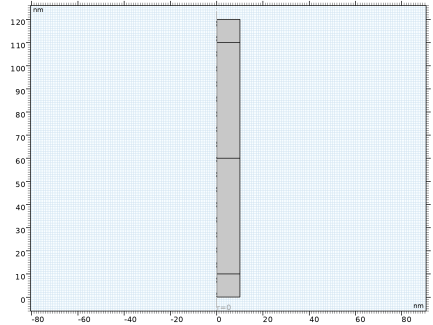
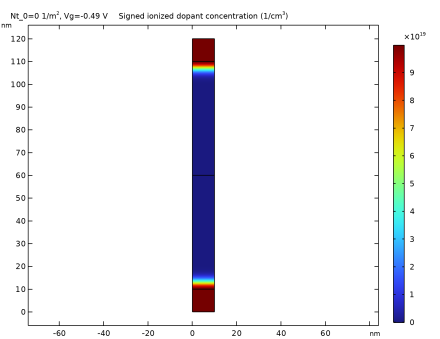
The nanoscale gate-all-around MOSFET is modeled as a simple cylinder of 10 nm radius in 2D axisymmetric geometry (see Figure 2). The 100 nm long silicon channel is p-doped at a concentration level of 1·1017 cm3. The 10 nm long drain and source regions are n-doped at a concentration level of 1·1020 cm3. Figure 3 shows the overall signed doping profile. The gate with a 2 nm thick oxide layer and surface traps is modeled using the thin insulator gate boundary condition around the perimeter of the channel. The source boundary is grounded and the drain is set at 0.5 V; both with ideal ohmic contacts. The gate voltage is swept from 0.5 to 1.5 V at 0.1 V intervals, for three different surface trap densities: 0.1·1012, and 5·1012 cm2.
Figure 2: Geometry.
Figure 3: Doping profile.
Results and Discussion
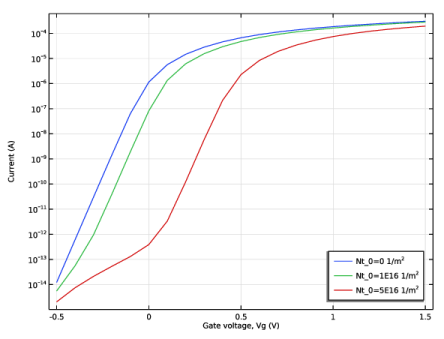
The computed current–voltage curves for the three trap densities are shown in Figure 4 in semi-log scale. The higher turn-on voltages for higher densities of surface traps is a direct result of the screening effect of the surface trap charges, as discussed in the next few paragraphs.
Figure 4: Current vs gate voltage.
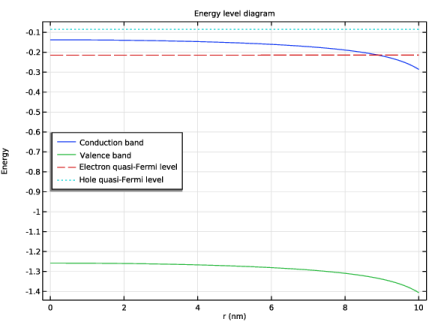
Figure 5 shows the relevant energy levels along the radius at the central cross section of the silicon channel when the MOSFET is in the ON state, for the case of trap density of 5·1012 cm2 and gate voltage of 1.5 V. The main effect of the gate voltage is to pull the conduction band (blue curve) below the electron quasi-Fermi level (red curve), leading to an increase in the electron density (and thus the current density) underneath the gate.
Figure 5: Conduction band (blue), valence band (green), electron quasi-Fermi level (red) and hole quasi-Fermi level (cyan) along the radius at the central cross section of the silicon channel when the MOSFET is in the on state, for the case of a trap density of 5·1012cm2 and a gate voltage of 1.5 V.
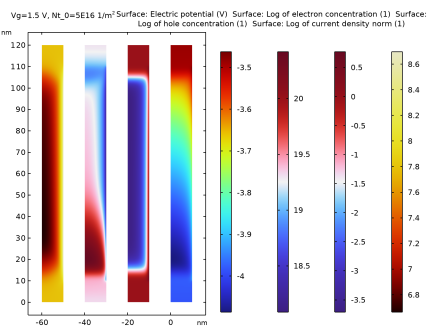
Figure 6 shows, from left to right, the current density, the hole concentration (log scale), the electron concentration (log scale), and the electric field, when the MOSFET is in the on state, for the case of trap density of 5·1012 cm2 and gate voltage of 1.5 V. The hole concentration is much lower than the electron concentration. Thus it does not contribute to the conduction current. The increase in the electron concentration and current density beneath the gate surface is clearly seen.
Figure 6: From left to right, the current density, the hole concentration (log scale), the electron concentration (log scale), and the electric field, when the MOSFET is in the ON state, for the case of trap density of 5·1012 cm2 and gate voltage of 1.5 V.
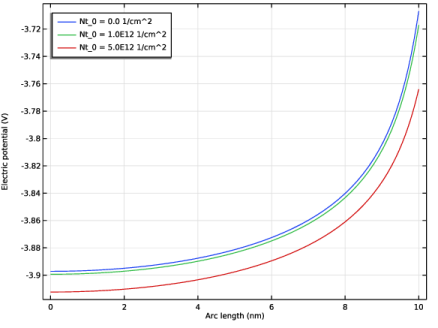
Figure 7 illustrates the screening effect by plotting the electric potential along the radius at the central cross section of the channel, for the gate voltage of 1.5V. The blue, green, and red curves are for the trap densities of 0.1·1012, and 5·1012 cm2, respectively. The electric potential is pulled down further by higher concentrations of surface traps, leading to less pileup and higher turn-on voltage.
Figure 7: Electric potential along the radius at the central cross section of the channel, for the gate voltage of 1.5V. The blue, green, and red curves are for the trap concentrations of 0, 1·1012, and 5·1012cm2, respectively.
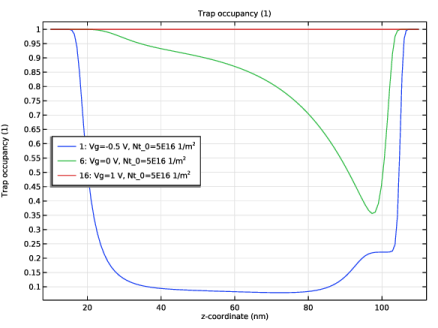
Figure 8 shows the trap occupancy fraction along the length of the channel, at three gate voltages for the trap density of 5·1012 cm2. At the gate voltage of 0.5 V, the occupancy is less than 10% in the central portion of the channel. At 0 V (still below turn-on), it is about 90%, and quickly rises to 100% in the ON state.
Figure 8: Trap occupancy fraction along the length of the channel, at three gate voltages for the trap density of 5·1012cm2.
Application Library path: Semiconductor_Module/Transistors/nanowire_traps
Modeling Instructions
From the File menu, choose New.
New
In the New window, click  Model Wizard.
Model Wizard
1
In the Model Wizard window, click  2D Axisymmetric.
2
In the Select Physics tree, select Semiconductor > Semiconductor (semi).
3
Click Add.
4
Click  Study.
5
In the Select Study tree, select General Studies > Stationary.
6
Geometry 1
The Model Wizard exits and starts the COMSOL Desktop at the Geometry node. We can set the length scale here right away. Then enter some model parameters.
1
In the Model Builder window, under Component 1 (comp1) click Geometry 1.
2
In the Settings window for Geometry, locate the Units section.
3
From the Length unit list, choose nm.
Global Definitions
Parameters 1
1
In the Model Builder window, under Global Definitions click Parameters 1.
2
In the Settings window for Parameters, locate the Parameters section.
3
Geometry 1
Rectangle 1 (r1)
1
In the Geometry toolbar, click  Rectangle.
2
In the Settings window for Rectangle, locate the Size and Shape section.
3
In the Width text field, type Rw.
4
In the Height text field, type L+2*t_np.
Rectangle 2 (r2)
1
In the Geometry toolbar, click  Rectangle.
2
In the Settings window for Rectangle, locate the Size and Shape section.
3
In the Width text field, type Rw.
4
In the Height text field, type L/2+t_np.
5
Click  Build All Objects.
Rectangle 3 (r3)
1
In the Geometry toolbar, click  Rectangle.
2
In the Settings window for Rectangle, locate the Size and Shape section.
3
In the Width text field, type Rw.
4
In the Height text field, type L.
5
Locate the Position section. In the z text field, type t_np.
6
Click  Build Selected.
Add Material
1
In the Materials toolbar, click  Add Material to open the Add Material window.
2
Go to the Add Material window.
3
In the tree, select Semiconductors > Si - Silicon.
4
Right-click and choose Add to Component 1 (comp1).
5
In the Materials toolbar, click  Add Material to close the Add Material window.
Materials
Si - Silicon (mat1)
1
In the Settings window for Material, locate the Material Contents section.
2
Semiconductor (semi)
1
In the Model Builder window, under Component 1 (comp1) click Semiconductor (semi).
2
In the Settings window for Semiconductor, locate the Model Properties section.
3
From the Carrier statistics list, choose Fermi–Dirac.
4
Click to expand the Continuation Settings section. From the Doping and trap density continuation parameter list, choose User defined.
5
In the Cpdop text field, type ramp.
Analytic Doping Model 1
1
In the Physics toolbar, click  Domains and choose Analytic Doping Model.
2
In the Settings window for Analytic Doping Model, locate the Domain Selection section.
3
From the Selection list, choose All domains.
4
Locate the Impurity section. In the NA0 text field, type Na_0.
Analytic Doping Model 2
1
In the Physics toolbar, click  Domains and choose Analytic Doping Model.
2
In the Settings window for Analytic Doping Model, locate the Domain Selection section.
3
From the Selection list, choose All domains.
4
Locate the Distribution section. From the list, choose Box.
5
Locate the Impurity section. From the Impurity type list, choose Donor doping (n-type).
6
In the ND0 text field, type Nd_0.
7
Locate the Uniform Region section. In the W text field, type Rw.
8
In the H text field, type t_np.
9
Locate the Profile section. In the dj text field, type t_np.
10
From the Nb list, choose Acceptor concentration (semi/adm1).
Analytic Doping Model 3
1
In the Physics toolbar, click  Domains and choose Analytic Doping Model.
2
In the Settings window for Analytic Doping Model, locate the Domain Selection section.
3
From the Selection list, choose All domains.
4
Locate the Distribution section. From the list, choose Box.
5
Locate the Impurity section. From the Impurity type list, choose Donor doping (n-type).
6
In the ND0 text field, type Nd_0.
7
Locate the Uniform Region section. Specify the r0 vector as
8
In the W text field, type Rw.
9
In the H text field, type t_np.
10
Locate the Profile section. In the dj text field, type t_np.
11
From the Nb list, choose Acceptor concentration (semi/adm1).
Trap-Assisted Recombination 1
1
In the Physics toolbar, click  Domains and choose Trap-Assisted Recombination.
2
In the Settings window for Trap-Assisted Recombination, locate the Domain Selection section.
3
From the Selection list, choose All domains.
Metal Contact 1
1
In the Physics toolbar, click  Boundaries and choose Metal Contact.
2
Metal Contact 2
1
In the Physics toolbar, click  Boundaries and choose Metal Contact.
2
3
In the Settings window for Metal Contact, locate the Terminal section.
4
In the V0 text field, type Vd.
Thin Insulator Gate 1
1
In the Physics toolbar, click  Boundaries and choose Thin Insulator Gate.
2
3
In the Settings window for Thin Insulator Gate, locate the Terminal section.
4
In the V0 text field, type Vg.
5
Locate the Gate Contact section. In the εins text field, type 3.9.
6
In the dins text field, type t_ox.
Define a selection for the boundaries occupied by the gate, to provide easier setup for the next step (adding surface traps).
7
Locate the Boundary Selection section. Click  Create Selection.
8
In the Create Selection dialog, type Gate in the Selection name text field.
9
Create a Trap-Assisted Surface Recombination boundary condition to add surface traps.
Trap-Assisted Surface Recombination 1
1
In the Physics toolbar, click  Boundaries and choose Trap-Assisted Surface Recombination.
2
In the Settings window for Trap-Assisted Surface Recombination, locate the Boundary Selection section.
3
From the Selection list, choose Gate.
Define traps at a discrete energy level using the neutral energy level formulation to determine the trapped charge. The default energy level for discrete traps is set to the midbandgap energy, which coincides with the default neutral level. By convention, traps with energy levels equal to or greater than the neutral level are treated as contributing a negative charge when occupied. Traps with energy level below the neutral level are treated as contributing a positive charge when occupied. Thus, in this case where the default levels are used, the traps will behave as if they capture electrons and accumulate a negative charge.
4
Locate the Trap-Assisted Recombination section. From the Trapping model list, choose Explicit trap distribution.
Discrete Energy Level 1
1
In the Physics toolbar, click  Attributes and choose Discrete Energy Level.
2
In the Settings window for Discrete Energy Level, locate the Traps section.
3
In the Nt text field, type Nt_0.
Since the mosfet base is floating, the doping will need to be ramped on and the initial values should be set to start from an intrinsic semiconductor.
Initial Values 1
1
In the Model Builder window, under Component 1 (comp1) > Semiconductor (semi) click Initial Values 1.
2
In the Settings window for Initial Values, locate the Initial Values section.
3
From the Specify initial values list, choose Intrinsic (carriers and potential).
Mesh 1
Mapped 1
In the Mesh toolbar, click  Mapped.
Distribution 1
1
Right-click Mapped 1 and choose Distribution.
2
3
In the Settings window for Distribution, locate the Distribution section.
4
From the Distribution type list, choose Predefined.
5
In the Number of elements text field, type 50.
6
In the Element ratio text field, type 40.
Distribution 2
1
In the Model Builder window, right-click Mapped 1 and choose Distribution.
2
3
In the Settings window for Distribution, locate the Distribution section.
4
From the Distribution type list, choose Predefined.
5
In the Number of elements text field, type 50.
6
In the Element ratio text field, type 5.
Distribution 3
1
Right-click Mapped 1 and choose Distribution.
2
3
In the Settings window for Distribution, locate the Distribution section.
4
In the Number of elements text field, type 50.
5
From the Distribution type list, choose Predefined.
6
In the Number of elements text field, type 50.
7
In the Element ratio text field, type 5.
8
Select the Reverse direction checkbox.
Distribution 4
1
Right-click Mapped 1 and choose Distribution.
2
3
In the Settings window for Distribution, locate the Distribution section.
4
From the Distribution type list, choose Predefined.
5
In the Number of elements text field, type 10.
6
In the Element ratio text field, type 5.
7
Select the Reverse direction checkbox.
Distribution 5
1
Right-click Mapped 1 and choose Distribution.
2
3
In the Settings window for Distribution, locate the Distribution section.
4
From the Distribution type list, choose Predefined.
5
In the Number of elements text field, type 10.
6
In the Element ratio text field, type 5.
7
Click  Build All.
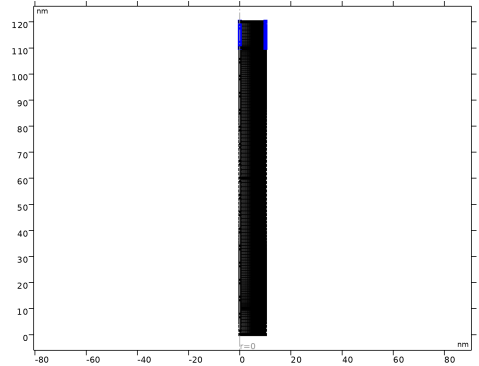
The mesh is shown in the image below.
The first study will find initial solutions for each of the trap densities.
Study 1
Step 2: Stationary 2
In the Study toolbar, click  Stationary.
Step 1: Stationary
1
In the Model Builder window, click Step 1: Stationary.
2
In the Settings window for Stationary, locate the Physics and Variables Selection section.
3
Select the Modify model configuration for study step checkbox.
4
In the tree, select Component 1 (comp1) > Semiconductor (semi) > Trap-Assisted Surface Recombination 1.
5
Click  Disable.
6
Click to expand the Study Extensions section. Select the Auxiliary sweep checkbox.
7
8
9
10
11
From the Sweep type list, choose All combinations.
Step 2: Stationary 2
1
In the Model Builder window, click Step 2: Stationary 2.
2
In the Settings window for Stationary, click to expand the Study Extensions section.
3
Select the Auxiliary sweep checkbox.
4
From the Sweep type list, choose All combinations.
5
6
7
8
9
In the Model Builder window, click Study 1.
10
In the Settings window for Study, locate the Study Settings section.
11
Clear the Generate default plots checkbox.
12
In the Label text field, type Study 1: Ramp doping and traps.
13
In the Study toolbar, click  Compute.
Check the doping has the correct form.
Results
2D Plot Group 1
1
In the Results toolbar, click  2D Plot Group.
2
In the Settings window for 2D Plot Group, locate the Data section.
3
From the Parameter value (Nt_0 (1/m^2)) list, choose 0.
Surface 1
1
Right-click 2D Plot Group 1 and choose Surface.
2
In the Settings window for Surface, click Replace Expression in the upper-right corner of the Expression section. From the menu, choose Component 1 (comp1) > Semiconductor > Carriers and dopants > semi.Ndoping - Signed ionized dopant concentration - 1/m³.
3
Locate the Expression section. In the Unit field, type 1/cm^3.
4
Click to expand the Quality section. From the Evaluation settings list, choose Manual.
5
From the Resolution list, choose No refinement.
6
From the Smoothing list, choose Everywhere.
7
In the 2D Plot Group 1 toolbar, click  Plot.
8
Click the  Zoom Extents button in the Graphics toolbar.
Doping
1
In the Model Builder window, under Results click 2D Plot Group 1.
2
In the Settings window for 2D Plot Group, type Doping in the Label text field.
Add studies to sweep the gate voltage at different trap densities.
Add Study
1
In the Home toolbar, click  Add Study to open the Add Study window.
2
Go to the Add Study window.
3
Find the Studies subsection. In the Select Study tree, select General Studies > Stationary.
4
5
In the Select Study tree, select General Studies > Stationary.
6
7
In the Select Study tree, select General Studies > Stationary.
8
9
In the Home toolbar, click  Add Study to close the Add Study window.
Study 2
Step 1: Stationary
1
In the Settings window for Stationary, click to expand the Values of Dependent Variables section.
2
Find the Initial values of variables solved for subsection. From the Settings list, choose User controlled.
3
From the Method list, choose Solution.
4
From the Study list, choose Study 1: Ramp doping and traps, Stationary 2.
5
From the Parameter value (Nt_0 (1/m^2),Vg (V)) list, choose 1: Nt_0=0 1/m^2, Vg=-0.49 V.
6
Locate the Study Extensions section. Select the Auxiliary sweep checkbox.
7
From the Sweep type list, choose All combinations.
8
9
10
11
For assistance in entering ranges of different kinds in the Parameter value list column, click the Range button to launch the Range dialog.
12
In the Model Builder window, click Study 2.
13
In the Settings window for Study, locate the Study Settings section.
14
Clear the Generate default plots checkbox.
15
In the Label text field, type Study 2: Vg sweep no traps.
Study 3: Vg sweep Nt=1e12[1/cm^2]
1
In the Model Builder window, under Study 3 click Step 1: Stationary.
2
In the Settings window for Stationary, locate the Values of Dependent Variables section.
3
Find the Initial values of variables solved for subsection. From the Settings list, choose User controlled.
4
From the Method list, choose Solution.
5
From the Study list, choose Study 1: Ramp doping and traps, Stationary 2.
6
From the Parameter value (Nt_0 (1/m^2),Vg (V)) list, choose 2: Nt_0=1E16 1/m^2, Vg=-0.49 V.
7
Locate the Study Extensions section. Select the Auxiliary sweep checkbox.
8
From the Sweep type list, choose All combinations.
9
10
11
12
For assistance in entering ranges of different kinds in the Parameter value list column, click the Range button to launch the Range dialog.
13
In the Model Builder window, click Study 3.
14
In the Settings window for Study, locate the Study Settings section.
15
Clear the Generate default plots checkbox.
16
In the Label text field, type Study 3: Vg sweep Nt=1e12[1/cm^2].
Study 4: Vg sweep Nt=5e12[1/cm^3]
1
In the Model Builder window, under Study 4 click Step 1: Stationary.
2
In the Settings window for Stationary, locate the Values of Dependent Variables section.
3
Find the Initial values of variables solved for subsection. From the Settings list, choose User controlled.
4
From the Method list, choose Solution.
5
From the Study list, choose Study 1: Ramp doping and traps, Stationary 2.
6
From the Parameter value (Nt_0 (1/m^2),Vg (V)) list, choose 3: Nt_0=5E16 1/m^2, Vg=-0.49 V.
7
Locate the Study Extensions section. Select the Auxiliary sweep checkbox.
8
From the Sweep type list, choose All combinations.
9
10
11
12
For assistance in entering ranges of different kinds in the Parameter value list column, click the Range button to launch the Range dialog.
13
In the Model Builder window, click Study 4.
14
In the Settings window for Study, locate the Study Settings section.
15
Clear the Generate default plots checkbox.
16
In the Label text field, type Study 4: Vg sweep Nt=5e12[1/cm^3].
Study 2: Vg sweep no traps
In the Study toolbar, click  Compute.
Study 3: Vg sweep Nt=1e12[1/cm^2]
Click  Compute.
Study 4: Vg sweep Nt=5e12[1/cm^3]
Click  Compute.
Results
1D Plot Group 2
1
In the Results toolbar, click  1D Plot Group.
2
In the Settings window for 1D Plot Group, click to expand the Title section.
3
From the Title type list, choose None.
4
Locate the Plot Settings section.
5
Select the x-axis label checkbox. In the associated text field, type Gate voltage, Vg (V).
6
Select the y-axis label checkbox. In the associated text field, type Current (A).
7
Locate the Axis section. Select the y-axis log scale checkbox.
8
Locate the Legend section. From the Position list, choose Lower right.
Global 1
1
Right-click 1D Plot Group 2 and choose Global.
2
In the Settings window for Global, locate the Data section.
3
From the Dataset list, choose Study 2: Vg sweep no traps/Solution 3 (sol3).
4
Locate the y-Axis Data section. In the table, enter the following settings:
5
Click to expand the Legends section. Find the Include subsection. Clear the Description checkbox.
6
In the 1D Plot Group 2 toolbar, click  Plot.
Global 2
1
Right-click Global 1 and choose Duplicate.
2
In the Settings window for Global, locate the Data section.
3
From the Dataset list, choose Study 3: Vg sweep Nt=1e12[1/cm^2]/Solution 4 (sol4).
4
Locate the y-Axis Data section. In the table, enter the following settings:
5
In the 1D Plot Group 2 toolbar, click  Plot.
Global 3
1
Right-click Global 2 and choose Duplicate.
2
In the Settings window for Global, locate the Data section.
3
From the Dataset list, choose Study 4: Vg sweep Nt=5e12[1/cm^3]/Solution 5 (sol5).
4
Locate the y-Axis Data section. In the table, enter the following settings:
5
In the 1D Plot Group 2 toolbar, click  Plot.
Current vs. gate voltage
1
In the Model Builder window, under Results click 1D Plot Group 2.
2
In the Settings window for 1D Plot Group, type Current vs. gate voltage in the Label text field.
Add a plot to show the current density, carrier concentrations and potential in the nanowire.
2D Plot Group 3
1
In the Results toolbar, click  2D Plot Group.
2
In the Settings window for 2D Plot Group, locate the Data section.
3
From the Dataset list, choose Study 4: Vg sweep Nt=5e12[1/cm^3]/Solution 5 (sol5).
4
From the Parameter value (Vg (V)) list, choose 1.5.
5
Locate the Plot Settings section. Clear the Plot dataset edges checkbox.
Surface 1
1
Right-click 2D Plot Group 3 and choose Surface.
2
In the Settings window for Surface, click Replace Expression in the upper-right corner of the Expression section. From the menu, choose Component 1 (comp1) > Semiconductor > Electric > V - Electric potential - V.
3
Locate the Quality section. From the Evaluation settings list, choose Manual.
4
From the Resolution list, choose No refinement.
5
From the Smoothing list, choose Everywhere.
Surface 2
1
Right-click Surface 1 and choose Duplicate.
2
In the Settings window for Surface, locate the Coloring and Style section.
3
From the Color table list, choose Wave.
4
Click Replace Expression in the upper-right corner of the Expression section. From the menu, choose Component 1 (comp1) > Semiconductor > Carriers and dopants > Electrons > semi.log10N - Log of electron concentration - 1.
Deformation 1
1
Right-click Surface 2 and choose Deformation.
2
In the Settings window for Deformation, locate the Expression section.
3
In the R-component text field, type -20.
4
Locate the Scale section.
5
Select the Scale factor checkbox. In the associated text field, type 1.
Surface 3
1
In the Model Builder window, under Results > 2D Plot Group 3 right-click Surface 2 and choose Duplicate.
2
In the Settings window for Surface, click Replace Expression in the upper-right corner of the Expression section. From the menu, choose Component 1 (comp1) > Semiconductor > Carriers and dopants > Holes > semi.log10P - Log of hole concentration - 1.
Deformation 1
1
In the Model Builder window, expand the Surface 3 node, then click Deformation 1.
2
In the Settings window for Deformation, locate the Expression section.
3
In the R-component text field, type -40.
4
In the 2D Plot Group 3 toolbar, click  Plot.
Surface 4
1
In the Model Builder window, under Results > 2D Plot Group 3 right-click Surface 3 and choose Duplicate.
2
In the Settings window for Surface, click Replace Expression in the upper-right corner of the Expression section. From the menu, choose Component 1 (comp1) > Semiconductor > Currents and charge > semi.log10normJ - Log of current density norm - 1.
3
Locate the Coloring and Style section. From the Color table list, choose ThermalDark.
Deformation 1
1
In the Model Builder window, expand the Surface 4 node, then click Deformation 1.
2
In the Settings window for Deformation, locate the Expression section.
3
In the R-component text field, type -60.
4
In the 2D Plot Group 3 toolbar, click  Plot.
5
Click the  Zoom Extents button in the Graphics toolbar.
J, P, N, V
1
In the Model Builder window, under Results click 2D Plot Group 3.
2
In the Settings window for 2D Plot Group, type J, P, N, V in the Label text field.
Add a plot to show the current along the mid line.
1D Plot Group 4
1
In the Results toolbar, click  1D Plot Group.
2
In the Settings window for 1D Plot Group, locate the Data section.
3
From the Dataset list, choose Study 3: Vg sweep Nt=1e12[1/cm^2]/Solution 4 (sol4).
Line Graph 1
1
Right-click 1D Plot Group 4 and choose Line Graph.
2
3
In the Settings window for Line Graph, click Replace Expression in the upper-right corner of the y-Axis Data section. From the menu, choose Component 1 (comp1) > Semiconductor > Currents and charge > semi.normJ - Total current density norm, nodal value - A/m².
4
Click to expand the Quality section. From the Evaluation settings list, choose Manual.
5
From the Resolution list, choose No refinement.
6
From the Smoothing list, choose Everywhere.
7
In the 1D Plot Group 4 toolbar, click  Plot.
Current along mid line
1
In the Model Builder window, under Results click 1D Plot Group 4.
2
In the Settings window for 1D Plot Group, type Current along mid line in the Label text field.
Add a plot to show the voltage along the mid line.
1D Plot Group 5
1
In the Results toolbar, click  1D Plot Group.
2
In the Settings window for 1D Plot Group, locate the Data section.
3
From the Dataset list, choose Study 2: Vg sweep no traps/Solution 3 (sol3).
4
From the Parameter selection (Vg) list, choose Last.
5
Locate the Legend section. From the Position list, choose Upper left.
Line Graph 1
1
Right-click 1D Plot Group 5 and choose Line Graph.
2
3
In the Settings window for Line Graph, locate the y-Axis Data section.
4
In the Expression text field, type V.
5
Click to expand the Legends section. Select the Show legends checkbox.
6
From the Legends list, choose Manual.
7
8
Locate the Quality section. From the Evaluation settings list, choose Manual.
9
From the Resolution list, choose No refinement.
10
From the Smoothing list, choose Everywhere.
11
In the 1D Plot Group 5 toolbar, click  Plot.
Line Graph 2
1
Right-click Line Graph 1 and choose Duplicate.
2
In the Settings window for Line Graph, locate the Data section.
3
From the Dataset list, choose Study 3: Vg sweep Nt=1e12[1/cm^2]/Solution 4 (sol4).
4
From the Parameter selection (Vg) list, choose Last.
5
Locate the Legends section. In the table, enter the following settings:
Line Graph 3
1
Right-click Line Graph 2 and choose Duplicate.
2
In the Settings window for Line Graph, locate the Data section.
3
From the Dataset list, choose Study 4: Vg sweep Nt=5e12[1/cm^3]/Solution 5 (sol5).
4
Locate the Legends section. In the table, enter the following settings:
5
In the 1D Plot Group 5 toolbar, click  Plot.
Voltage along mid line
1
In the Model Builder window, click 1D Plot Group 5.
2
In the Settings window for 1D Plot Group, locate the Title section.
3
From the Title type list, choose None.
4
In the 1D Plot Group 5 toolbar, click  Plot.
5
In the Label text field, type Voltage along mid line.
Add a plot to show the band diagram along the mid line.
1D Plot Group 6
1
In the Results toolbar, click  1D Plot Group.
2
In the Settings window for 1D Plot Group, locate the Data section.
3
From the Dataset list, choose Study 4: Vg sweep Nt=5e12[1/cm^3]/Solution 5 (sol5).
4
From the Parameter selection (Vg) list, choose Last.
Line Graph 1
1
Right-click 1D Plot Group 6 and choose Line Graph.
2
In the Settings window for Line Graph, click Replace Expression in the upper-right corner of the y-Axis Data section. From the menu, choose Component 1 (comp1) > Semiconductor > Fermi levels and band edges > Energies > semi.Ec_e - Conduction band energy level - J.
3
Locate the y-Axis Data section. From the Unit list, choose eV.
4
Locate the x-Axis Data section. From the Parameter list, choose Expression.
5
In the Expression text field, type r.
6
Locate the Legends section. Select the Show legends checkbox.
7
From the Legends list, choose Manual.
8
9
Locate the Quality section. From the Evaluation settings list, choose Manual.
10
From the Resolution list, choose No refinement.
11
From the Smoothing list, choose Everywhere.
12
Line Graph 2
1
Right-click Line Graph 1 and choose Duplicate.
2
In the Settings window for Line Graph, click Replace Expression in the upper-right corner of the y-Axis Data section. From the menu, choose Component 1 (comp1) > Semiconductor > Fermi levels and band edges > Energies > semi.Ev_e - Valence band energy level - J.
3
Locate the Legends section. In the table, enter the following settings:
4
In the 1D Plot Group 6 toolbar, click  Plot.
Line Graph 3
1
Right-click Line Graph 2 and choose Duplicate.
2
In the Settings window for Line Graph, click Replace Expression in the upper-right corner of the y-Axis Data section. From the menu, choose Component 1 (comp1) > Semiconductor > Fermi levels and band edges > Energies > semi.Efn_e - Electron quasi-Fermi energy level - J.
3
Click to expand the Coloring and Style section. Find the Line style subsection. From the Line list, choose Dashed.
4
Locate the Legends section. In the table, enter the following settings:
Line Graph 4
1
Right-click Line Graph 3 and choose Duplicate.
2
In the Settings window for Line Graph, click Replace Expression in the upper-right corner of the y-Axis Data section. From the menu, choose Component 1 (comp1) > Semiconductor > Fermi levels and band edges > Energies > semi.Efp_e - Hole quasi-Fermi energy level - J.
3
Locate the Coloring and Style section. Find the Line style subsection. From the Line list, choose Dotted.
4
Locate the Legends section. In the table, enter the following settings:
Band diagram along mid line
1
In the Model Builder window, click 1D Plot Group 6.
2
In the Settings window for 1D Plot Group, locate the Title section.
3
From the Title type list, choose Manual.
4
In the Title text area, type Energy level diagram.
5
Locate the Plot Settings section.
6
Select the x-axis label checkbox. In the associated text field, type r (nm).
7
Select the y-axis label checkbox. In the associated text field, type Energy.
8
Locate the Legend section. From the Position list, choose Middle left.
9
In the 1D Plot Group 6 toolbar, click  Plot.
10
In the Label text field, type Band diagram along mid line.
Finally, plot the trap occupancy along the surface of the gate.
1D Plot Group 7
1
In the Results toolbar, click  1D Plot Group.
2
In the Settings window for 1D Plot Group, locate the Data section.
3
From the Dataset list, choose Study 4: Vg sweep Nt=5e12[1/cm^3]/Solution 5 (sol5).
4
From the Parameter selection (Vg) list, choose From list.
5
In the Parameter values (Vg (V)) list, choose -0.5, 0, and 1.
6
Locate the Legend section. From the Position list, choose Middle left.
Line Graph 1
1
Right-click 1D Plot Group 7 and choose Line Graph.
2
In the Settings window for Line Graph, locate the Selection section.
3
From the Selection list, choose Gate.
4
Click Replace Expression in the upper-right corner of the y-Axis Data section. From the menu, choose Component 1 (comp1) > Semiconductor > Trapping > semi.tasr1.dtb1.ft - Trap occupancy - 1.
5
Locate the x-Axis Data section. From the Parameter list, choose Expression.
6
In the Expression text field, type z.
7
Locate the Quality section. From the Evaluation settings list, choose Manual.
8
From the Resolution list, choose No refinement.
9
From the Smoothing list, choose Everywhere.
10
Locate the Legends section. Select the Show legends checkbox.
11
In the 1D Plot Group 7 toolbar, click  Plot.
Trap occupancy
1
In the Model Builder window, right-click 1D Plot Group 7 and choose Rename.
2
In the Rename 1D Plot Group dialog, type Trap occupancy in the New label text field.
3